
Known Participant
February 22, 2024

P: PS v25.5&25.6 Missing ALT keyboard shortcuts in panels

  • February 22, 2024
  • 40 replies
  • 5398 views

I updated from Photoshop 25.4 to 25.5 on my Windows 11 PC running the latest patches and I noticed that many keyboard shortcuts using the ALT-key are now gone in editing panels, for instance Image Resize and Image Canvas.


ALT keyboard shortcuts have become something of a hidden feature in Photoshop, because they're only visibile when hold the ALT key pressed down. But when you know this trick it becomes possible to use the keyboard to access options in the PS pull-down menu and change numerical values; it can really speed up your workflow compared to using a mouse.  I only need three key presses to change any option in amy PS panel. Memorize those and you can speed through PS using just the keyboard.


The problem is that the ALT hotkeys that have numerical input fields (like Width and Height in the Canvas Size panel), are gone in Photoshop 25.5 and 25.5.1. Needless to say it worked fine in 25.4 and every other Photoshop version released in the past 20 years.


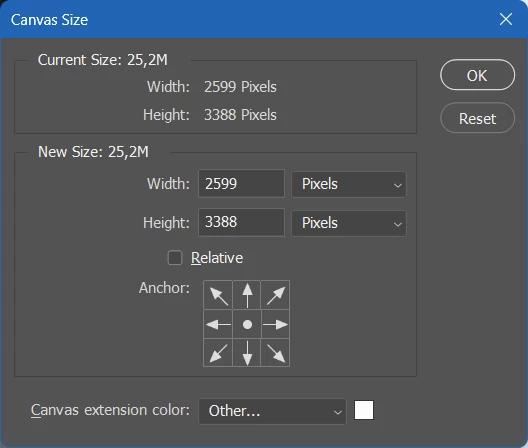
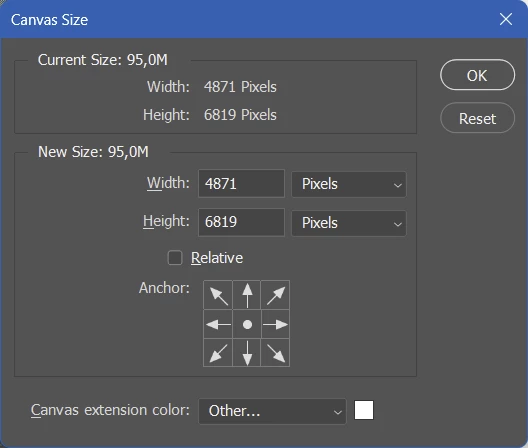
Take these two screenshot of the Canvas Size panel (image top = PS 25.5, image bottom = PS 25.4). If you hold the ALT key you should not just see the Cancel button change to Reset, but the first letters of options like Width, Height, Relative and Canvas Extension color should now be underlined to indicate that you can press ALT plus an underlined letter to move the keyboard focus to those options.


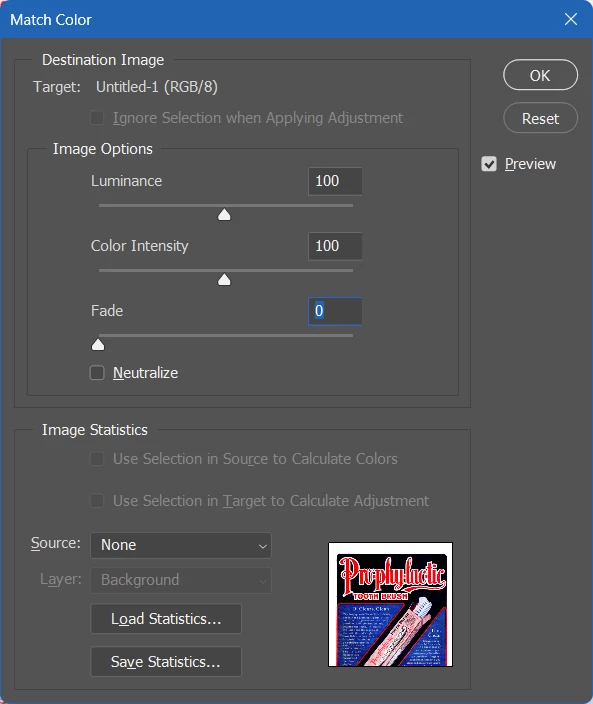
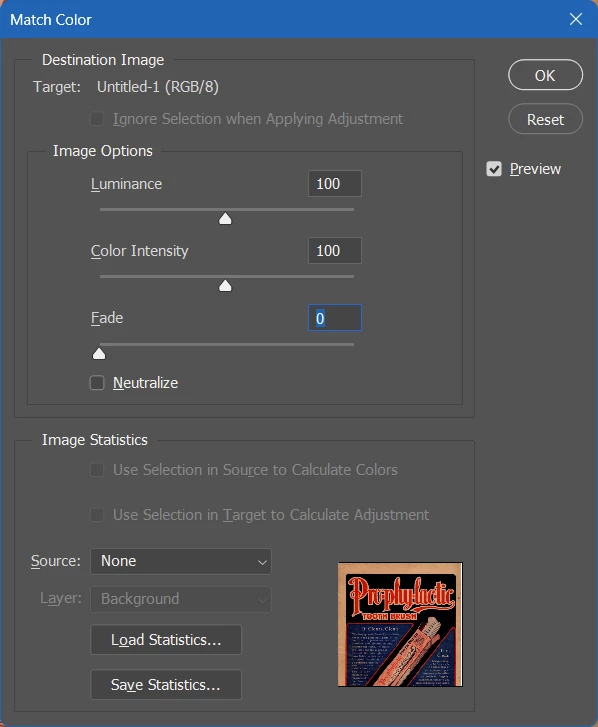
The same thing is happening in the Image Size panel. (image top = PS 25.5, image bottom = PS 25.4). In the latest PS version the ALT keyboard shortcuts for Luminance, Color Intensity and Fade don't work anymore.


Only a few people have acknowledged this issue in my previous posting. I'm trying again with a better structured post hoping that others can confirm this buy so that this bug will reach the Adobe devs. I rely a lot on ALT keyboard shortcuts in my Photoshop workflow and I'm really unhappy about this bug. The good news is that's incredibly easy to reproduce, the bad news is that probably not that many people even know these ALT keyboard shortcuts exist in the Windows version of Photoshop.

This topic has been closed for replies.

40 replies

Sawiro Takoni
Known Participant
May 4, 2024


I can confirm the terrible bug.


I am a long term Photoshop user, since 1992, and this is (for me) the first major bug that will seriously ruin my total workflow.


ALL the (numeric binded) shortcuts in ALL panels are completely gone, period.


You could press CTRL + U to show up the color panel and than ALT +A to adjust the saturation without moving your mouse.


As a hardcore Photoshop user I even use my keyboard more than I use my mouse when editing, serious.


This behaviour (of the ALT shortcuts) is in Photoshop since, at least, version 3 from the '90s.


Check out the screencapture I made (Photoshop 3, still legally working). The ALT keys are always visible (the behaviour that hides them initially is a Windows API, introduced later on).


We are missing all those (and others) underlined shortcuts.


Bonus bug, which is in Photoshop since the migration to the CC series; in fully fullscreenmode (F) you could always press ALT + T (for example) to open (even when totally invisible) the menubar on top of the screen and than navigate (by arrowkeys) to the menu-item you wanted.


ALT + T (open filters), twice "down", one "right" and bammo! you have the filter of choise.


But this handy feature is gone for ages now, so you have to return to the not-full-screen-mode first, before having access to the main menu-items by shortcuts.


The screenshot is Photoshop 3, Windows 11, so it is not a fullscreen Windows-API thing (at Microsofts side) : it still works.

Known Participant
April 29, 2024

I was surprised and disappointed by that, too. Now we'll have to wait for 2.5.8 for this to be fixed?

michaljanata
Inspiring
April 24, 2024

25.7 is out and problem is still not fixed? hey, Adobe, wake up!

Known Participant
March 21, 2024

Here are a few more examples of this phenomenon:


michaljanata
Inspiring
March 21, 2024

all panels with number value boxes - Resize, Levels, Selective color, Curves, Hue&Saturation etc.

Sameer K
Community Manager
Community Manager
March 21, 2024

Would you mind listing down all the Panels where you see this behavior?

I can verify for Image Resize & Color match. 

Thanks! 

Sameer K.

Sameer K
Community Manager
Community Manager
March 20, 2024

Hey there! 

I am seeing this, too. I've shared it with the team to investigate further.

Thanks for bringing all the details. 

Sameer K

Known Participant
March 20, 2024

I just upgraded to Photoshop 25.6. Problem hasn't been fixed.

Known Participant
March 3, 2024

I just updated from Photoshop 25.4 to 25.5 on my completely up to date Windows 11 PC and I noticed that a number of the keyboard shortcuts using the ALT-key are now gone.


The only ALT-shortcut that works in the Image Size panel is Resample. The ALT-shortcuts for Width, Height and Resolution are inactive. Here's screenshots of the new and old panel.


This is really annoying since I always use these shortcuts to quickly make changes.

jane-e
Community Expert
Community Expert
March 3, 2024
quote

The only ALT-shortcut that works in the Image Size panel is Resample.

By @Saskia5CBF


Alt seems to be working as expected to change the Cancel button to Reset.


Jane


michaljanata
Inspiring
February 22, 2024

Just updated PS 25.5 and it is broken again.


Shortcuts in dialog windows (levels, resize etc.) that use ALT key to jump with cursor into value boxes are not working.

For example in Levels dialog ALT+I for input value or ALT+O for output value. 

Same for Resize dialog. ALT+R for resolution value etc.

Sameer K
Community Manager
Community Manager
March 7, 2024

Hey, @michaljanata. Welcome to the Photoshop Community. I'll help you figure this out.

Before troubleshooting, update Photoshop to the latest version (v25.5.1) via the Creative Cloud desktop app & check if the issue exists. 


Go to Edit > Keyboard Shortcuts & export your current keyboard shortcuts as a preset outside of Photoshop; detailed steps here: https://adobe.ly/49CVvD3


Try these steps: 

Ensure there are no stale preferences in your Photoshop. Go to the location of the preference folder below and rename it to backup.

  • Windows 10/11: Users/[user name]/AppData/Roaming/Adobe/Adobe Photoshop [version]/Adobe Photoshop [version] Settings
  • You can press Press the Windows key > Enter 'Run' > Enter %APPDATA%\Adobe
  • Rename the Adobe Photoshop folder by adding a .old at the end. (Adobe Photoshop 2024 > Rename > Adobe Photoshop 2024. old), You can restore these preferences later if needed.(https://adobe.ly/4860qM9)
  • Restart the computer.

These changes will give a fresh start to Photoshop as a fresh install. Let me know how it goes.

Thanks!

Sameer K

michaljanata
Inspiring
March 7, 2024

Sameer, thanks for your trying to help.


Don't take it personally, but I'm really tired with deleting Preferences mantra and setting up Photoshop from scratch after every update just because some basic features are broken.

You really can't make updates without breaking what is working and without forcing people to reseting preferences again and again?


BTW, no, your suggestion didn't help. Fresh install and shortcust still broken. So I have to go back to v25.4 again, third time  trying and reverting.