

Carlos_Oliveras
Known Participant
February 20, 2020

P: Recessed layer thumbnails

  • February 20, 2020
  • 36 replies
  • 2684 views

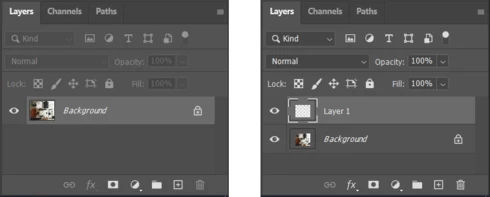
Since updating to 21.1.0, I've noticed something weird - when opening an image, the thumbnail for the Background layer is ok, but as soon as I create an empty layer, or duplicate the layer, or just turn the Background layer into a regular layer, then the layer thumbnails appear "contracted".

This image shows how the Layers palette (and more specifically, the layer thumbnails) looks like when opening a new document, and how it looks like just after clicking the "new layer" button:


Anyone else experiencing the same? I'm using Windows 10, by the way.

This topic has been closed for replies.

36 replies

Legend
October 21, 2020

Thanks. This is indeed fixed in Photoshop 22. Sorry it took some time to resolve.

Carlos_Oliveras
Known Participant
October 21, 2020

Finally... normal thumbnails again... It's been like 7 months, but it has felt much longer for me. Working with older versions was not an option for me. so I've had to work all this time with 100% crappy thumbnails.

Thanks Adobe for fixing this - still, I must add that, in my opinion, it should have been fixed much sooner. I know there are a lot of issues to be fixed, but this one has been a serious impediment for working properly with the software.

Now let's see what new annoying bugs future updates will bring us! 😅😄

Mykyta Soloviov
Participant
October 21, 2020

Congratulations guys! It’s finally fixed 🎉

kikogodeca
Participating Frequently
October 21, 2020

can confirm! It's finally fixed with version 22 🙂 

Participating Frequently
October 20, 2020

I updated this morning. They may be releasing it in waves. You'll probably get it soon - the Adobe MAX conference is starting today and all these updates are timed for the conference.

kikogodeca
Participating Frequently
October 20, 2020

@andrei_vasilescu When is this update coming out, because I don't have an update yet?

Participating Frequently
October 20, 2020

It's finally fixed in PS 2021. Rejoyce, we can update again!

Known Participant
October 2, 2020

I just tested latest version :2020_v21.2.4.323 , same issue . 

all adobe products have big bugs except substance painter because it's free from adobe engineer's touch . 

they should record app's bugs and don't focus on new feature except the app works correctly with minimum bugs . 

PS version 2020 destroyed the app . I noticed zoom behavior changed in this version , if you use ctrl+space+click and drag for zooming it will kinda lag if move tool enabled, it won't zoom normally it kinda try to snap to smart guild lines and not zoom in and out smoothly . 

if there was a Competitor like blender for photoshop , no one uses this old rusty app. 

kikogodeca
Participating Frequently
September 30, 2020

@earth_oliver wow, Adobe really has a lot of design flaws to fix here. Hope it gets to them!

Earth Oliver
Legend
September 30, 2020

and there are additional errors in the Win10 layers panel... gaps at the top of thumbnails and the selected layer highlight is offset...