

grauenwölfe
Inspiring
October 21, 2017

P: Smoothing keeps getting re-enabled despite being disabled and locked in Brush & Tool Presets.

  • October 21, 2017
  • 18 replies
  • 839 views

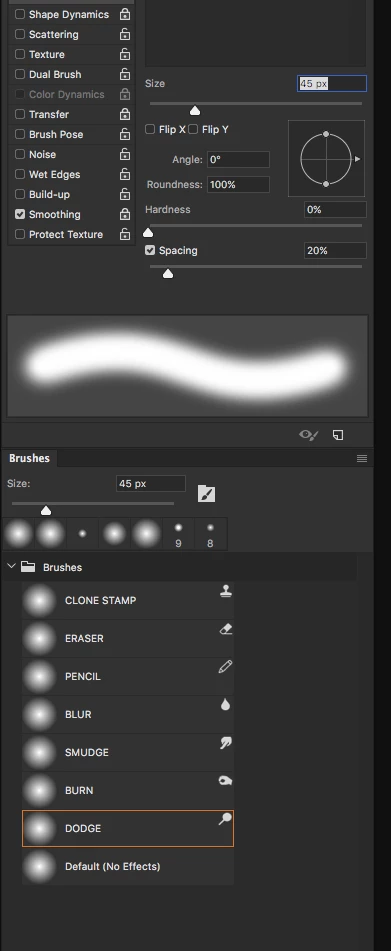
My Brush Presets have Smoothing unchecked and locked in addition to Tool Presets and it's still enabled every time PS restarts. In fact, it's outright overriding my Brush Presets, they're all outlined in orange the second I click on them. Even the purpose-built "Default (No Effects)" Preset is affected and it's not linked to any Tools.

Screenshot shows Smoothing still locked yet re-checked and re-enabled regardless causing the orange outline as the Preset knows Smoothing is supposed to be off... However, Shape Dynamics and Transfer settings ARE retained and staying set in the expected way. Smoothing says "f-you, I'll do what I want."

Incidentally, what's up with the WHITE hightlighting in the entry fields of Collapsed ⇄ Expanded panels? (visible in screenshot)


Lastly, good job on implementing this reworked Brush Presets managament. Hoping this Smoothing hiccup will be remedied quickly.

This topic has been closed for replies.

18 replies

Inspiring
December 30, 2017
I have been trying to create a new brush preset with a similar issue. Every time I try to create a new brush present by taking an existing present (Soft Round) and unchecking the Transfer and Shape Dynamic boxes so that only Smoothing is checked, those two boxed recheck by themselves in the new preset.  I have tried both locking and unlocking those settings.

Note: my 2018 release version is 19.0 and there is no listed upgrade to 19.0.1 in the Adobe's Creative Cloud App.
Inspiring
November 16, 2017
Until we began testing the bug, I never felt I needed to turn it off, absolutely off. But it seems to me that if it's going to be a setting we can effect, then that checkbox and lock next to it ought to mean something.
grauenwölfe
Inspiring
November 16, 2017
It's still getting re-enabled every launch after the update. Deleted all brush presets and built new ones with Smoothing OFF/unchecked. Still comes back on every time.
Akash Sharma
Legend
November 14, 2017
This should be resolved in the 19.0.1 update we released last night. Please update Photoshop from the Creative Cloud desktop app and let us know if you continue to see this issue. 

Edit:- Sorry about the incorrect update posted. This issue is still being worked upon as we have mentioned in the official comment above.

Regards,
Akash
Participant
November 3, 2017
Please keep in mind, that to mimic the legacy brush behavior, you have to set smoothing to 1%, not 0%.
Hannah Nicollet
Community Manager
Community Manager
November 3, 2017
Hi Grauenwölfe,

Sorry for the frustration. This is a known issue in CC2018. And you are correct that for the time being it needs to be disabled with each launch.

We are working on an update to address this issue in the very near future.

Regards,
Hannah Nicollet
grauenwölfe
Inspiring
October 24, 2017
I've managed to get Smoothing to stay at 0% in the Options Bar and all Smoothing Options (gear icon drop-down) to remain unchecked. However, Smoothing still re-enables itself every restart, always enabled in the Brush Settings panel.

Seems pretty bugged through and through and it's causing Healing and Clone Tools to behave chaotic and inaccurate. In addition, a number of the Tools that have Smoothing enabled in the Brush Setting panel don't show any Smoothing adjustment in the Options Bar? Why is that?
Inspiring
October 22, 2017
All the problems they seem to be having around Smoothing crops up again. I saved my basic round brushes to its own set and locked everything I wanted OFF, including smoothing. But quit and relaunch and Smoothing is back, not only in the Brush Settings, but also the default 10% smoothing in the Options bar.

Let's hope they can fix this without breaking the ability to use Smoothing on the Options bar, and that it also is the fix to the problem with the healing brushes.