
Participating Frequently
November 12, 2021

P: Text on path not exported correctly to pdf PS 23.0.1

  • November 12, 2021
  • 9 replies
  • 7218 views

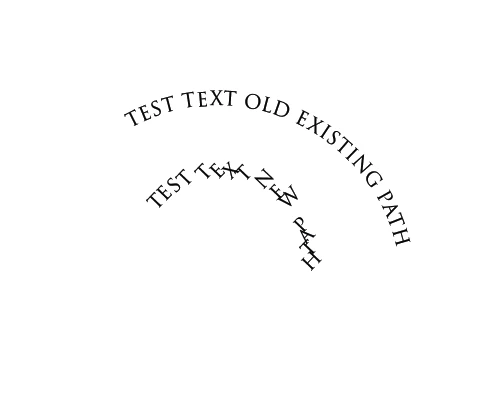
I opened an existing PSD file, created a new path for a text layer. Put text on the path.

Exported it to PDF.


Expected: Text shows as on edit.


Result: Text shows as attached and breaking the orientation.

Existing paths do not have this problem though.


I have attached a JPG export as well so you can see that it exports correctly to JPG.
This topic has been closed for replies.

9 replies

Mohit Goyal
Community Manager
Community Manager
December 14, 2021

Hi all,  


We're happy to announce the release of Photoshop 23.1. This update includes the fix for this issue. To see the list of all fixed issues, click here

To update Photoshop to 23.1, click "Update" in the Creative Cloud desktop app next to Photoshop. More detailed instructions for updating  


Let us know if the update resolves the problem for those affected and share your feedback with us.


Thanks,

Mohit

Adobe Employee
November 15, 2021
A caution to the workaround above: It can be applied if the script is Latin or CJK. If you are using Middle East or North African scripts, you cannot use this workaround. Rasterize type if that is the case.
Adobe Employee
November 15, 2021
Thank you for reporting the issue.
I was able to reproduce the issue. Dev will work on the fix.
 
In the meantime, as a workaround, please do the following steps.
  1. Select the type layer in Layers panel
  2. Open Paragraph panel and open the context menu
  3. Select "Latin and East Asian Layout"
Subsequent creation of PDF should show correct output.
 
Legend
November 15, 2021

Thanks. Running this by the engineering team.

Participating Frequently
November 15, 2021

Plus I am running on a Windows system. (Win 10 64bit, latest updates, PS 23.0.1 64bit, Acrobat DC Pro for viewing - but same result when viewed with crome for example).

Participating Frequently
November 15, 2021

Sorry for the flattened PSD - my fault.


I use Save As and PDF/X-3:2002 but also tried others.


Enclosed a new PSD File, same result: https://shared-assets.adobe.com/link/c0dff00b-e9aa-48a7-69fb-3cb3a9a211d8 

Legend
November 12, 2021

Sorry, looked at your PSD and it's been rasterized. Can you post the PSD that has the text layers in it?

Legend
November 12, 2021

Seems to work for me. I used the default PDF settings from Save a Copy > PDF. Anything special about your PDF export options?


Participating Frequently
November 12, 2021

Screenshot from expected result (from the export as JPG):