
Participating Frequently
May 19, 2020

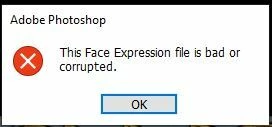
P: This Face Expression File is bad or corrupted

  • May 19, 2020
  • 93 replies
  • 178109 views

I keep gettting the following error when I launch Photoshop 2020 on a Windows 10 64bit machine


This Face Expression File is bad or corrupted


I assume it relates to the Default Face Expression Presets.p3f file, which a scan reveals to be OK. The application launches after I click OK but how can I get rid of the error?


I have reinstalled, tried the clean up tool and there has even been an update since it started but still it persists. Is there anywhere I can find a replacement file?


Thanks in advance


Steve


93 replies

Participant
November 8, 2023

Thank you!

Worked like a charm!

jane-e
Community Expert
Community Expert
November 2, 2023


@Fotomaker01RA wrote: no way I'm uninstalling then re-installing Ps...given all my customizations


You don't need to uninstall Photoshop to delete or rename the "FaceExpressionPresets.psp" file. You just need to quit Photoshop first.


Jane


Known Participant
November 1, 2023

Good to know, except no way I'm uninstalling then re-installing Ps (2024 or any other version of Ps) given all my customizations and 3rd party software that would not re-install (some of which is no longer available or supported & which the companies have completely changed designs of in their newer release).


Sounds like a bug Adobe devs must fix...


I'm running on Win 11 Pro.

Known Participant
November 1, 2023

I just started getting the same Error Msg in the past 2 days (Oct 29-Nov 1, 2023) on Win 11 trying to launch Ps 2024 (rel. 25.0.0). I've never seen this before in any of my prior Ps CC releases. I haven't worked with Ps in any way that's different than what I've done before. I have used generative fills and generative expands several times in the past few days. What's going on?


I tried the Jane-E solution option above re: C: Users/myname/appdata/roaming/ps2024.... and renamed the face expressions .psp file to a suffix of .old. Then relaunched Ps 2024. It launched w/out the error msg box, but there's no longer a face expressions .psp file (other than my newly renamed '.old' one in the list of settings). Should there be for something to work properly (Liquify face-related, Neural Filters face-related, etc.)?


It didn't regenerate another file like the original looked before I renamed it? What should I do now? Do I need that settings file as it was for certain features to work in Ps 2024?


Thx.

tedt6258165
Participating Frequently
October 27, 2023

it's fixed, thank you

tedt6258165
Participating Frequently
October 27, 2023

yes this corrected the problem, thank you

Participant
October 27, 2023

Awesome. Did the same and it worked! Thanks!

Ged_Traynor
Community Expert
Community Expert
October 27, 2023

@Trevor.Dennis you can also use %temp% to get to the local > temp folder

Trevor.Dennis
Community Expert
Community Expert
October 27, 2023

Hey, I didn't know that Ged!  🙂

Participant
October 27, 2023

Great.....It works...Thanks