
Participating Frequently
October 19, 2014

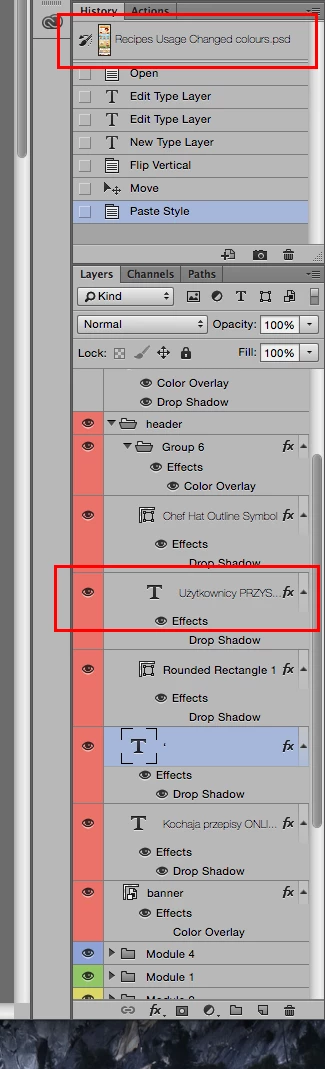
P: Unreadble font for layer and document names OSX Yosemite

  • October 19, 2014
  • 10 replies
  • 503 views

The font for document and layer names is too thin and almost invisible in OS X Yosemite. Is there a way to make the font more readable? I guess this bug is due to the move to Helvetica, but using so thin font for such a small text is never a good idea. I hope it will get fixed soon.
This topic has been closed for replies.

10 replies

Legend
June 16, 2015
This should be fixed in the Photoshop CC (2015) update.
Inspiring
June 5, 2015
Getting the same issue with Adobe Bridge's Output panel
Inspiring
May 6, 2015
Got the same problem here. You can fix it by using a patch that replaces Yosemite's UI font Helvetica Neue with the Lucida Grande.

You can download the patch here:
https://github.com/schreiberstein/luc...
saintluuAuthor
Participating Frequently
January 16, 2015
I hope it gets fixed soon by Apple, the "save as" window is buggy too, it always takes the whole screen height, on 27" iMac it looks ridiculous...
Inspiring
January 15, 2015
As far as I know, we haven't received any workarounds.
Participant
January 15, 2015
Still frustrated by this— have you found any work arounds? I get the feeling Apple won't be very responsive about it
saintluuAuthor
Participating Frequently
December 8, 2014
Yes, the update haven't fixed it yet, it was working fine for a while and after that it was the same, thank you for your replay!
Inspiring
December 8, 2014
We are working with Apple to figure out how to work around this MacOS 10.10 change in the way strings are drawn by the OS.
Inspiring
December 7, 2014
No it wasn't.

saintluuAuthor
Participating Frequently
October 21, 2014
The issue was fixed by the latest CC update, thanks Adobe!