
omerh7177378
Known Participant
October 29, 2017

P: Wrong selection when there is a hidden layer in clipping mask

  • October 29, 2017
  • 9 replies
  • 308 views

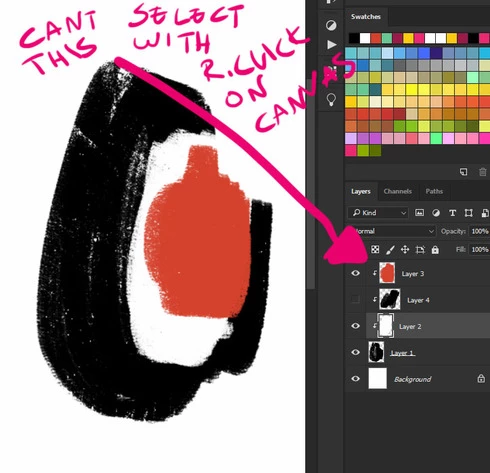
Using the new Photoshop cc 2018, there is a wrong selection process with a clipping mask layer. 
Once there is a bottom layer with two or more layers clipped to it, and one of the layer is Hidden, you cannot select any layer above it using CTRL+Alt+Right Click on canvas. Furthermore, any layer above the hidden layer will NOT be shown in the pop up menu of CTRL+Right Click on canvas. 
This topic has been closed for replies.

9 replies

Pete.Green
Community Manager
March 13, 2018
This issue should be fixed with the Photoshop CC 2018 (19.1.2) update which is now available. 
Please install the update and let us know if you still see this issue.

To update, click Update next to Photoshop CC in the Creative Cloud desktop application.
If you don't see the update right away, click the 3 dots in the upper right and choose Check for App Updates.

Regards
Pete
Inspiring
March 9, 2018


If you create multiple clipping layers and then turn off one of the layers you can no longer ctrl+alt+RC any of the visible layers above the layer that was turned off, it just selects the next visible layer below the hidden layer. If you turn on all the layers ctrl+alt+RC works as expected.

Tested in Windows 10
Participating Frequently
February 13, 2018


In previous version of Photoshop control-click would reveal a popup listing ALL layers below the mouse and allow you to select one. In the current 2018 version, if any layer in a clipping group is invisible the control-click will only show the base layer providing the clip.

NOTE – turning on auto-select layers in the top menu is not the answer – more often than not the layer I want to select is not the top in a clipping group. In any case, if any one layer on the clipping group is invisible, auto select will still only select the base layer of a clipping group. NOT useful.
The only time the control click (or auto select) will work is if ALL layers in the clipping group are visible. 

A extremely useful tool – one I used 100s of times a day – has been removed here. 
How can I get the previous functionality back? 
Participant
February 13, 2018
Can't select with the casual left click either. 19.1.1
Inspiring
February 5, 2018
This bug is definitely slowing my workflow. Had to revert to 2017. Would really appreciate this being fixed!
chazcron_
Participating Frequently
October 31, 2017
Nice catch.
Legend
October 30, 2017
I've asked engineering to take a look. Thanks!
Earth Oliver
Legend
October 30, 2017
Nice find. Can confirm this is broken in CC2018 but works as expected in CC2017.
Known Participant
October 29, 2017
I don't use these shortcuts as part of my normal workflow, but I can verify this bug on my end