

RoyCoumans
Inspiring
September 24, 2023
Answered

Photoshop 2024 Brush settings are not holded after change of brush

  • September 24, 2023
  • 3 replies
  • 1068 views

I have the new Photoshop 2024 Dutch installed. I use a Wacom-tablet. In the Brush-settings the "Vormdymaniek" (Shape Dynamics) is not holded when I change it. The Size - Jitter always is set to Pendruk (Penpressure), while I set it to off. As soon as I try to edit the photo, it goes back to Penpressure again. So I always have to press hard to have the size I want. This behaviour wasn't in the previous version of Photoshop. The first time it had this bug when I changed the brush to some other brush. When I changed it back to the normal round soft brush I can't get it set to my prefered setting again. 
This topic has been closed for replies.
Correct answer RoyCoumans

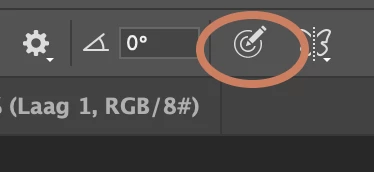
Solved, the button "Always use pen pressure for size..." (free translated from Dutch, I don't know the exact English name) was on. When I set it off, it works as it should. Somehow the button was set to on. 

3 replies

Participant
March 7, 2024

Yes, thank you for sharing this! So frustrating. Why hide this somewhere obsure and not in the flipping brush panel Adobe.  

mglush
Community Expert
Community Expert
September 24, 2023

Thanks for sharing the solution you found!

Michelle

RoyCoumans
RoyCoumansAuthorCorrect answer
Inspiring
September 24, 2023

Solved, the button "Always use pen pressure for size..." (free translated from Dutch, I don't know the exact English name) was on. When I set it off, it works as it should. Somehow the button was set to on.