
Answered
Photoshop Automate Bash skips second or third file bug
I've encountered a strange bug. I have a simple Photoshop action that says:
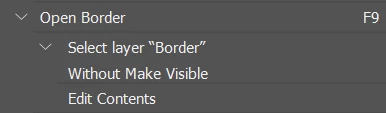
It essentially opens a Vector Smart Object layer in my PSB files with the layer name "Border" and opens it in Illustrator. I've been using Automate batch with this action to open a sequence of Vector Smart Objects from my PSB files into Illustrator and it's been working fine. But yesterday, for no reason, it skips opening the second or third file. I went to check the temp folders and it appears to have generated ALL the .ai Vector Smart Object files, so I know that it's been selecting the right Vector Smart Object layer in each PSB file. It just wasn't opening the second or third file in Illustrator. I was able to open these .ai files in the temp folder and it worked fine, but it's super annoying to do this with so many batched files. Can someone help, please? My bashes for other actions work fine. Opening Vector Smart Object layers just skip opening files.
I have PS 24.4.1 AI 27.5
 AdChoices