
Minus Front
Known Participant
July 23, 2023
Question

Photoshop is a memory hog

  • July 23, 2023
  • 14 replies
  • 722 views

I have NO PS files opened, I am staring at the PS home screen, and this abomination of a bloated software uses 4.5GB of RAM just to sit there.


God help us when the Figma deal goes through..


I am on version 24.6 (stable).


This topic has been closed for replies.

14 replies

Minus Front
Known Participant
July 24, 2023

Hi. PS uses about 1.6GB when starting up cold in my system @J E L 

D Fosse
Community Expert
Community Expert
July 24, 2023

I have a very basic out-of-the-box installation, just a handful of extra fonts and one plugin, but no brushes, patterns, gradients etc.


So the 1.3 GB I see can probably be considered baseline memory usage for idle Photoshop.


And then it grows with everything you add. Just like elsewhere in life, what goes up must come down.

J E L
Community Expert
Community Expert
July 23, 2023

Thanks, @davescm, I appreciate that. It doesn't bother my workflow to use that extra memory, so I'm not concerned about that. I do think it's a lot of memory usage for the program to sit there doing nothing. I was wondering if there was a folder I could look at to see how much all these extras amount to, but that wouldn't indicate how much memory was needed to load them and sit there, right? It would take an uninstall/reinstall of each set of fonts, brushes, patterns and so on, I guess. Any way to know how many active fonts = how many MBs?

davescm
Community Expert
Community Expert
July 23, 2023

@J E L  Sorry, I don't know a way to start Photoshop without loading those items.

You can hold down shift when starting Photoshop, to open without loading 3rd party extensions and plug ins, which might be a cause, but that is not the same as fonts, brushes etc. In my case it made no difference to the size in RAM.

Dave

J E L
Community Expert
Community Expert
July 23, 2023

Okay, thanks for that. I'd like to know what happens when @Minus Front starts up cold. I was thinking they also showed the same amount of memory use either way. I do have a reasonable amount of extras, but not anything exorbitant. Is there a way to measure them all quickly?

davescm
Community Expert
Community Expert
July 23, 2023

@J E L  - you have a different issue to the OP, who confirmed his memory use had increased after opening images and, as is normal and by design, the memory was not handed back to the OS.

If you are seeing high memory use on opening, do you have a lot of brushes, fonts, patterns and gradients loaded? Mine is higher that D Fosse's but I would expect that given the additional fonts and brush sets I have installed here.


Dave

J E L
Community Expert
Community Expert
July 23, 2023

I can't get it down. Same after a full system reboot. Same with or without Creative Cloud Desktop app running. @Minus Front and I have something in common… (I'm Windows 10 Pro btw).

davescm
Community Expert
Community Expert
July 23, 2023

Here's mine

Open Photoshop 2.5GB used. Open 5 images 6.5GB used, close those images - still 6.5GB used

All perfectly normal.


Memory use on open will depend on Brushes, Fonts, add ins etc

Dave

D Fosse
Community Expert
Community Expert
July 23, 2023

Something else is going on there. With a fresh launch you should have 1-1.5 GB.

J E L
Community Expert
Community Expert
July 23, 2023

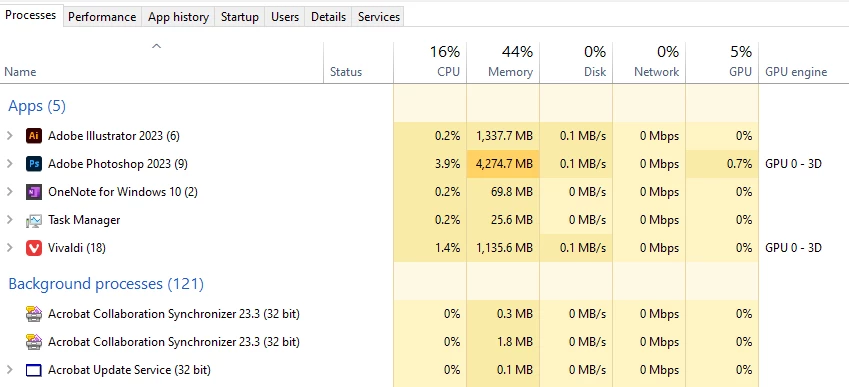
Here's what happens to me: first without any files open after working on a dozen or so different images; second on a fresh launch without opening anything. Not that much difference.