
Participant
October 16, 2021
Answered

これはバグ!?(Is this a bug? Or is it a setting?)

  • October 16, 2021
  • 2 replies
  • 643 views

Photoshop(Mac)を使っていてバグに遭遇しました
消しゴムツールやペンツールを使うときの"円"が変なのです
円全体が機能してくれません
一回り小さくしか機能しない現象がここ数日で出ています!
バグなのか知らないうちにそういう設定にしてしまってたのか不明ですが
もちろん全て最新アップデート済みです
バグの現象を動画にしましたので是非見てください
英語翻訳も打ち込んでおります
 
バグ現象の動画です(This is a video of the bug phenomenon)⬇︎
 https://youtu.be/1Ee-NrVJjNc

(I ran into a bug using Photoshop (Mac)
The "circle" when using the eraser tool or pen tool is strange.
The whole circle doesn't work
The phenomenon that works only one size smaller has appeared in the last few days!
I'm not sure if it was a bug or if I had made such a setting without knowing it.
Of course, all have been updated to the latest
I made a video of the bug phenomenon, so please take a look.
We also type in English translation)
This topic has been closed for replies.
Correct answer gener7

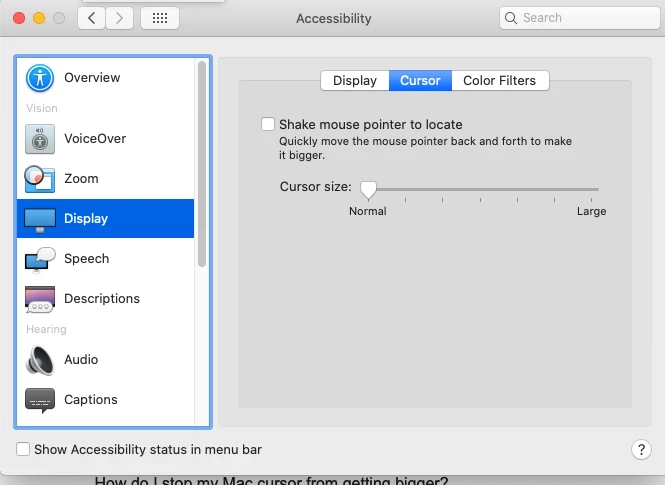
Go into Mac Preferences > Accessibilty > Display > Cursor  See if these are your settings:


2 replies

Participant
October 16, 2021

This problem was solved by a lovely gentleman!
thank you very much!

gener7
Community Expert
Community Expert
October 16, 2021

This looks like someone selected the "Full Size" instead of the "Normal" Brush cursor. Go to Preferences > Cursors and see  what your settings are:

If this does not work, select the Eraser Tool, right-click on it, and reset it from the menu:

If that does not works, then likely your settings file is corrupted. You can reset preferences here:

Since resetting Preferences can set everything to default and lose all custom settings, follow this guide before you reset: https://helpx.adobe.com/jp/photoshop/using/preferences.html (Japanese)


Participant
October 16, 2021

Thank you! But even if I set it normally, the cursor still doesn't work ... (crying)

gener7
Community Expert
gener7Community ExpertCorrect answer
Community Expert
October 16, 2021

Go into Mac Preferences > Accessibilty > Display > Cursor  See if these are your settings: