Participating Frequently
January 31, 2023
Answered

2023 update won't recognise my psd files

  • January 31, 2023
  • 4 replies
  • 1903 views

Just updated to 2023 version of Photoshop and it does'nt seem to recognise any of my psd files. I can access them from within the programme but not using the Icon.

This topic has been closed for replies.
Correct answer D Fosse

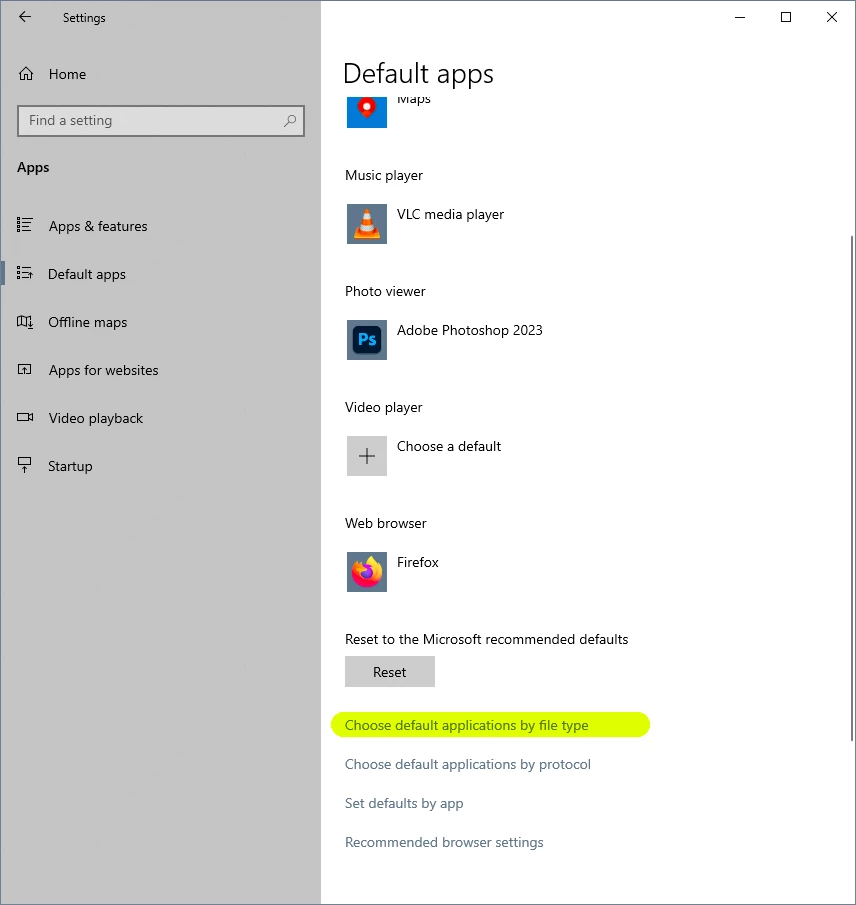
That's probably broken Windows file associations. That can sometimes happen when updating, if the old version is removed after the new one is in place. The outgoing version takes file associations with it, leaving them orphaned.


In the future, always uninstall/install in strict version order. Last in, first out. That's always safe.


Go here to reset the correct associations:
4 replies

Participating Frequently
February 1, 2023

Thats brilliant all. All working now with your help by choosing those default applications settings so many thanks.


D Fosse
Community Expert
Community Expert
February 1, 2023

This is how you need to think of your installed Photoshop versions. The only opening is at the top:

Then you will never get this problem again.

PECourtejoie
Community Expert
Community Expert
January 31, 2023

Hi, what happens, do you receive an error message?

Participating Frequently
February 1, 2023

Hi, No error message and the files work absolutely fine if I open them within the programme but the files aren't showing the photoshop icon and when you double click them they won't open in photoshop.

John Waller
Community Expert
Community Expert
February 1, 2023

As mentioned above, that's an operating system issue relating to a broken file association for PSD files.

D Fosse
Community Expert
D FosseCommunity ExpertCorrect answer
Community Expert
January 31, 2023

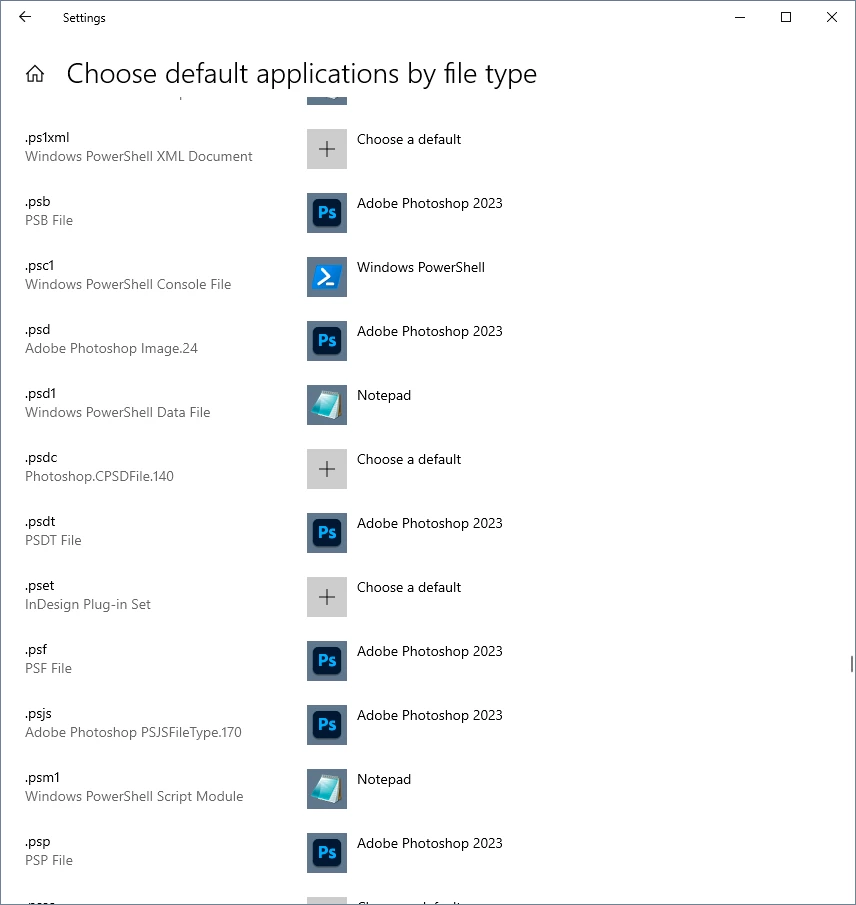
That's probably broken Windows file associations. That can sometimes happen when updating, if the old version is removed after the new one is in place. The outgoing version takes file associations with it, leaving them orphaned.


In the future, always uninstall/install in strict version order. Last in, first out. That's always safe.


Go here to reset the correct associations:
Participating Frequently
February 1, 2023

That looks like the solution many thanks. I'll get my IT team to sort it as I have no permission to do it myself. Thanks again.


AxelMatt
Community Expert
Community Expert
January 31, 2023

Which application will be opened if you double click on a .psd file?

From which version do you have updated?

Please check if you have two Photoshop versions installed. Because if you installed a major update the older version will be kept if you don't set the option to uninstall the former version.  


Please take a also look here: 

https://support.microsoft.com/en-us/windows/change-default-programs-in-windows-e5d82cad-17d1-c53b-3505-f10a32e1894d

https://uk.pcmag.com/operating-systems/136310/customizing-windows-11-how-to-change-default-apps


My System: Intel i7-8700K - 64GB RAM - NVidia Geforce RTX 3060 - Windows 11 Pro 25H2 -- LR-Classic 15 - Photoshop 27 - Nik Collection 8 - PureRAW 6 - Topaz Photo AI