
nightversus
Participant
October 26, 2023
Question

25.1 colour wheel not following active brush colour

  • October 26, 2023
  • 5 replies
  • 871 views

Suddenly when I try to use the eye dropper tool, the colour is selected and loaded to the brush but the colour wheel does not update. I can select a new colour using the colour wheel but it won't follow the any other methods of selecting colours
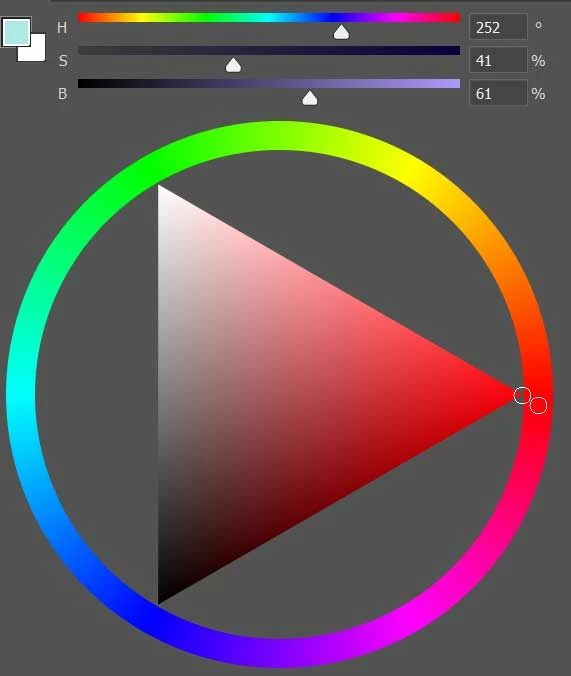
 In the image you can see the colour wheel is set to red, but the active colour is a light green I have 'picked' from an image

This topic has been closed for replies.

5 replies

Ged_Traynor
Community Expert
Community Expert
October 27, 2023
nightversus
Participant
October 27, 2023

I was able to fix this issu for now by reverting to the previous version

jakeM17166197
Known Participant
October 26, 2023


Yep it seems like whatever Color palette you Choose, the Active Color is not reflected on the color pallette! This is kind of bad because I would use it to pinpoint where on the color spectrum a color is landing. I'm sure it's pretty important for illustrators, designers and photographers alike! 


Inspiring
October 26, 2023

Same with using the color cube-it does not change-v25.1.0

Jeff Arola
Community Expert
Community Expert
October 26, 2023

Yes same here on macOS Monterey 12.7.1 with photoshop 2024 (ps ver 25.1)


Not only does the Color Wheel not update, but none of the other color settings such as the RGB Slider display, etc do.