

32-bit histogram is shifted right
Hi. The histogram shown in the Histogram panel and Curves & Levels UI is incorrect for 32-bit images. The histogram is shifted right. I see this in Ps 26.8.1 and recent prior versions.
The shifted histogram makes it much harder to use Curves because the plotted histogram doesn't relate to the curves I make. The curves I make are being applied correctly in compositing (thankfully!).
Below is a simple example with a solid gray layer, having an RGB value of [0.1, 0.1, 0.1]. The direct conversion to 8-bit would be [26, 26, 26]. The Info panel is correct:
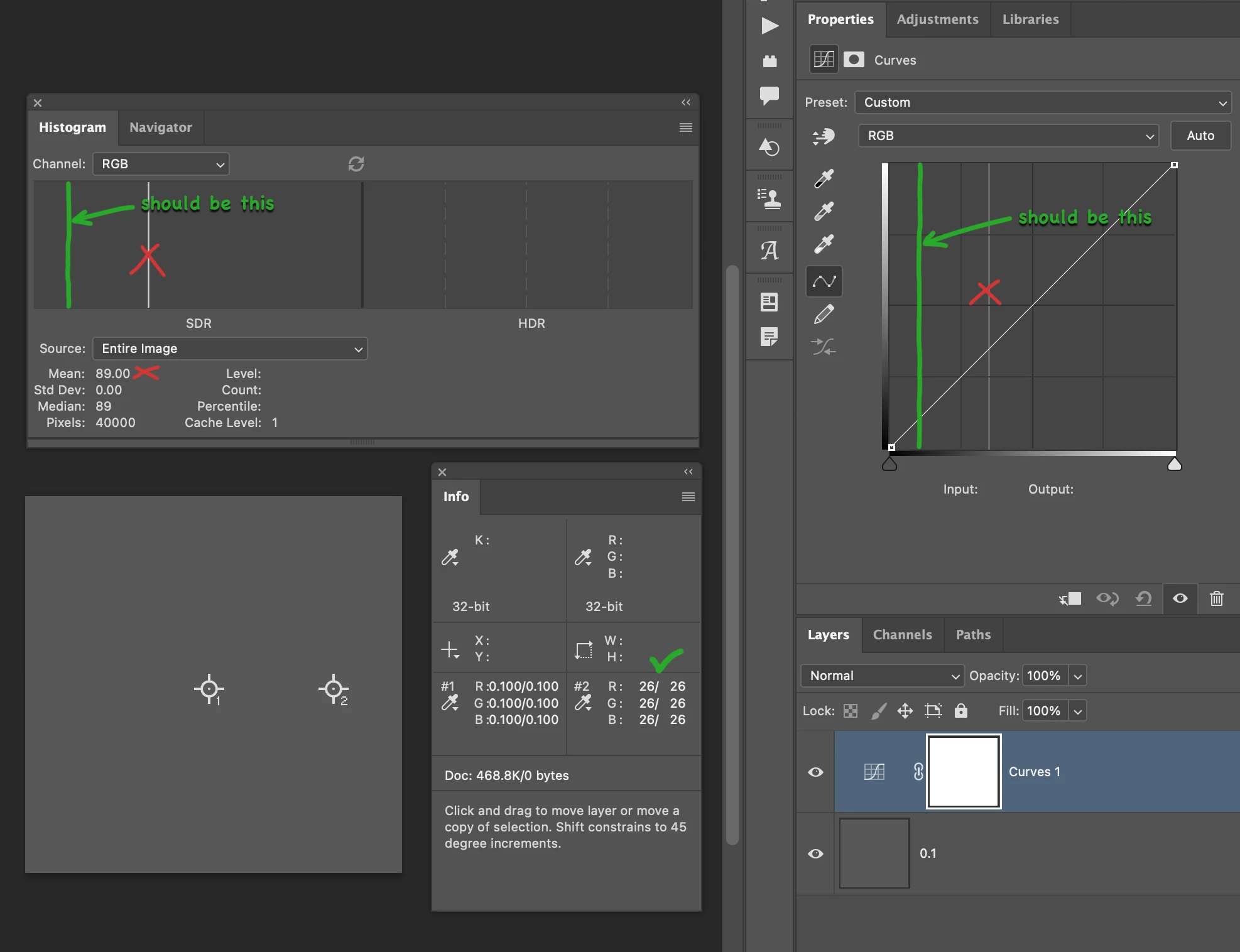
The Histogram and Curves panels show incorrect histograms, showing an 8-bit value of 89 instead of 26.
Various 32-bit color values I have tried seem to show 8-bit histogram values that are being gamma-converted to gamma 2.2. For this example having a 32-bit color value of [0.1, 0.1, 0.1]:
(0.1 ^ (1 / 2.2)) * 255 = 90.48
Here the converted value of 90.48 is close to the value 89 shown in the histogram.
I tried changing my working RGB profile to ones having various gammas, but that had no effect on the displayed histograms.
I have attached the PSD shown in the screen shot above.
Please have a look. Thanks!
 AdChoices