
Participant
October 21, 2017
Answered

360 spherical panorama, "edit the texture" after recent updates has gone?

  • October 21, 2017
  • 1 reply
  • 2847 views

Hi there.

I'm an illustrator and I draw Spherical Panorama Illustration.

I stuck with my current project and losing time and money and client.

Since I've recently updated Photoshop, I cannot find the feature "Edit texture" for 360 panoramas. I can see only "current camera" in the "3D" panel. Buttons "Show all scenes elements", "Show all materials" (which linked to editing panel) and others on the "3D" panel are disabled. I can just paint on the panorama with only 1 layer and export it to jpg. But it is not enough!

How can I work it out? Rollback to the previous version (but how)? Or Adobe just only hides these functions to the secret place?

Thank you.

Update: I've done install the previous version, 2017, and it works perfectly again, but it is not a good way to get out the necessary features in updates, how do you think?
This topic has been closed for replies.
Correct answer davescm

Hi

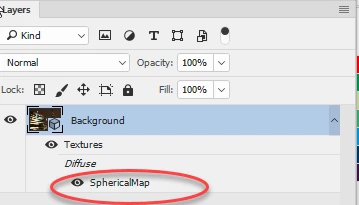
In CC2018 you can double click on the texture in the layers panel as shown below in the layers panel which will open a psb where you can add layers as before

Dave

1 reply

davescm
Community Expert
davescmCommunity ExpertCorrect answer
Community Expert
October 21, 2017

Hi

In CC2018 you can double click on the texture in the layers panel as shown below in the layers panel which will open a psb where you can add layers as before

Dave

Participant
October 21, 2017

Oh, it really works! Thank you!

I've tried to do the same, but it seems I stopped at double-clicking on "Textures" which lead only to invisible of it. And I got a panic

Participant
October 23, 2017

I'm kind of baffled as to why this was changed - but at least it is workable

Dave


I'm sorry to bother you, but maybe you also know, why the buttons to manipulate with a view in the spherical panorama are disabled?

And thank you for your previous help, I'm really appreciated it.

and this features does not work either... 

So, I cannot claim it is workable...