
360° Spherical Panoramas
I've been taking some 360° spherical panoramas with my DJI Mavic 2 Pro drone. Due to gimbal limitations, it does not photograph the sky; it can only tilt to 30° above the horizon. It can, however, point straight down. The drone does it's own stitching, and these are okay but quite low resolution. It also saves individual high resolution RAW files.
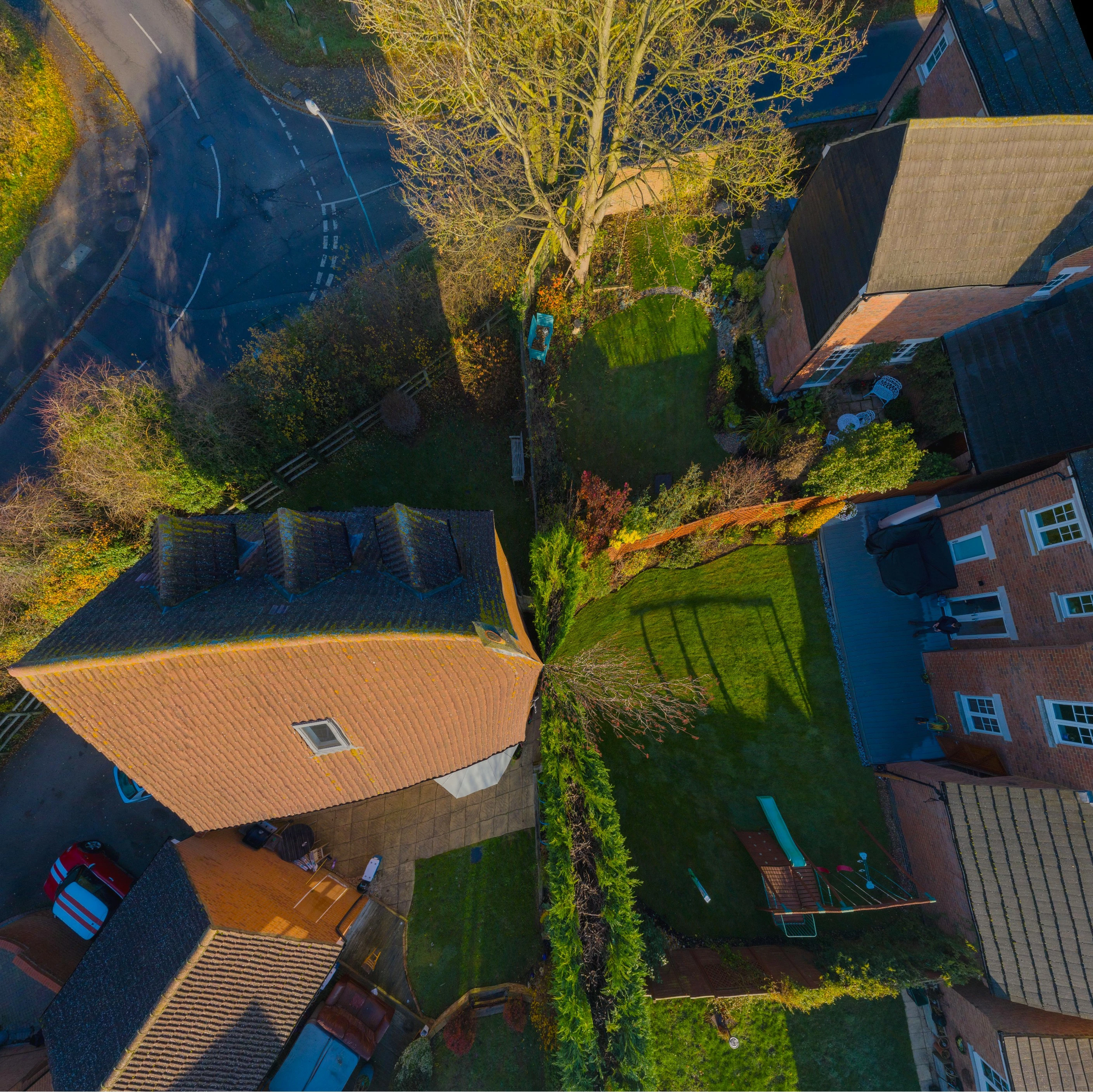
When I open the individual RAWs into PS and Photomerge into a spherical panorama, the results aren't correct; the bottom (nadir) is pinched (see image).
The idea is to stitch them together, then change the image ratio to 2:1 for a true equirectangular 360° spherical panorama, and the let it do a Content-Aware Fill for the missing portion of sky on the now blank bit of canvas.
This works perfectly if I stitch them together first in another program (I'm using MS ICE) then do the rest in PS. However, it's clunky doing it this way and I'd like to be able to do it all from end to end in PS if possible.
Why is PS not able to stitch it together properly? Other software seems to manage. I've played around with all the various different settings and options, but can't get it to work.
The drone manual says the images are 3x8 +1, but for some reason there are 26 images, not 25 as would be expected.
Please help!
 AdChoices