
Participating Frequently
January 23, 2021
Answered

#3D Material Slots Suddenly Missing

  • January 23, 2021
  • 7 replies
  • 974 views

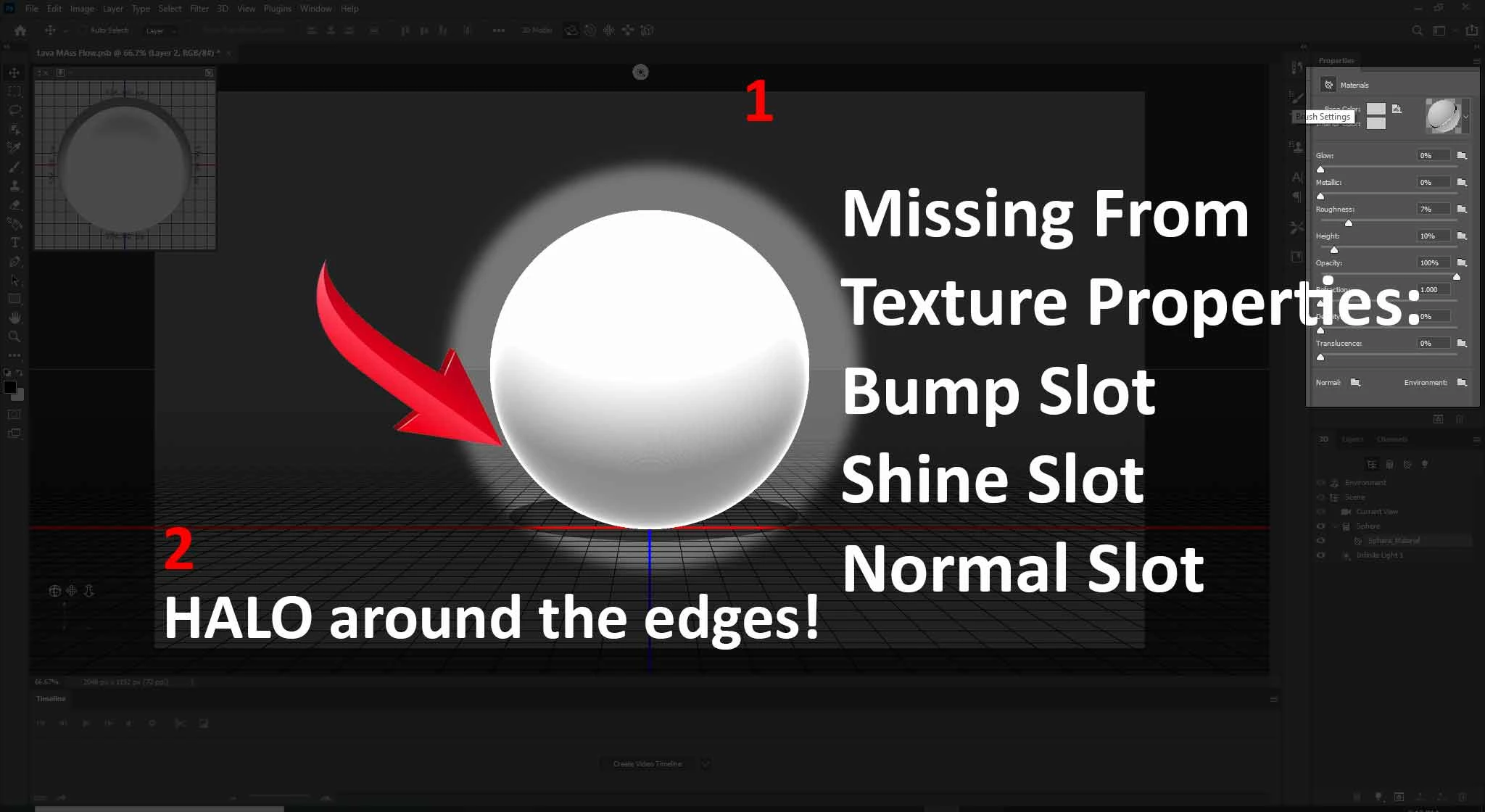
I'm using Photoshop 3D instead of 3D Max to save a bit of time on composition, About a month ago, I was working on a project and decided to upgrade to PS 2020. I followed a tutorial to get familiarized with the 3D workflow, and the Bump, Shine, and Normal slots all appeared in the 3D Properties panel. I've returned to PS to finish this stage of the project and those slots--Bump, Shine, and Normal--are missing. I need the Normal channel specifically. Also, there is a bright halo around the edge of the sphere. I could easily import the geometry to PS, but making quick simple, and quick 3D  objects and text is the reason I purchased the subscription.  
This topic has been closed for replies.
Correct answer davescm

The materials were changed in Photoshop 2020 (  version 21). Shine and reflection were related to the old specular material system which was replaced by a Metallic Roughness system


A bump map should be used in the Height property.

Normal is at the bottom of the properties dialogue on your screenshot.

For the halo at the bottom, adjust the image based lighting (IBL) in environment properties.


All that said I would not recommend Photoshop for 3D work. It is buggy and rendering is painfully slow. If you want to stick within Adobe CC then Dimension works better but does not do modelling. If you already have 3DS Max I would use that.


Dave


7 replies

Gino5CB4Author
Participating Frequently
January 24, 2021
<meta http-equiv="Content-Type" content="text/html; charset=utf-8" /><meta name="Generator" content="Microsoft Word 15 (filtered medium)" /><!--<br>/* Font Definitions */<br>@font-face<br> {font-family:"Cambria Math";<br> panose-1:2 4 5 3 5 4 6 3 2 4;}<br>@font-face<br> {font-family:Calibri;<br> panose-1:2 15 5 2 2 2 4 3 2 4;}<br>/* Style Definitions */<br>p.MsoNormal, li.MsoNormal, div.MsoNormal<br> {margin:0in;<br> font-size:11.0pt;<br> font-family:"Calibri",sans-serif;}<br>a:link, span.MsoHyperlink<br> {mso-style-priority:99;<br> color:blue;<br> text-decoration:underline;}<br>.MsoChpDefault<br> {mso-style-type:export-only;}<br>@page WordSection1<br> {size:8.5in 11.0in;<br> margin:1.0in 1.0in 1.0in 1.0in;}<br>div.WordSection1<br> {page:WordSection1;}<br>-->

That’s a very useful tip. I’m just getting used to PS 2020. I’ve been using 2015 until about seven months ago. PS 2020 has some issues, but I think overall it can still be used for 3D if optimized properly (meshes, consolidate texture maps). It’s the same (kind of buggy) with Element 3D’s new capability to import .obj sequences. But if optimized, you can achiece some powerful results, while killing two birds with one stone, which is what I’m trying to accomplish with PS 2020.  


Sent from Mail for Windows 10


Ussnorway7605025
Legend
January 24, 2021

when you play in 3D with Photoshop you can use the ui to: edit, make by hand, load or auto generate a map

  • if you want Photoshop to autogenertate then don't click inside the box but use your mouse to adjust the sliders
  • the other major bug in 3D is the Gpu sniffer not detecting your system Gpu... both these bugs have workarounds and are actually easy to fix in the code once Adobe gets around to it

ime Photoshop still does a better job than Maya but Dimension is good for a fast rendor if the models are not that complex... Blender is another good option as well

davescm
Community Expert
Community Expert
January 24, 2021

There are many more bugs in Photoshop 3D than those you mention. These include:

Colour shifts between preview render and final render.

If UVs are scaled then the material is rendered twice leadindxto double images on the surface.

The implementation of metallic reflections is incorrect

The implementation of volumes is buggy. Some of the options works others do not.


The last versions to work reliably were 2018 and 2019.

Even then, the limitations of modelling, no GPU final rendering, no ability to split render passes, make 3D in Photoshop extremely restricting.


Don't get me wrong, I love using Photoshop and it plays a key role in my 3D workflow for compositing and final image correction i.e. the 2D stage at the end. But 3D itself is better left to 3D applications.


Dave 

Gino5CB4Author
Participating Frequently
January 24, 2021
<meta http-equiv="Content-Type" content="text/html; charset=utf-8" /><meta name="Generator" content="Microsoft Word 15 (filtered medium)" /><!--<br>/* Font Definitions */<br>@font-face<br> {font-family:"Cambria Math";<br> panose-1:2 4 5 3 5 4 6 3 2 4;}<br>@font-face<br> {font-family:Calibri;<br> panose-1:2 15 5 2 2 2 4 3 2 4;}<br>/* Style Definitions */<br>p.MsoNormal, li.MsoNormal, div.MsoNormal<br> {margin:0in;<br> font-size:11.0pt;<br> font-family:"Calibri",sans-serif;}<br>a:link, span.MsoHyperlink<br> {mso-style-priority:99;<br> color:blue;<br> text-decoration:underline;}<br>.MsoChpDefault<br> {mso-style-type:export-only;}<br>@page WordSection1<br> {size:8.5in 11.0in;<br> margin:1.0in 1.0in 1.0in 1.0in;}<br>div.WordSection1<br> {page:WordSection1;}<br>-->

Thanks Dave. I’ll keep all that in mind. I’ve been using Element 3D in After Effects for Motion Graphics, was hoping could do the same in PS, I guess not. Thanks again!


Sent from Mail for Windows 10


davescm
Community Expert
davescmCommunity ExpertCorrect answer
Community Expert
January 23, 2021

The materials were changed in Photoshop 2020 (  version 21). Shine and reflection were related to the old specular material system which was replaced by a Metallic Roughness system


A bump map should be used in the Height property.

Normal is at the bottom of the properties dialogue on your screenshot.

For the halo at the bottom, adjust the image based lighting (IBL) in environment properties.


All that said I would not recommend Photoshop for 3D work. It is buggy and rendering is painfully slow. If you want to stick within Adobe CC then Dimension works better but does not do modelling. If you already have 3DS Max I would use that.


Dave


Gino5CB4Author
Participating Frequently
January 23, 2021

Adding a bump filter wasn't the issue. I don't have time to waste on such a simple issue!

Gino5CB4Author
Participating Frequently
January 23, 2021

The Halo around the edges is still an issue. If anyone has any solutions,  I would appreciate it.

Gino5CB4Author
Participating Frequently
January 23, 2021

My apologies. No sooner than I posted the question, I remembered the solution!