

Tamixes
Inspiring
July 14, 2019
Answered

5-second lag when closing files in Photoshop [Locked]

  • July 14, 2019
  • 6 replies
  • 8036 views

I've gone through the options to improve performance but still have a 5-second lag when I close a file in Photoshop CC (I used to have the same unresolved problem with Adobe Photoshop CS6). This also happens with a blank document, so file size isn't an issue.


[ Note from moderator: this post is now locked as it is drawing excessive spam, a dozen of which have removed. ]
 

This topic has been closed for replies.
Correct answer Tamixes

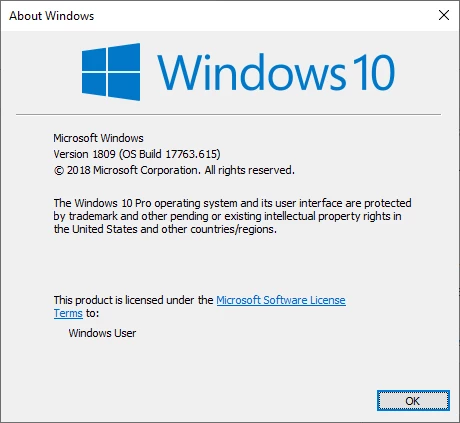
Which Windows 10 I have not updated to build 1903  I still use

I have CS3, CS6, CC 2014, CC 2018 and CC 2019 installed and updated I do not have a problem like yoy describe.


Thanks JJMack, turns out it's a hardware issue, I've connected with Adobe directly through the homepage - my graphics card needs to be updated

6 replies

JJMack
Community Expert
Community Expert
October 4, 2021

SmokMorph

Smoking should not be legal and you should not be advertising it here it violate guide lines.

JJMack
August 24, 2021

Please select a damaged PSD file on first page of repair wizard in Recovery Toolbox for Photoshop.

Select file name for new recovered file.

it must be a hardware issue. As it happen with me i was making post template for [ web link removed by moderator ] and when i finish working there is stuck happen in computer and no thing is working after 30 40 sec photoshop close. Then i update my graphic card and now everything working smoothly. 

James@StTherese
Known Participant
April 30, 2021

Is you're running FontBase font manager, try removing their plugin from the Photoshop program folder > Plugins. Removing the plugin from Photoshop (and Illustrator) solved the lag issue for me!

Known Participant
May 31, 2021

Solved my problem , ty bro

richardk46067604
Participant
August 1, 2019

If anyone else is having similar problems I fixed mine in seconds by going to control panel>programs>programsfeatures and then found "Intel(R) C++ Redistributables on Intel(R) 64" in the list. If you right click and chose repair it quickly fixes the problem and no more awful hanging when merely closing files in Photoshop. I'm so happy, it was driving me nuts!

Participant
May 20, 2020

Thank you,richardk46067604 

I've uninstalled Intell Graphic Drivers and updated it through Device Manager (windows 10) and Photoshop became perfectly smooth again!

Participant
May 21, 2020

Premature happiness 😞 I've tested on simple small files. Some bigger cause the same lag 😞

melissapiccone
Community Expert
Community Expert
July 14, 2019

You went through options to improve performance, did you reset the preferences?

Melissa Piccone | Adobe Trainer | Online Courses Author | Fine Artist
Tamixes
TamixesAuthor
Inspiring
July 14, 2019

Hi melissapiccone,

I've reset my prefs and it still has the same lag.

macaulus
Participant
August 8, 2021

This started happening straight away on photoshop and illustrator with a new computer i just got, couldn't find any info on the adobe forums but did find something here which fixed it straight away if you are using nvidea
https://superuser.com/questions/1234909/photoshop-very-slow-to-close-files

changing the nvidea 3d options worked on both photoshop and illustrator, hope it can help someone.


JJMack
Community Expert
Community Expert
July 14, 2019

When you close a document if there are no unsaved changes the window or tab should close instantly. If there are unsaved changes you should be prompted asking if you want to save the changes first.  Small document should save and close very swiftly.  Exactly what Photoshop UI are you using to close you document.  Photoshop is not a file editor it saved documents into image files. Many image file types are supported some Image file types are sot supported.

JJMack
Tamixes
TamixesAuthor
Inspiring
July 14, 2019

Hi JJMack, 

I should also mention that I'm on Windows 10.

It lags even if I save a file first, it doesn't matter what format (or size) the file is - it does exactly the same thing even if it's a native PSD, a jpg.png,TIFF, etc.

JJMack
Community Expert
Community Expert
July 14, 2019

Which Windows 10 I have not updated to build 1903  I still use

I have CS3, CS6, CC 2014, CC 2018 and CC 2019 installed and updated I do not have a problem like yoy describe.

JJMack