


Copy link to clipboard
Copied
When importing video frames to layers from a .mov image sequence it gives me a limit of only 500 frames. Is there any way to get around this? Really any way at all, even if it's not directly importing or somethign tricky with smart objects, I don't care. At most I can convince myself to cut down to 8fps in Quicktime and even then it's only a minute or so of footage at most. Any suggestions on how to make longer .gifs?


 1 Correct answer


Roughly:
1. File>Import Video Frames to Layers....
2. Select frames 1-500 and import them
3. Create a second, new document
4. File>Import Video Frames to Layers....
5. Select frames 501-1000
6. select all the layers, Layer>Duplicate Layers... and duplicate the layers from from the second document into the first.


Explore related tutorials & articles
 24
Replies
24
24
Replies
24


Copy link to clipboard
Copied
dramrah wrote:
...Any suggestions on how to make longer .gifs?
Oy!
GIF is not a video format and it is certainly not suited for 500 frames. (not even 100 frames)
Insert token. Please play again.
Copy link to clipboard
Copied
no need to be rude now, it's not my fault this is what i've been told to do.
Copy link to clipboard
Copied
I'm just the artist. Understanding why they want such a bulky GIF, or the technicalities of file formats such as this is not my purview, especially as this is outside the norm of what I usually do and more of a favor anyway. I'm only trying to make what I've been asked to. If they don't understand what they've requested or it's impossible to do in photoshop that's their fault and out of my hands.
Copy link to clipboard
Copied
Understanding the technicalities of file formats such as this is most certainly the responsibility of a digital artist.


Copy link to clipboard
Copied
.. Especially if your next question is going to be "how do I get more than 256 colors in my "movie" ..."
Copy link to clipboard
Copied
You people get pretty worked up over an innocent question. Isn't there a more constructive use of your time than not helping me? Like actually helping someone else, for instance. As I've said, this isn't what I normally do and for the most part I'm just trying to do a favor if I can. And no, I won't be needing any help with the colors. All I wanted to know is if I could make a longer GIF in photoshop or not, sheesh. I'm sorry if you consider this flagarent "GIF abuse" that I should be reported for, but regardless it's what they've asked for and I'll try to provide. It's really up to them if they want a bloated, bulky file on their own webspace or not. Good luck trying to get the internet to stop using files in ways you don't want. 
Copy link to clipboard
Copied
There is no "working up". We are well-conditioned to this silliness. This topic appears frequently here and each instance becomes more ludicrous. You should see last week's silliness.
It is not a matter of what your friend wants on their web space.
It is a matter of the limits of the GIF format, the limits of any particular system playing back that GIF file, and the limits of tolerance demonstrated by the web visitors that must endure an insanely large download.
...and in your case, it is the limit of the tool you have.
Copy link to clipboard
Copied
What's needed is a file that can be embedded and linked like an image, not a video. Video formats do not work for the intended purpose, they aren't supported. Playback control is not needed, it just has to loop continuously without being touched, like a moving avatar or something of this nature.
GIF is the only format he knows of that can do what he wants and understands that the file size will be huge, take a long time to download and pushes the limits of what the file type is intended for. No one involved, my friend, myself or anyone who will come in contact with the GIF has any issues with these facts. All I want to know is if it's possible.
He says that there is a copy of CS5 Extended I can use if it's necessary.

Copy link to clipboard
Copied
so helpful thanks wow you should be a teacher. Sike
Copy link to clipboard
Copied
thumbs down
Copy link to clipboard
Copied
Do you have Photoshop Extended? You could create a video layer with more frames. If you don't, you can import a second batch of 500 frames in another document and combine them. Save for Web is going to be brutally slow at some point and not be able to handle that much data.
Copy link to clipboard
Copied
Jeff, I'm not working with PS Extended. How do you combine the two batches of frames/is there a tutorial somewhere? Thanks a heap!
Copy link to clipboard
Copied
Roughly:
1. File>Import Video Frames to Layers....
2. Select frames 1-500 and import them
3. Create a second, new document
4. File>Import Video Frames to Layers....
5. Select frames 501-1000
6. select all the layers, Layer>Duplicate Layers... and duplicate the layers from from the second document into the first.
Copy link to clipboard
Copied
Were you going to explain how to get those additional 500 layers into the animation window? 
Copy link to clipboard
Copied
Right there:
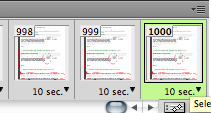
AFAIK, there's not a hard limit on # of frames.
Copy link to clipboard
Copied
Sorry... I meant sequentially.
Copy link to clipboard
Copied
Yeah. Thought about that after posting my rough steps. Duplicating the layers should keep the layer stack sequence correct. One might have to select all the layers, and turn the visibility on for all of them Layer>Hide/Show Layers then clear out all the frames from the Animation panel and choose Make Frames from Layers from the Animation panel flyout menu. It's definitely some hoop jumping, but I *think* it should work.
Copy link to clipboard
Copied
Perhaps you can improve this in a future release so users do not need to jump through such hoops to make 40MB GIF files.
Copy link to clipboard
Copied
Possibly. We added the feature for CS3 (from ImageReady, no less) so a lot of limitation was from way back. Given this feature only works in 32bit because of limitations in the QuickTime API, it can't really benefit from 64bit, unless we use something other than QuickTime for our video support. (chicken/egg)
Copy link to clipboard
Copied
Hey, so getting the layers onto the document was not the step I needed help with, though thanks a heap because that's a bit easier than the method I was using. Turning those layers into frames was the more confusing bit, which you've explained here and that's all well and dandy.
However.
I was able to get more than 500 frames when the document is a frame animation, but if I then convert my frame animation to timeline and then the layers into a smart object so I can edit the footage, etc when saving it caps back to 500 regardless of the number of frames that were in the frame animation. Being able to edit the footage is kind of a key step and more so than just what the adjustments layers can do. I need to be able to apply filters and such. Am I screwed?
Copy link to clipboard
Copied
dramrah wrote:
...Am I screwed?
I'm pretty sure that has been the theme of this discussion. Even Jeffrey pointed out a limit to SFW in his first post (which you have not hit yet because you're still playing in the main application). I can assure you it will not get pretty once you get to SFW.
All this discussion makes me think that GIF is not a video format. I only wish we knew this earlier.

Copy link to clipboard
Copied
But adobe Photoshop team extend frames more than 500 ....it is very essential part for save for web

Copy link to clipboard
Copied
Wow! A Marian Driscoll thread woken up from the dark and murky past. She/he (I think Marian is a he) was like our Station 2, who went by a string of user names because he kept getting banned. If Marian is the reason that Jeff Tranberry no longer posts here, then no loss. There was a report/rumor that Marian had gone to troll him upstairs, or more likely, the one with the horns who lives in the other direction, but that was thought to be a joke in the worst possible taste.
ashwinganvir wrote
But adobe Photoshop team extend frames more than 500 ....it is very essential part for save for web
You need to raise your request on the Feedback site (where Jeff Tranberry still posts)
Copy link to clipboard
Copied


Find more inspiration, events, and resources on the new Adobe Community
Explore Now
 AdChoices