

chucom
Known Participant
March 15, 2021
Question

A font error occurred in the latest version of Photoshop 2021.

  • March 15, 2021
  • 1 reply
  • 539 views

A font error occurred in the latest version of Photoshop 2021.

There is a problem with automatically recognizing certain fonts as different fonts.


1. When I open the psd file, the font is broken.
2. If I copy and paste the text, it will be applied in a different font.


The font I used : S-core Dream (KOREAN)
Fonts that change automatically : Source code pro
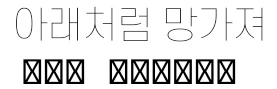


※ This article was written through a translator.

This topic has been closed for replies.

1 reply

lambiloon
Community Expert
Community Expert
March 15, 2021

Hi as photoshop has the English language as basic coding some fonts may cause this you should check some other font or check the following link...regards


https://helpx.adobe.com/photoshop-elements/using/asian-type.html

Ali Sajjad / Graphic Design Trainer / Freelancer / Adobe Certified Professional
chucom
chucomAuthor
Known Participant
March 15, 2021

Thank you for answering my question.
However, this method has already been tried before I post.
Currently I am using a previous updated version where this problem did not appear.


※ This article was written through a translator.

Participant
March 15, 2021

이전 업데이트 버전으로 어떻게 돌리나요?ㅠㅠ 

저도 주로 사용하는 폰트가 에스코어드림인데 안되서 너무 갑갑해요