
Participant
July 27, 2023
Answered

About gradients

  • July 27, 2023
  • 2 replies
  • 267 views

Hello all!!


How can I add several gradients to a single layer?

I'm trying to do this, I create one gradient and then, when I try to create another, with the same defititions in the same layer, photoshop deletes the last one. Or, worse, it creates a mask to the layer, for ever single new gradient. I'm watching a video tutorial of a guy that does this every time and no mask are needed, but he doesn't explain how to do that.


Could you guys help me?
This topic has been closed for replies.
Correct answer Trevor.Dennis

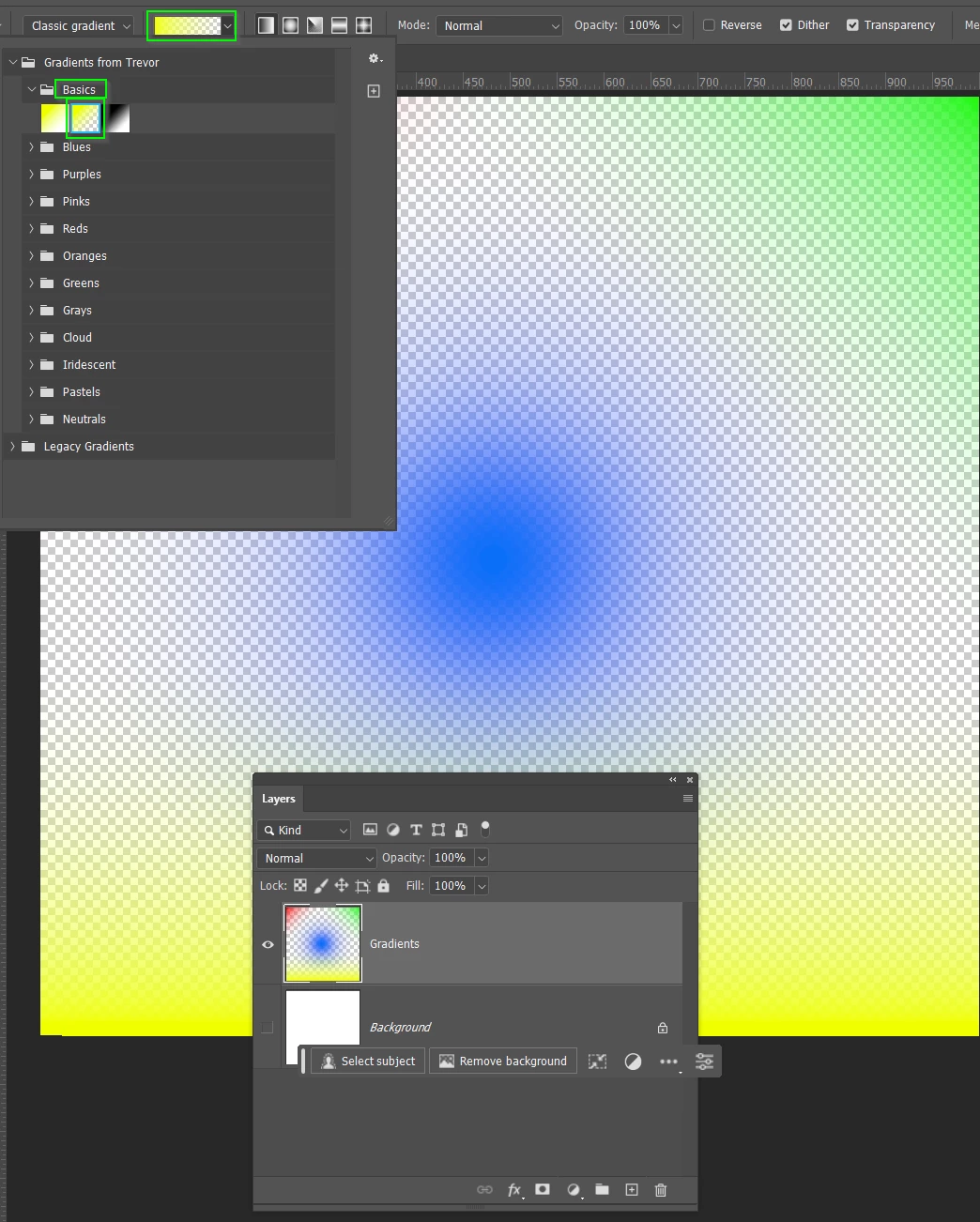
Use classic, but also select Foreground to Transparent

You can even use different colours and styles (linear, radial, reflected, diamond)

2 replies

Trevor.Dennis
Community Expert
Trevor.DennisCommunity ExpertCorrect answer
Community Expert
July 27, 2023

Use classic, but also select Foreground to Transparent

You can even use different colours and styles (linear, radial, reflected, diamond)

Participant
July 27, 2023

Guys, I found it. 

You just need to change to classic gradient as you can see below...