donovandine
Participant
June 1, 2017
Answered

Accidentally Deleted a Brush

  • June 1, 2017
  • 2 replies
  • 10915 views

Hey there,

I apologize if this is a frequent question.  I've researched this for over an hour at this point and to no avail.

I don't know why this happens but I'll hit something on the keyboard and my cursor turns into a pair of scisors and will delete whatever brush I try to select.  I've accidentally deleted a brush I use frequently and I would like to find a way to recover it.

Is there a way to do so?  Like a folder?  I'm using an Imac and photoshop CC. 

I appreciate any help.
This topic has been closed for replies.
Correct answer Trevor.Dennis

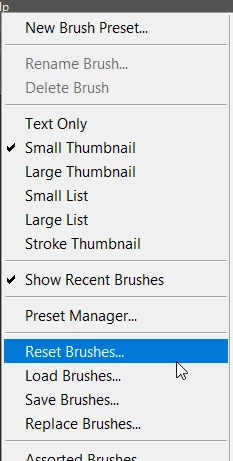
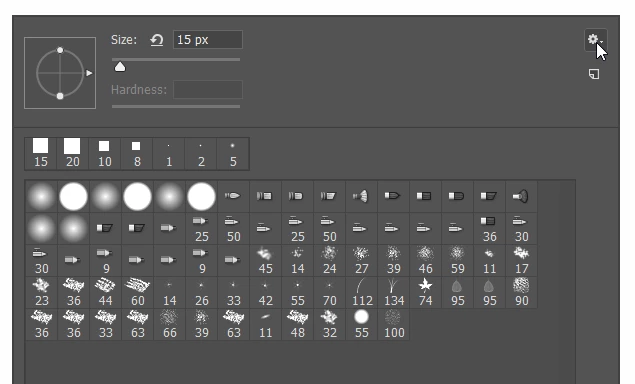
Is the brush one that comes with Photoshop?  Try resetting the brushes.

Select the brush tool and right click inside the document area.

Click on the little cog icon top right corner.

And choose reset brushes

If that doesn't do it, then reinstalling Photoshop will.

I'm struggling to think what you might be doing to delete the brush, but if it is a Mac thing I wouldn't know.

2 replies

Trevor.Dennis
Community Expert
Trevor.DennisCommunity ExpertCorrect answer
Community Expert
June 1, 2017

Is the brush one that comes with Photoshop?  Try resetting the brushes.

Select the brush tool and right click inside the document area.

Click on the little cog icon top right corner.

And choose reset brushes

If that doesn't do it, then reinstalling Photoshop will.

I'm struggling to think what you might be doing to delete the brush, but if it is a Mac thing I wouldn't know.

donovandine
Participant
June 1, 2017

Ahh!  Thank you so much for your help and your patience with me!

Inspiring
June 1, 2017

You must have accidentally pressed alt+click on the brush panel. If it's still in your Brushes folder inside the PS installation on your hard-drive you should be able to add it back in.

donovandine
Participant
June 1, 2017

Oh? 

Excellent.  I hate to be thick here - where do I locate that in Imac?

Trevor.Dennis
Community Expert
Community Expert
June 1, 2017

donovandine  wrote

Oh? 

Excellent.  I hate to be thick here - where do I locate that in Imac?

Photoshop CS6 preference file functions, names, locations