
David 101
Participating Frequently
January 22, 2024
Answered

ACR filter defaults to second monitor

  • January 22, 2024
  • 1 reply
  • 368 views

I have a dual monitor system.  I sometimes move panels to the secondary monitor and can move them back to the main monitor at will.  That works well for me.


However,  in recent weeks, when I choose the Camera Raw filter it automatically opens in the secondary monitor (which is not fully colour managed and therefore does not give a true representation of adjustments).  I cannot manually move it to the primary monitor.


I have searched the Edit/Preferences and cannot find a way to ensure the Camera Rwas filter opens on the Main monitor. 


I am using  a Windows 10 PC with the lastest (25.3.1) version of Photoshop..


How do I ensure the Camera Raw filter defaults to the primary screen?
This topic has been closed for replies.
Correct answer Per Berntsen

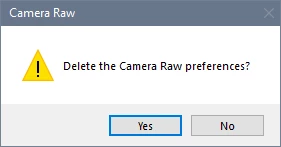
Resetting the Camera Raw preferences may fix it.

In Photoshop, go to Edit > Preferences > Camera Raw. Click Camera Raw with the Control key pressed.

Click Yes in the dialog that follows.


1 reply

Per Berntsen
Community Expert
Community Expert
January 22, 2024

Sounds like the filter is in full screen mode, in which case it cannot be moved.

Click the double arrow in the top right corner to exit full screen mode, which will enable you drag the window to your main monitor by the title bar. 


David 101
David 101Author
Participating Frequently
January 22, 2024

Thank you for your reply, Per.  I had tried this but it does not allow me to drag the window.  When not in full screen mode, I can resize it by dragging the right or bottom edges, but I cannot drag the whole window.

Per Berntsen
Community Expert
Per BerntsenCommunity ExpertCorrect answer
Community Expert
January 23, 2024

Resetting the Camera Raw preferences may fix it.

In Photoshop, go to Edit > Preferences > Camera Raw. Click Camera Raw with the Control key pressed.

Click Yes in the dialog that follows.