
Participating Frequently
June 21, 2012
Answered

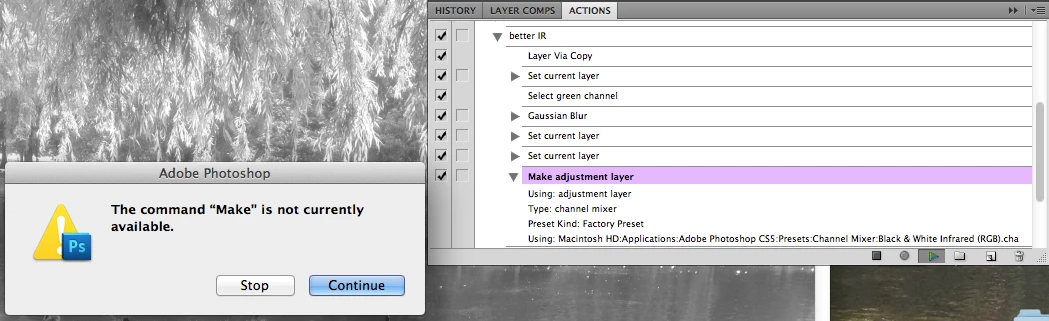
Action 'the command "make" is not currently available'. sometimes but not others
  • June 21, 2012
  • 2 replies
  • 42760 views

CS5 Mac OSX

I am making an action that uses an adjustment layer. when I go through the process without recording the action it woorks fine but when I record it the action always stops at the Make adjustment layer step with the error 'The command "Make" is not currently available.' I tried inserting that step through the adjustment layers panel, from the bottom of the layers panel, clipped and un-clipped, but I can't get it to work. I made a test action with only the make adjustment layer step and that worked but when I copied the step into the real action it broke again.

how can I get this action to record?

Correct answer JJMack

Since the change was made in photoshop 6, it was probably intentional and actions don't always record the steps needed to complete certain tasks without some intervention of the user.

You have to tell actions to do certain things like select channels, select certain layers, etc.


The action recorder job is to record everything that you do that is recordable.  If adding a adjustment layer is recordable when a channel is the current target like it is recorded.  Why is it not available when an identical document is in the same state with the green channel target why is it not possible to do. Its because something is rotten in the code.  If I stop the action I can add the adjustment layer but I can not play add adjustment layer. Why is it available to me but not available to the action player. I have told Photoshop to make adjustment layer and it does. The Action player with the same document in the same state tells Photoshop Make Adjustment layer and Photoshop pop-up not available.  I;ve reduced the action to two steps. Select Green Channel ans Make Adjustment layer.  Possible to do is Photoshop not possible in a Photoshop Action. Rotten simply rotten...

2 replies

Participant
April 24, 2025

Like others have stated, you must have the RGB channel selected in order to make the adjustment. You can reorder the actions if you habitually do this after making the adjustment and the action will run.

Jeff Arola
Community Expert
Community Expert
June 21, 2012

Looks like from the steps in your action that the green channel is the only channel visible.

You probably need to put a step in your action to select rgb channels  to be able to add an adjustment layer in action.

If we knew what you wanted the action to do, we could perhaps offer more helpful advice.

mcsperAuthor
Participating Frequently
June 21, 2012

That makes sense, but if I select the rgb channel, before I go back to the layers panel to add the channel mixer adjustement layer, it changes the picture in a way that i can't use. I need it to stay black and white from the channel selection, not rgb. does that make sense?

! - I found a workaround that includes doing my changes in the green channel then making a selection of the page and copying what it looks like and pasting a new layer of that and deleting the one with the actual green channel changes and moving on from there. the adjustment layer works after that. so i think you were right about the channels. this is far from ideal but it is in an action now so i am ok with it.

if you can figure out how to really fix it that would be great, but thanks for the help and pushing my mind that way.

JJMack
Community Expert
JJMackCommunity ExpertCorrect answer
Community Expert
June 26, 2012

Since the change was made in photoshop 6, it was probably intentional and actions don't always record the steps needed to complete certain tasks without some intervention of the user.

You have to tell actions to do certain things like select channels, select certain layers, etc.


The action recorder job is to record everything that you do that is recordable.  If adding a adjustment layer is recordable when a channel is the current target like it is recorded.  Why is it not available when an identical document is in the same state with the green channel target why is it not possible to do. Its because something is rotten in the code.  If I stop the action I can add the adjustment layer but I can not play add adjustment layer. Why is it available to me but not available to the action player. I have told Photoshop to make adjustment layer and it does. The Action player with the same document in the same state tells Photoshop Make Adjustment layer and Photoshop pop-up not available.  I;ve reduced the action to two steps. Select Green Channel ans Make Adjustment layer.  Possible to do is Photoshop not possible in a Photoshop Action. Rotten simply rotten...

JJMack