
Participant
March 7, 2017
Answered

Action to change image resolution.

  • March 7, 2017
  • 1 reply
  • 3759 views

Hello there.

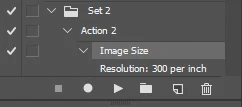
I have to change about to 300 images resolution from 96 pixels/pol to 200 pixels/pol and save in JPG . I did create a action just to do so but it won't change the resolution, only the size of the image.

Image Processor won't let me change the resolution, only the size of it.

I'm working with Photoshop CS5.
This topic has been closed for replies.
Correct answer Benjamin Root

Am I correct that you want to change only the resolution (ppi) without resampling? An action will record that:

Scratch that. I see you are running CS5. I don't have CS5 installed on my workstation to test, only CS6 and CC.

1 reply

Nancy OShea
Community Expert
Community Expert
March 7, 2017

Guibertho  wrote

Hello there.

I have to change about to 300 images resolution from 96 pixels/pol to 200 pixels/pol and save in JPG .

For what purpose?  I can't imagine why you want to do this. 

Up-sampling images only leads to distortion and unwanted artifacts.

See this link for details:

Photoshop Fundamentals: Changing an Image’s Resolution and Size | Graphics.com

Nancy

Nancy O'Shea— Product User & Community Expert
GuiberthoAuthor
Participant
March 7, 2017

Usually I also resize the image according to the resolution.

Checking/Unchecking the Restore Image Resolution box.

This way I keep the image dimensions.

I'm open to discussion anyway, I'm not sure about those settings.

Benjamin Root
Benjamin RootCorrect answer
Legend
March 7, 2017

Am I correct that you want to change only the resolution (ppi) without resampling? An action will record that:

Scratch that. I see you are running CS5. I don't have CS5 installed on my workstation to test, only CS6 and CC.