Participant
March 6, 2023
Answered

Actions: Export as PNG no longer recorded

  • March 6, 2023
  • 3 replies
  • 3612 views

As title describes!

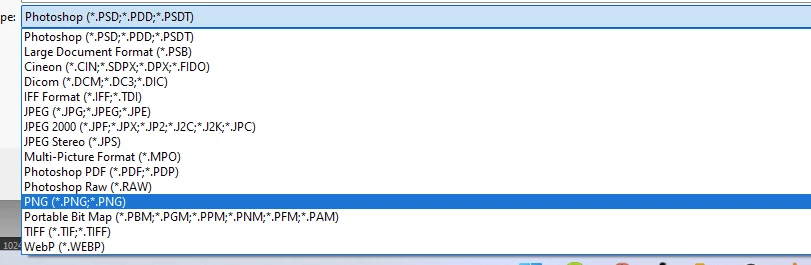
With the newer version of Adobe Photoshop, Save As no longer gives you the option to save your project as a .png file, though the action will be recorded.

None of the Export options will be saved in Actions, and otherwise there are no options to save projects as .png when doing a batch with actions.


What am I doing wrong?
Correct answer Imaginerie

Hi!

I can certainly save as .png on my end


but maybe there is something in your file that prevents you from saving?


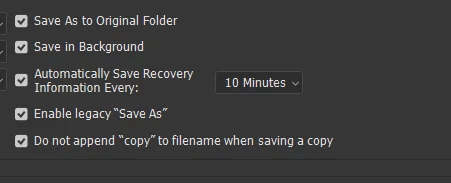
also check that you have the "enable legacy save as" ticked in your preferences

in the file handling section.

3 replies

Clever_Ocean15A9
Inspiring
December 1, 2023

I was running into the same issue and found "enable legacy save as" as the fix. But the "Save as PNG" option created a file 3x the file size compared to the "Quick Eport as PNG" option (3 MB vs 1 MB). I would guess there are settings you can adjust but wanted to point that out. 

Stephen Marsh
Community Expert
Community Expert
December 2, 2023

@Satty. 


Yes, there are certainly PNG quality options in Save As/Save As a Copy:


However, Export As and Export > Save for Web (Legacy) both strip metadata, so the increased file size in Save As could also be due to extra metadata. For example, some folk have had major issues with photoshop:DocumentAncestors metadata bloating files.


Clever_Ocean15A9
Inspiring
December 2, 2023

Thanks Stephen, I did play with those and selected "Smallest file size" which still produced the 3x difference. Super appreciate the breakdown on the metadata!

Stephen Marsh
Community Expert
Community Expert
March 6, 2023

If not save as, then save as a copy...

Imaginerie
Community Expert
ImaginerieCommunity ExpertCorrect answer
Community Expert
March 6, 2023

Hi!

I can certainly save as .png on my end


but maybe there is something in your file that prevents you from saving?


also check that you have the "enable legacy save as" ticked in your preferences

in the file handling section.