
Inspiring
May 12, 2025
Answered

Actions - how to enter variable info?

  • May 12, 2025
  • 1 reply
  • 482 views

Hi. I'm wondering if there is a way to enter variable info in an action. Specifically, in my action I want to add canvas but depending on the photo, not the same amount of canvas. Is there a way to have the action open the "add canvas" window, wait for me to enter the variables, and then continue?


And/or, is there a way to open the "stroke" window, wait for me to enter the variables and then continue?

I've been struggling with this and cannot figure out how to do it.


Thanks.


Mark
Correct answer Stephen Marsh

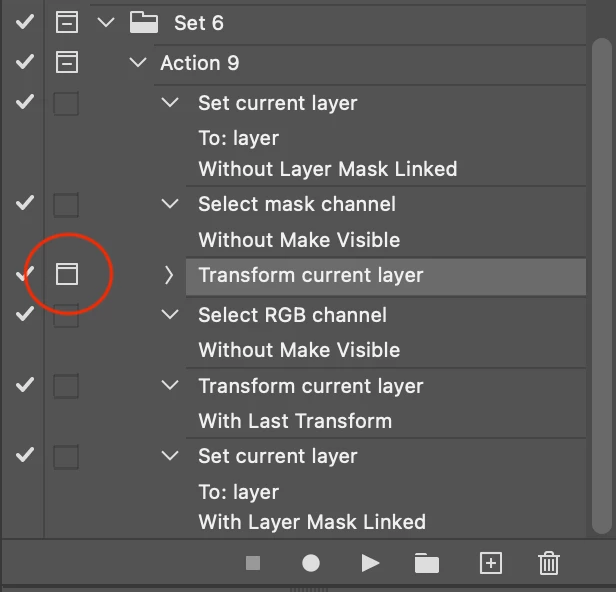
@MarkNF – To illustrate the reply from @D Fosse here's a screenshot, where the "modal control" has been set against the transform step.


1 reply

D Fosse
Community Expert
Community Expert
May 12, 2025

Any dialog can be turned on or off in the actions panel. Just check the "dialog" box for that step. If on, the action waits for input and then continues when the dialog is OK'd.


There's also a set of conditional steps in the panel menu.

Stephen Marsh
Community Expert
Stephen MarshCommunity ExpertCorrect answer
Community Expert
May 12, 2025

@MarkNF – To illustrate the reply from @D Fosse here's a screenshot, where the "modal control" has been set against the transform step.


Stephen Marsh
Community Expert
Community Expert
May 13, 2025

Thank you both. 


@MarkNF – You're welcome, I have marked the reply from @D Fosse as a correct answer for you.