
wallaceh3639989
Known Participant
December 27, 2018
Answered

Actions panel stopped working

  • December 27, 2018
  • 3 replies
  • 3138 views

Suddenly the Actions Panel doesn't show the actions in the edit mode, just show them as buttons, when I turn off the buttons options the panel is empty. I already restore the Photoshop settings restarting with Cmd+Alt+Shift and nothing happens. I restart the computer too. Even when loading new actions they don't appear, just as buttons.
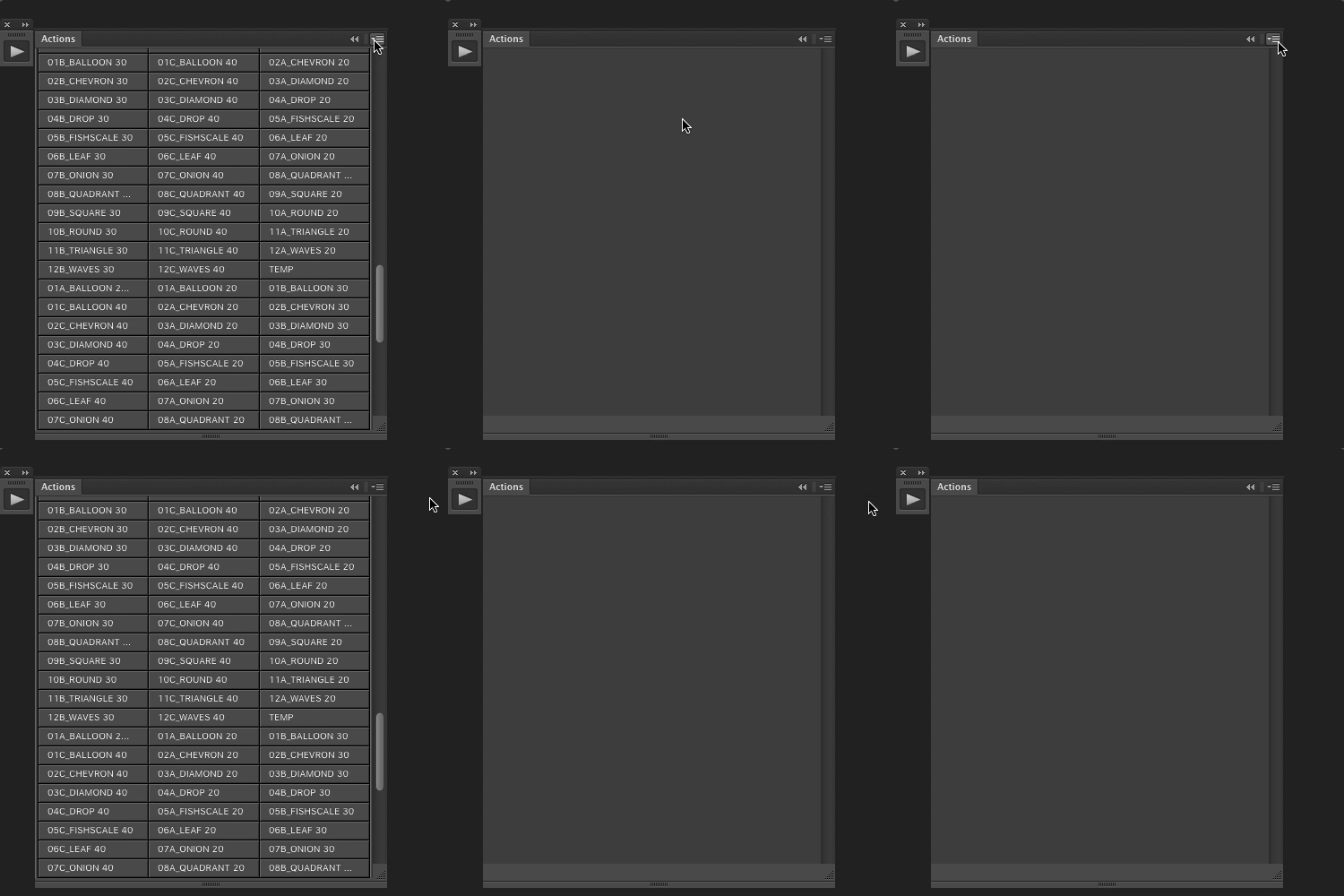
This topic has been closed for replies.
Correct answer c.pfaffenbichler

Does this also apply if the Actions Panel is not docked?

What happens of you »Reset Actions«? (Don’t do this if you have unsaved Actions, though.)

3 replies

GCWB
Participating Frequently
November 12, 2024

Found this problem years later & as a professional had hundreds of actions that hadn't been saved (Had recently been updated in the last week - Don't ask). 


If you have actions that you don't want to lose the progress of. You can run the action you want in Button Mode, after running, change out of button mode, you can then save the action you've just run using the dialog menu.


Because after running in Button mode, it automatically selects the name of the action you just ran. So even though you can't see it, it's selected & thus you can save it. I managed to save all my actions by systematically doing this one by one. I tried EVERYTHING before this, including tens of scripts & forums, this is all that worked.

Participant
March 11, 2019

I see that this was answered

I have the same problem and wondered if its because I have a LOT of actions that I've downloaded

So, although it seems that resetting the actions is the answer, as someone mentioned above, this isn't advisable if we have actions that aren't saved

The problem of course is how to save those actions....?? Nothing shows up when in edit mode which is where you need to be to save the actions. In button mode, the option is greyed out

So it seems now that I'm faced with losing my unsaved actions just to get edit mode back, or stay as I am with my actions and be unable to save, edit, add to or even create new actions

Does anyone have a solution to this?? Is there a way to retrieve the action data??

Thanks

jane-e
Community Expert
Community Expert
March 11, 2019

davidh96652494  wrote

So, although it seems that resetting the actions is the answer, as someone mentioned above, this isn't advisable if we have actions that aren't saved.

The problem of course is how to save those actions....?? Nothing shows up when in edit mode which is where you need to be to save the actions. In button mode, the option is greyed out

Hi David,

The way to save actions is to select the set (folder) you put them in, then go to the Action panel menu and choose Save Set. This step will be grayed out if you have an action selected — you have to select the set (folder) that the actions are in, not an action inside the set.

Do this every time you make a change to any action that you want to keep.

Repeat for each set you have created. When you reset actions, you will be able to reload each of your saved sets.

~ Jane

Stephen Marsh
Community Expert
Community Expert
March 12, 2019

Hi Jane

Thanks for the reply, but what I mean is, I know how to save sets, but in order to do that you have to be in EDIT mode in your actions panel, not BUTTON mode.....

My problem is that my edit mode is completely empty, so I'm unable to do anything to my actions, whether that be, save them, edit them, delete them or even create a new one. If you look at the original post on this thread, the user has actually taken. screen recording and you can see that his panel is empty

Its like its a glitch in photoshop, because honestly its completely empty, I don't even have the record, play and pause buttons

My saving grace is that my actions still work. I can use them in button mode and with my function key shortcuts, but its like I can't ever get at them now to save or edit them, which is why I was wondering if there is an ALTERNATE way to save them or access their data.

I have some of them saved as ATN files on my machine, so they're ok, but my most recent ones have never been saved and there's loads and they're quite complex

Again if anyone knows why this is or if there's a solution, please let me know

Ta


David


Please review the link in my previous post.

This could also be a case of needing to reset Photoshop preferences - after backing up the .psp file and or saving out/converting using various xtools scripts for insurance.

c.pfaffenbichler
Community Expert
c.pfaffenbichlerCommunity ExpertCorrect answer
Community Expert
December 27, 2018

Does this also apply if the Actions Panel is not docked?

What happens of you »Reset Actions«? (Don’t do this if you have unsaved Actions, though.)

wallaceh3639989
Known Participant
December 27, 2018

Resetting the actions was the solution, ok, the partial solution... I have discovered that this happens when expanding many actions. I would like to know why this happens, if there's a memory problem or a number limit when expanding actions...

c.pfaffenbichler
Community Expert
Community Expert
December 27, 2018

Sorry, I am not aware if a limit on the number of loaded Actions exists (or if it may depend on fact9ors like available RAM).