
June 2, 2011
Answered

Actual inches in Photoshop ruler

  • June 2, 2011
  • 6 replies
  • 80057 views

Hoping someone can help with what I originally thought was a real simple question.  But I’ve looked everywhere online, and the answers get complicated. 

I would like my Photoshop rulers to show actual inches.  Period.  I know how to change the ruler from pixels to inches, but when I do, the “inches” are really about half an inch each.  So then (based on online tips), I play with the resolution, etc. and I can change the size of the “inches” on the ruler, but I still can’t get Photoshop’s “inches” to be real actual inches, as measured with a ruler.  I'm sure I can evetually find the right rez to make an inch equal an inch, but do I have to?  When you buy a ruler at a hardware store, you don't have to experiment with several before finding one that measures inches correctly.  An in ch is an inch on every ruler on earth.  So what am i missing with PS?

How do I get my Photoshop ruler measure an in exactly like a ruler does?  Thanks if someone can help !!
    This topic has been closed for replies.
    Correct answer

    Noel, hi.   Yes, when my image is printed, it comes out at exactly the 2x2 dimensions I set up.  So then the question is how do I get my screen display to show the exact same size as what the print/output display will be.  (I realize the problems that will occur for, say an image of 24" by 36" that won't fit on any screen...but I'm talking about a mere 2 x 2 image.)  I design cell phone graphics and I need my PS screen display to appear exactly the same size as the cell screen will be.


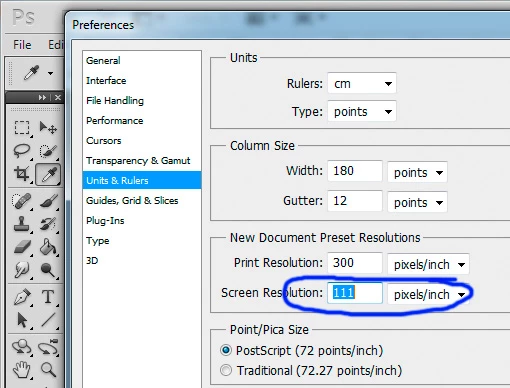
    Semaphoric already gave you the answer, but maybe it's easier for you, with an image:

    You need to find your screen ppi or calculate it by yourself and enter it there. If you set ps up this way and you click on "print size" when in zoom mode, you'll get a very good result.

    Off topic: Agreed with Marian. Your approach is flawed. You need to work at the devices resolution, not on the physical size of the screen.

    Displaying sizes accurately make infinitely more sense when working for print. (like for example checking readbility of small text, prior to making a test print)

    6 replies

    Participating Frequently
    December 24, 2022

    I have a client who wants to see the printed size to determine text size and readability.

    Found an article to breaks it down and shows all the details and steps how to get it done. https://www.bumblejax.com/content/how-to-view-your-photo-at-actual-print-size-in-photoshop/

    Participant
    December 5, 2018

    I just signed in simply to say:

    You have issues  

    That’s not how the digital world and screens work. You would just have to line up your photoshop’s scale with your real scale by zooming in / out On your monitor. And be happy that when you print a size it’s the exact size.

    I HOPE you go to Best Buy and complain about this because everyone in there would get a good laugh.

    No trying to be mean, but you act as if the world is in disorder because your monitor isn’t presenting the perfect inch to you in real life. You’re acting as if OTHER people or computers are dumb because YOU don’t understand how screens and computers work.

    This is hilarious to me, had to call it out.

    Nice day all,

    Eva - San Diego Photographer

    Participant
    February 15, 2020

    Gonna resurrect again just to say...


    "Now, I'm not tryin'a be mean here..."


    (paragraphs of THE EFF IS THE MATTER WITH YOU, YOU IDIOT. YOU MORON. YOU ACTUAL IMBECILE.)


    Also I hope that Marian or whatever woman was able to find herself a magic wand or something cuz damn was she catty for no reason.


    Anyway y'all answered my question thanks or something.


    Love,

    An idiot. A Moron. An Actual Imbecile.

    June 4, 2011

    I'm still wondering why we're discussing inches for a screen designer.

    Screen designers need to see pixels exactly as they will appear on a device, not resampled to approximate an inch measure. You should not be fiddling with small type if it is being resampled on your screen at something other than the true resolution of the target device.

    For clarity, when we say we design for cell phones, what exactly are we designing?

    1. the images that appear on the device's electronic display screen?
    2. printed adhesive wraps to decorate a phone?
    3. printed training manuals or marketing for selling a phone?

    Only options 2 and 3 require you to think in inches. If you are dealing with option 1 then you are making an extreme mistake in trying to approximate inches... and everyone here trying to help you with approximating an inch is making an extreme mistake. I thought we all knew better here.

    JJMack
    Community Expert
    Community Expert
    June 4, 2011

    Marian Driscoll wrote:

    I'm still wondering why we're discussing inches for a screen designer.

    Screen designers need to see pixels exactly as they will appear on a device,

    Still all screen do not display pixels at the same resolution.  An image 300 pixels wide will display greater then " wide on a screen  with a 84 DPI resolution and less the an inch wide on a screen with a 326 DPI resolution.  A screen designer need to design for the display an image will be displayed on.  They may even need have more then one version of an inage and use one the will display well on the device being used.    You can no read text on a 326 DPI resolution screen if the text size used was designed for an 84 DPI resolution device for the text will be too small to see well.  Just because a screen designer can see an image well on his display device does not mean all users will see a useable image they display the same image on their display device.   IMO size matters and DPI resolution is where size is made.

    JJMack
    June 5, 2011

    JJMack wrote:

    ...You can no read text on a 326 DPI resolution screen if the text size used was designed for an 84 DPI resolution device for the text will be too small to see well...

    Are you certain of that?

    You'd be making a perfectly fair argument if scaling an image on a 84 ppi screen to the same physical size of a 326 ppi screen would actually allow you to evaluate how readable text would be on that device. But the truth is that Photoshop's display would be resampling the art on the desktop screen so you really could not tell if the text was truly readable on the target device.

    JJMack
    Community Expert
    Community Expert
    June 3, 2011

    I do not know why this thread is so long.

    Calulate your screen's dpi resolution if you do not know it.

    Use menu edit preferences and set the display DPI resolution for the screen you are using.

    Then use menu View and select view print size. Photoshop will zoom your image so 1" will display  1" in size on your display.

    If you set ruler units to inches and set rulers on you will see 1" is 1" in size when you measure it. If you zoom your image to anything other size then print size 1"  will not display 1" in size when measured.

    JJMack
    Noel Carboni
    Legend
    June 3, 2011

    Oops, just got longer with the same info. 

    Oops, just got even longer with a meaningless comment.

    -Noel

    June 3, 2011

    Oh man, This is an intertaining thread...

    With seems to have some tension... lol

    "did i just ad to all the nonsense..."

    Noel Carboni wrote:

    Oops, just got longer with the same info.

    Oops, just got longer with a meaningless comment.

    -Noel

    Semaphoric
    Community Expert
    Community Expert
    June 3, 2011

    If you know what the native resolution of your display is, you can enter that in Edit > Preferences > Units and Rulers > New Document Preset Resolutions > Screen resolution. If you view the image on another display, though (say, connecting your computer to your large-screen HDTV, or on another computer), you'll be back to square one.

    June 3, 2011

    I've had this same issue and by going into the prefrences > screen Resolution i was able to get it ALOT closer... its still not 100 % but its close enough...

    my 2"x2" comes out about 1.8"x1.8" on screen

    June 3, 2011

    Sadly, the discussion must continue. An inch is always an inch...Adobe just doesn't get it and displays their own version of an inch.

    Participating Frequently
    June 2, 2011

    The measurable size of the rulers depend on the dimensions of the file and your zoom level. It's the only way to have precise measurements inside of Photoshop–the rulers will always change when you zoom.

    June 2, 2011

    Thank you, Jeff,  I can certainly understand that the ruler will change when I zoom.   But what about when I open a brand new image at 2 inches by 2 inches, and the zoom is set at the basic 100%.  I measure the onscreen image that is created, and it's about 1.4 x 1.4, and not 2 x 2.    Why is Photoshop compressing a 2-inch image and making it look smaller?  It prints at exactly 2 x 2, so I want it to appear as 2 x 2 on my screen.

    Participating Frequently
    June 2, 2011

    It boils down to the pixel resolution of your display...

    The ruler will still be accurate in it's on-screen measurements...do you use the measure tool?

    If you want the physical dimensions to be "real" then you would need to set your image resolution to be the same PPI as your display. Course if you want print resolution then you have no alternative to using a higher PPI resolution which will alter the physical dimensions of the rulers.

    I really don't think you'll ever get a 1:1 ratio of real life dimension to digital file dimension. That's not the way Photoshop was designed to work. I would suggest dealing with image dimension in the "Photoshop Way™" and just learn how to use the rulers the way they work...