This topic has been closed for replies.
Correct answer gener7

After you add the shortcuts as Julienne and Ged instructed, they show up in the Layer > Layer Mask menu.

There is no direct "Add Layer Mask" command.

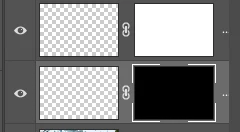
There are two kinds of Layer Masks: Reveal and Hide   ,

Reveal is the White mask, Hide is the Black Mask.

2 replies

gener7
Community Expert
gener7Community ExpertCorrect answer
Community Expert
June 28, 2019

After you add the shortcuts as Julienne and Ged instructed, they show up in the Layer > Layer Mask menu.

There is no direct "Add Layer Mask" command.

There are two kinds of Layer Masks: Reveal and Hide   ,

Reveal is the White mask, Hide is the Black Mask.

david.pierce
Participant
June 28, 2019

The button I was looking for was "Reveal Selection" which is confusingly named. Should be "Mask Selection" imo.

June 27, 2019

Hi

Option to add a shortcut is there for me, Photoshop 20.0.5