Chochography
Participant
December 31, 2015
Answered

Add layer mask shortcut?

  • December 31, 2015
  • 6 replies
  • 92237 views

Hello, is posible to add shortcut for "add layer mask"?

I can't find it. Thanks

Correct answer Akash Sharma

Hi chochography,

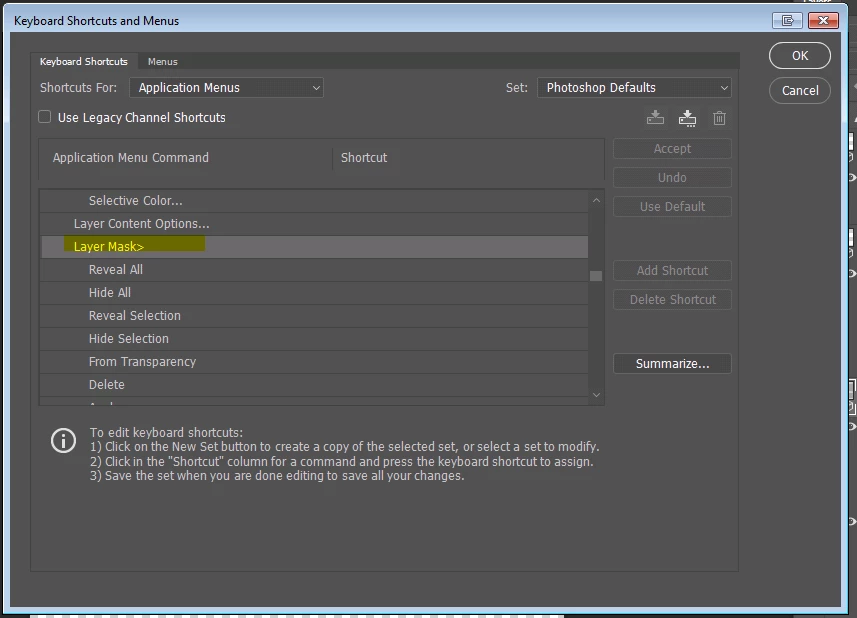
Select Edit>Keyboard Shortcuts and assign your own shortcuts for Layer>>Layer Mask>>Reveal All
Regards,

Akash

6 replies

Participating Frequently
September 6, 2023

I realized that the "Reveal All" and "Reveal Selelction" options as shown in the screenshots are what we are looking for when we want to create a layer mask.
But reveal all will always give you a white layer mask, even if a selection is active, so there is a difference between these two, just in case anyone was wondering! 

and if you always want a black layer mask, that woudl be "Hide All"

Participant
April 9, 2024

THIS is the answer everyone!!! 
New Layer Mask > Reveal All

Thank you!
There was always a way to map a shortcut for this function. We just need to learn the way Adobe words the action lol

Participant
April 16, 2021

Thanks!

Participant
February 27, 2023

You can create an action. 


Participating Frequently
April 18, 2020

Thank you, this is great if you want to add a White layer mask, but what about a keyboard shortcut to add a Black layer mask?

kibriyamunna
Participant
June 20, 2020

If you want to add a Black Layer mask you have to Press Alt and at the meantime, you have to press the Layer mask under the layer panel.

I hope you have understood.

Thanks
Regards,
Kibriya Munna

You can say Graphic design is my Passion. From 2019 I'm trying to be skilled as a Motion Graphics Designer. For Motion Graphic I use Adobe After Effects, Autodesk 3Ds Max and Adobe Premiere Pro and Cinema 4D. I normally use Photoshop, Illustrator, Powerpoint for Graphic Designing. Linkedin: www.linkedin.com/in/kibriyamunna Facebook Page: https://www.facebook.com/kibriyacreations/ Please let me know what is on your mind and what are you thinking! Waiting for your response. Thank you. Wish you all the best. Pray for me too. Regards, Kibriya Munna
Known Participant
November 25, 2020

I've just had the same question and found this thread. Then I realised that you could make an Action assigned to a Fn button for the inverted - black mask.

Bando
Known Participant
January 23, 2020

Hello, did you get a proper response to this question?
I too want a keyboard shorcut that does what the button at the bottom of the layer panel does. Reveal All or Reveal Selected depending if something is selected.

Participant
February 15, 2020

Me too. What do you think, how much time will pass before they hear us - 2020? Have a question, no answer.

Help us Adobe, plz. Thanks.

JJMack
Community Expert
Community Expert
December 31, 2015

Just click on the add layer mask icon in the bottom of the layers palette. If you have an active selection it will be usea for the layer mask content. Otherwise a Show all or Hide all layer mask will be the layer mask added. The Alt key held down will invert the layer mask.  Not held down show all.  Held down inverted hide all.   I'm quite sure alt would also invert an active selection layer mask.

JJMack
JohanW
Participant
April 20, 2018

The whole idea with asking for a shortcut is to not have to click on that button

JJMack
Community Expert
Community Expert
April 20, 2018

We do not think alike.  To me using a shortcut means clicking one or more keyboard  keys or clicking mouse programmable button or clicking a pen button or clicking a UI element all seem to be clicking something. 

JJMack
Akash Sharma
Akash SharmaCorrect answer
Legend
December 31, 2015

Hi chochography,

Select Edit>Keyboard Shortcuts and assign your own shortcuts for Layer>>Layer Mask>>Reveal All

Regards,

Akash

Chochography
Participant
December 31, 2015

Thanks.... I was in "Panel Menus".