Exit
  • Global community
    • Language:
      • Deutsch
      • English
      • Español
      • Français
      • Português
  • 日本語コミュニティ
  • 한국 커뮤니티
12

Adding additional Inner Shadow replaces an existing layer effect

Participant ,
Oct 03, 2023 Oct 03, 2023

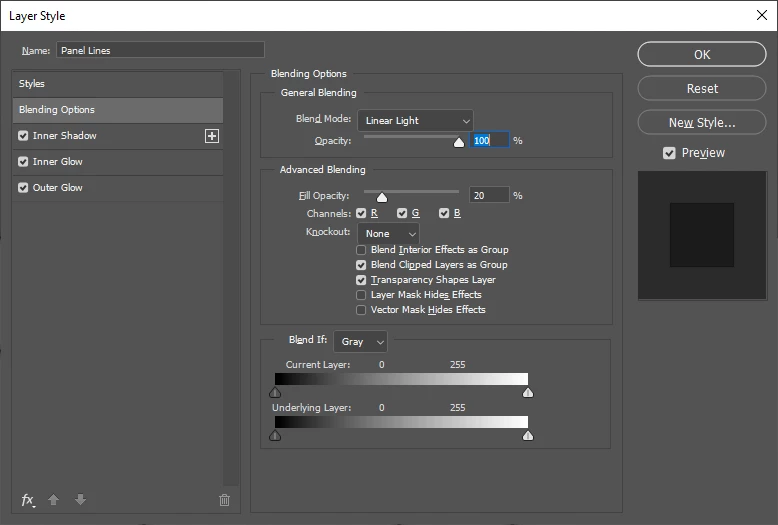
Before:

ThatRobHuman_0-1696395735397.png

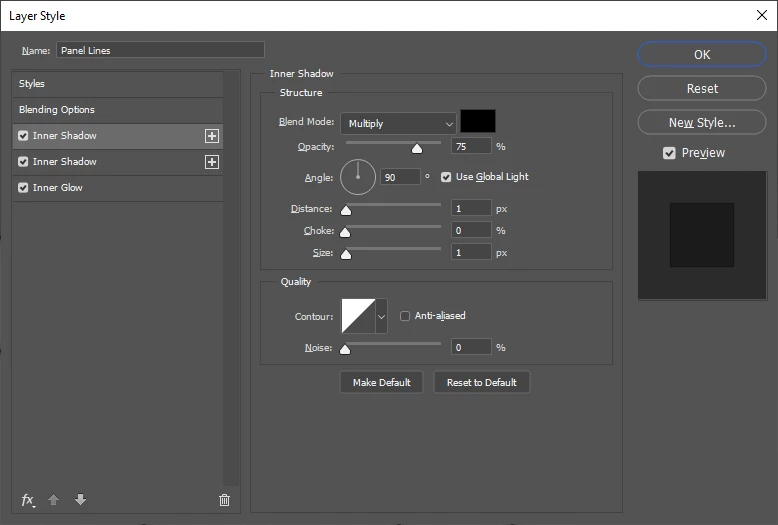
After:

ThatRobHuman_1-1696395748450.png


I've clicked the Plus button next to the Inner Shadow as well as tried adding a new Inner Shadow using the fx menu at the bottom.



TOPICS
Windows
314
Translate
Report
Community guidelines
Be kind and respectful, give credit to the original source of content, and search for duplicates before posting. Learn more
community guidelines
Adobe
Participant ,
Oct 03, 2023 Oct 03, 2023

Addendum: This appears to be a non-destrucrtive UI desync issue. When I click anywhere in the pane with the list of styles on the left of the Layer Styles dialog, the UI refreshes and both the new style and the already-existing style appear.

Translate
Report
Community guidelines
Be kind and respectful, give credit to the original source of content, and search for duplicates before posting. Learn more
community guidelines
Participant ,
Oct 31, 2023 Oct 31, 2023
LATEST

Still an issue in 25.1

Translate
Report
Community guidelines
Be kind and respectful, give credit to the original source of content, and search for duplicates before posting. Learn more
community guidelines