
Participant
March 24, 2020
Question

'Adjustment Layer Properties' window (bring to front by double clicking)

  • March 24, 2020
  • 5 replies
  • 2999 views

Hi:)


In the older Photoshop versions I used to be able to automatically bring up an 'adjustment layer properties' window (Hue & Saturation for example) in front of all the other open windows when I double click on the 'adjustment layer' layer in my layers window.

Now when i go to my 'layers' window and double click on any of the existing adjustment layers the 'adjustment layer property' window doesn't automatically appear in front of all other open windows and so I have to search through all the  open windows and tabs to try to find it.  It sometimes takes a while to find it and is quite disruptive to the workflow.  


Do any of you know if there is an option somewhere which will allow me to bring up the adjustment layer window in front of all the other windows when I double click on it in the layers window? 


I hope I explained myself properly. Hopefully the attachment will help shed some light on what I mean🙂
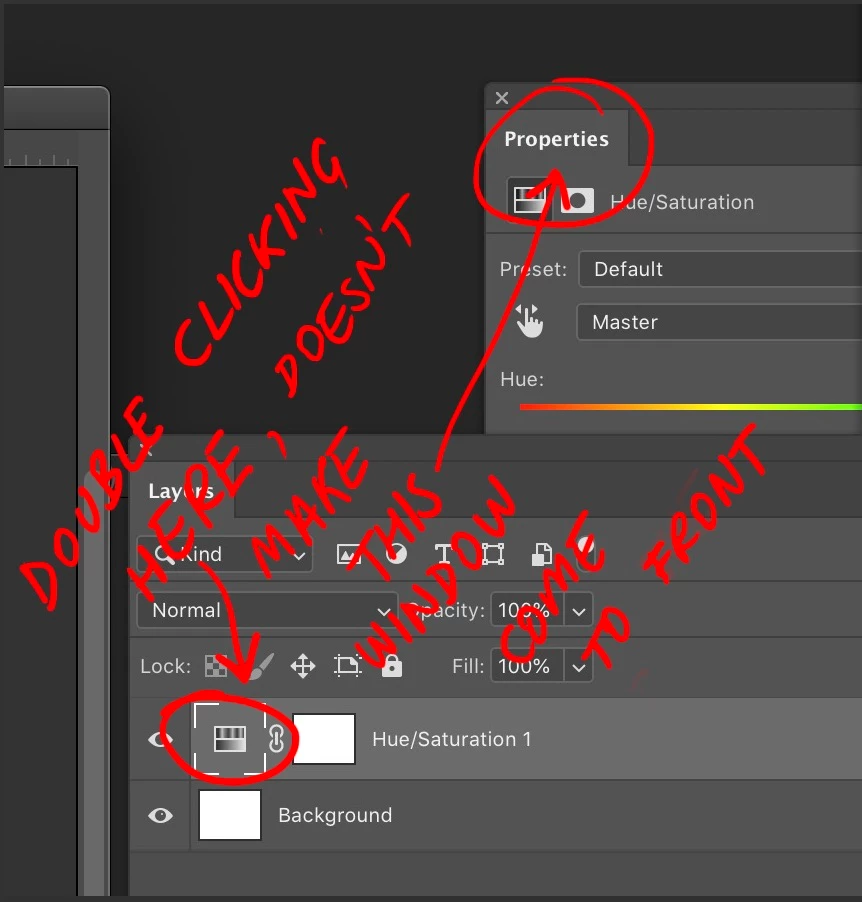
This topic has been closed for replies.

5 replies

Known Participant
February 15, 2024

Yes, I'm getting something similar. When I try and create a Hue/Saturation layer by clicking on the the "Adjustments" tab and then select "Hue/Saturation", it just takes me straight to the Properties tab and doesn't create a hue/saturation layer. All I'm trying to do is change the hue/saturation of one layer, but I've watched about a dozen tutorials on how to do this, and none of them apply to the latest Photoshop CC. I'm going to see if I can do it in GIMP instead.

melissapiccone
Community Expert
Community Expert
February 15, 2024

Adjustments tab - do you mean the drop down? You can't do it that way - it's destructive from the drop down menu and keyboard shortcut. You can use the adjustments panel to create a new Hue/Saturation adjusment Layer or use the icon at the bottom of the layers menu to create it. 


Yes:


y

Yes : 

No 

Melissa Piccone | Adobe Trainer | Online Courses Author | Fine Artist
Known Participant
February 15, 2024

Thanks, Melissa, I appreciate your response. However, I'm trying to use what you're showing in your second image. I click on a layer and then on the adjustment tab I click hue/saturation...

And as soon as I click Hue/Saturation, it just opens the Properties tab but doesn't do anything else:

So it's not creating a Hue/Saturation element - I'm not getting the little white box next to "Layer 1". Exactly the same thing happens if I click the two-tone circle at the bottom of the screen.


Basically, I have two images on separate layers, and I just want to adjust the hue/saturation of a single layer, not both. I can't find a way of doing this. My first idea was to try a hue/saturation adjustment layer - not sure if this is even the right approach, but I can't even manage to do that in this latest version of Photoshop CC (25.4.0).

andreut60668364
Participant
January 27, 2022

It may be poping up behind your other dock panels, like Layers, History, etc.

Try to undock the other panels and move them around to see if it is behind them. If so, move it to a visible location and try again to use double click. 


melissapiccone
Community Expert
Community Expert
September 22, 2021

It's working correctly fo rme. My suggestion for a work around is to have your properties panel out and available as part of your workspace. I always have mine in a sidebar to access quickly. 

Melissa Piccone | Adobe Trainer | Online Courses Author | Fine Artist
Participant
September 22, 2021

I've run into the same issue and was hoping there'd be an answer in this thread. The same question doesn't seem to be posted anywhere else on the internet. Did you ever find a solution?

Legend
September 22, 2021

I can't repro. Only thing I can think of is the panel is on a different monitor than you're looking at, or maybe corrupt prefs.


Try restoring your preferences using this manual method:

https://helpx.adobe.com/photoshop/using/preferences.html#Manually

c.pfaffenbichler
Community Expert
Community Expert
March 24, 2020

Have you tried undocking the Properties Panel?