



Adjustments Panel Fixed in Beta Version
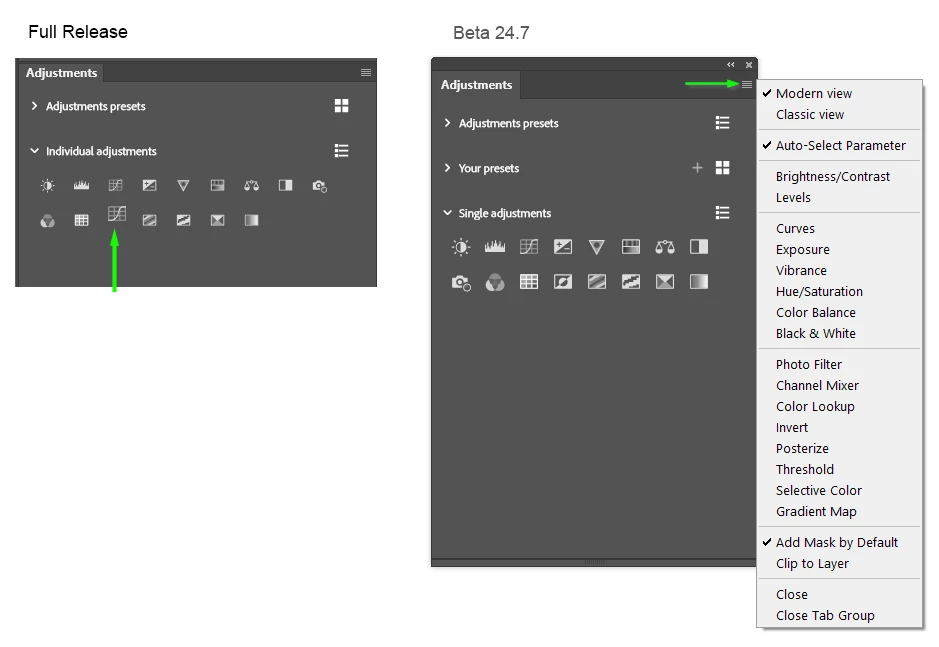
I have not seen any mention of this so sorry if this has been covered, but I have just noticed that the horible new Adjustments panel has been fixed in beta 24.7.0 If you look at the full release panel on the left, and at the Curves icon above the green arrow, you can see that the beta icon I have pasted there is way bigger. The icons are also individual and will addapt to different panel sizes.
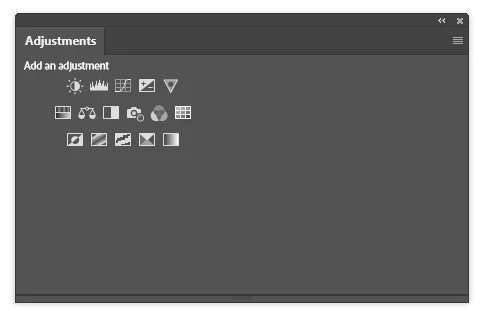
Classic view keeps the larger (legacy) icon sizes, but bunches them up regardless of panel size. That's still nicer than the microscopic icons in the full release version.
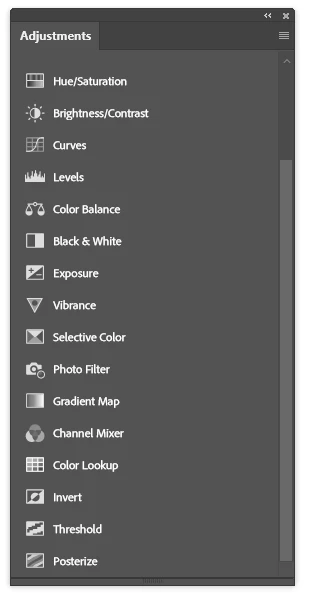
My main complaint with the List view is that the Presets options (Note: there is an additional Your Presets option in 24.7) is that the twirl out presets take a bunch of screen space spoiling your custom workspaces, but the first time you use the panel, you just need to hover above and spin down with the mouse wheel, and the presets options are scrolled up and out of site. I am guessing that we'll need to do that each time we open Photoshop again.
If this makes it to the major version full release update in October, I am going to be a happy P'shopper.
A wee, and potentially embarrassing, aside to this, I like to change the Adjustments shortcuts to the Adjustment Layers, which proved to be a gotcha this week. I was finding that when I inverted a layer mask (which is what I use Ctrl i for 99 times out of a hundred) Photoshop was adding an invert Adjustment layer. I _almost_ started a thread asking 'What the actual heck is going on here?' When I remembered that I had included Ctrl i when updating my main workspace in 24.7 beta. It's like when we do something so many times that it becomes muscle memory, and we forget specifics when forced to think about a single part of a larger process. e.g. I can more or less touch type with my fingers knowing where the keys are, but if asked to describe where each character is on a keyboard, I doubt I'd get more than half of them right.
 AdChoices