
MacAwesome88
Known Participant
July 20, 2019
Answered

Adobe 32 Bit Sub-Apps

  • July 20, 2019
  • 8 replies
  • 3246 views

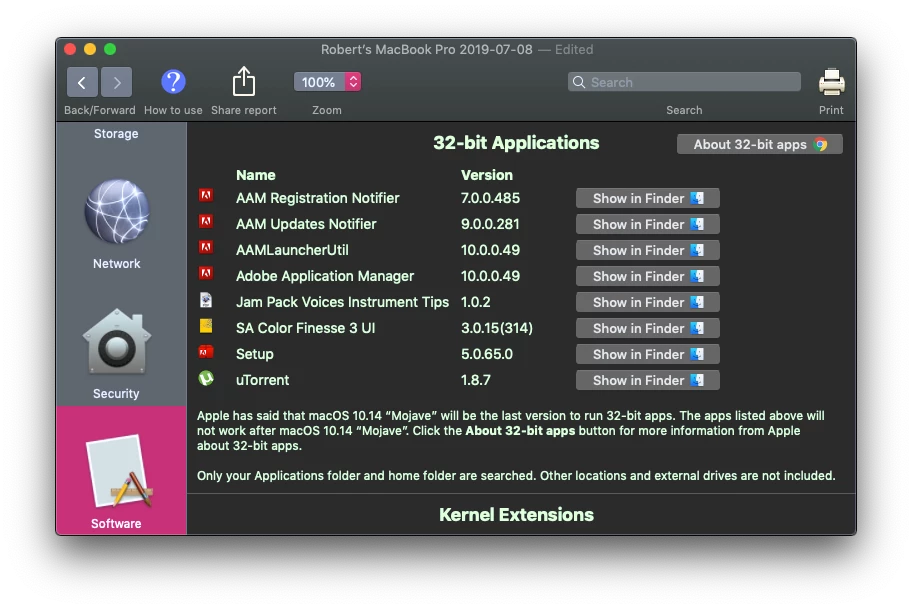
I am wondering when Adobe is going to take care of the 5 (32 bit) Apps that my CC 2018 Installation shows.. I Cannot upgrade to 2019 CC APPS since they run Much Slower on my 2012 MacBook Pro and require newer graphics cards. Mac Users Need 64 Bit versions of these Sub-Apps for "Catalina" this fall. Adobe is the the Only developer left WHO HAS NOT pushed 64 bit versions... I can only conclude That Adobe Has Intentionally done this in order to force us to upgrade to CC 2020 in order to use the New Mac OS this Fall 2019. My 2018 CC Apps will not Load if these Sub-Apps are not 64 bit. I will fight this with the NYS Attorney General and Better Business Bureau if I am stuck not being able to Use my 2018 CC with Mac OS Catalina, unless I get some answers and solutions. As a Disabled Veteran I cannot afford a new $2K Macbook Pro just to be able to continue what I have installed now. Any Ideas and suggestions are welcome.
    This topic has been closed for replies.
    Correct answer davescm

    Hi

    Without getting into a Mac vs PC debate, there is a principle which applies to any platform. Hardware, operating system and application software need to be in step. If you insist on upgrading any of those three without the others then at some point you will run into issues.

    Macawesome3278829  wrote

    I cannot afford a new $2K Macbook Pro just to be able to continue what I have installed now.

    If your system works now it will continue to work. What you cannot do is update just one part of it (in this case your operating system) and expect all the other parts to keep in step when using old hardware and applications.

    Dave

    8 replies

    D Fosse
    Community Expert
    Community Expert
    July 21, 2019

    Point taken. An apology is in order - I see that would easily be misunderstood.

    Actually my post was a tongue-in-cheek reply to Ussnorway, meaning a powerful desktop machine vs. a laptop of _any_ brand, which is still a laptop whether there's an apple or any other logo on the lid.

    The problem is I was using my phone, and replying directly doesn't work (hangs forever). Replying directly to the OP works, however, so that's what I did. Sorry about that.

    Participant
    January 3, 2020

    My CC programs are running fine on my 2012 MBP under 64-bit Catalina OS.  Can I delete the 32-bit Adobe related programs indicated under the 64-bit column with a big NO found by the GO64 app?  Thanks in advance.


    Nancy OShea
    Community Expert
    Community Expert
    January 3, 2020

    Use the latest Adobe CC Cleaner Tool to remove old Adobe apps.

    https://helpx.adobe.com/creative-cloud/kb/cc-cleaner-tool-installation-problems.html


    Nancy O'Shea— Product User & Community Expert
    Nancy OShea
    Community Expert
    Community Expert
    July 21, 2019

    DO NOT upgrade to Catalina until you are fully committed to 64-bit apps. 

    https://appletoolbox.com/psa-macos-catalina-will-kill-your-32-bit-apps-heres-what-you-should-know/

    Sorry if you don't like the opinions expressed here but filing a false abuse report against a well-respected forum contributor is not going to change the fact that Catalina is not for everyone.  Apple expects their customers to have the very latest hardware and software.  It's unthinkable to them that anyone would WANT to keep using a  7-10 year old anything.  That's why backwards compatibility is not in Apple's vocabulary. 

    Best advice, hold off on upgrading your OS until you're ready to buy a new computer. 

    Nancy O'Shea— Product User & Community Expert
    MacAwesome88
    Known Participant
    July 22, 2019

    I appreciated all the feedback I got on the subject and marked as answered... I am a "well-respected contributor" in my local area area, but would not tell my any of my clients to "get a real computer instead of a Toy." Many "Opinions" by Staff and "well-respected forum contributors" these days on community support forums like Adobe and Yes Apple too, come off as "Trump Tweets." Telling me to "go back to my country of origin" would have been less insulting to me but probably not to others who may have the same question.

    case closed as I move on with work and "helpful" feedback to my customers today. I accept the apology given above and no hard feelings. I get frustrated too and can come off as "less than helpful." Peace.

    RpH Media

    Syracuse, NY

    davescm
    Community Expert
    davescmCommunity ExpertCorrect answer
    Community Expert
    July 21, 2019

    Hi

    Without getting into a Mac vs PC debate, there is a principle which applies to any platform. Hardware, operating system and application software need to be in step. If you insist on upgrading any of those three without the others then at some point you will run into issues.

    Macawesome3278829  wrote

    I cannot afford a new $2K Macbook Pro just to be able to continue what I have installed now.

    If your system works now it will continue to work. What you cannot do is update just one part of it (in this case your operating system) and expect all the other parts to keep in step when using old hardware and applications.

    Dave

    D Fosse
    Community Expert
    Community Expert
    July 21, 2019

    Time to get a _decent_ computer instead of a toy laptop... ;-)

    Trevor.Dennis
    Community Expert
    Community Expert
    July 21, 2019

    From this Puget Systems article comparing Windows Intel and AMD systems with Mac

    https://www.pugetsystems.com/labs/articles/Photoshop-CC-2019-CPU-Roundup-Intel-vs-AMD-vs-Mac-1295/#Introduction

    Twice the price and less performance.  The numbers don't lie.

    A list of Mac vs Windows articles on Puget Systems (they all say the same thing).

    https://www.pugetsystems.com/all_articles.php?filter[]=Mac%20vs%20PC

    Ussnorway7605025
    Legend
    July 20, 2019

    time to move over to a Windows laptop... even a cheap ($500-$1000) one will blow most new Macbooks out of the water

    Daniel E Lane
    Inspiring
    July 21, 2019

    nope. and those cheap windows laptops will not last anywhere near as long as those MacBook Pro's

    gener7
    Community Expert
    Community Expert
    July 20, 2019

    AAM is for non CC Adobe apps. The CC Desktop manager is 64 bit and will work on Catalina

    Troubleshoot Adobe Application Manager download and installation issues

    But that begs the question, if you feel your Macbook is not up to running 2019, why upgrade to Catalina?

    I don't know how old your MBP is, mine is mid-2012

    Daniel E Lane
    Inspiring
    July 20, 2019

    Exactly as JJMack said. And if you seriously think going to the NYS Attorney General and the better business bureau will get you anywhere, feel free. But be prepared to be laughed at and told to go away. They have a lot more pressing things to deal with than someone who is mad because they want to upgrade an old computer to a new OS and their old software will not work right on it. Kind of a silly gripe in the first place. That OS will barely if at all run on that old of a computer, but you are unwilling to upgrade to the newest version of the Adobe software that you would also get at no additional cost from your subscription anyway. why are you all ready to upgrade one bit of software and not another?

    JJMack
    Community Expert
    Community Expert
    July 20, 2019

    Adobe does not update old version of their software that been their policy for as long as I remember.. If you are running an old mac rum an old Mac OS for that machine and a version of Photoshop that runs one that machine and OS...

    JJMack