


- Home
- Photoshop ecosystem
- Discussions
- Re: Adobe Camera Raw plugin for Photoshop 7
- Re: Adobe Camera Raw plugin for Photoshop 7
Adobe Camera Raw plugin for Photoshop 7

Copy link to clipboard
Copied
Is it still possible to purchase the Adobe Camera Raw plugin for Photoshop 7?
If so, can the plugin read *.raw files from an Olympus C-8080?



Explore related tutorials & articles
 10
Replies
10
10
Replies
10


Copy link to clipboard
Copied
No, that hasn't been available for many years.
Copy link to clipboard
Copied
Thanks Chris,
Looks like it's time to buy a RAW editor, upgrading to CS costs quite a bit...
I love Photoshop 7, it does everything I need but read RAW files, I had been
hoping to use Photoshop for all of my photo processing needs but it looks like
that won't be possible.
Thanks,
Mike
Date: Wed, 12 Oct 2011 23:10:48 -0600
From: forums@adobe.com
To: mscir@hotmail.com
Subject: Adobe Camera Raw plugin for Photoshop 7
Re: Adobe Camera Raw plugin for Photoshop 7
created by Chris Cox in Photoshop Windows - View the full discussion
No, that hasn't been available for many years.
Replies to this message go to everyone subscribed to this thread, not directly to the person who posted the message. To post a reply, either reply to this email or visit the message page:
To unsubscribe from this thread, please visit the message page at . In the Actions box on the right, click the Stop Email Notifications link.
Start a new discussion in Photoshop Windows by email or at Adobe Forums
For more information about maintaining your forum email notifications please go to http://forums.adobe.com/message/2936746#2936746.

Copy link to clipboard
Copied
These are the cameras listed as supported for camera raw 1.0 (the version for ps 7/pse 2) so it doesn't look like your camera is supported anyway.
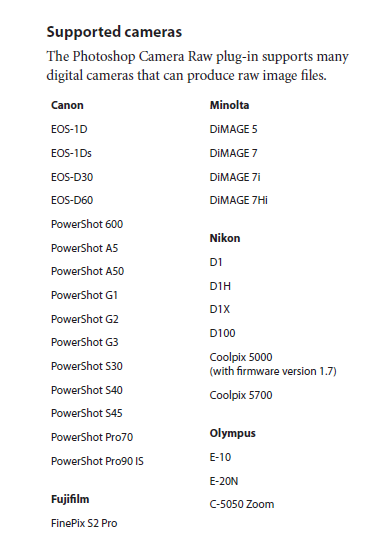
There are a few free and open source raw converters that work very well and most can be set up to open the files into photoshop, although
they are standalone converters not plugins.
ufraw:
raw therapee
http://rawtherapee.com/blog/features
MTSTUNER
Copy link to clipboard
Copied
Have you tried using the software for your camera? Looks like Olympus has one available for PS 6.0 and up.
C-8080 Software:
http://www.olympusamerica.com/cpg_section/software_results.asp?id=961&os=w
Instructions:
http://www.olympusamerica.com/files/oima_cckb/Rawplugin_instr.pdf
Copy link to clipboard
Copied
HI mattscreative,
Yes I've installed that but that imports .orf files and my camera saves .raw files.
Thanks,
Mike
Date: Wed, 12 Oct 2011 23:26:25 -0600
From: forums@adobe.com
To: mscir@hotmail.com
Subject: Adobe Camera Raw plugin for Photoshop 7
Re: Adobe Camera Raw plugin for Photoshop 7
created by mattscreative in Photoshop Windows - View the full discussion
Have you tried using the software for your camera? Looks like Olympus has one available for PS 6.0 and up. C-8080 Software:
http://www.olympusamerica.com/cpg_section/software_results.asp?id=961& os=w Instructions:http://www.olympusamerica.com/files/oima_cckb/Rawplugin_instr.pdf
Replies to this message go to everyone subscribed to this thread, not directly to the person who posted the message. To post a reply, either reply to this email or visit the message page:
To unsubscribe from this thread, please visit the message page at . In the Actions box on the right, click the Stop Email Notifications link.
Start a new discussion in Photoshop Windows by email or at Adobe Forums
For more information about maintaining your forum email notifications please go to http://forums.adobe.com/message/2936746#2936746.

Copy link to clipboard
Copied
Can you post a link to one of your non-ORF RAW files, using www.yousendit.com or www.dropbox.com or some other such service?
Copy link to clipboard
Copied
Apologies, I misread the manual, the RAW files are stored as ORF not RAW as I originally posted. The plugin from Olympus does import and adjust the ORF files into Photoshop 7.
So for now the issue is resolved. I read so many good things about CS I think I may upgrade anyway, the RAW interface looks better, not to mention all of the other features.
Thanks to everyone who posted, the response in this forum is really impressive!
Mike
Date: Wed, 12 Oct 2011 23:55:00 -0600
From: forums@adobe.com
To: mscir@hotmail.com
Subject: Adobe Camera Raw plugin for Photoshop 7
Re: Adobe Camera Raw plugin for Photoshop 7
created by ssprengel in Photoshop Windows - View the full discussion
Can you post a link to one of your non-ORF RAW files, using www.yousendit.com or www.dropbox.com or some other such service?
Replies to this message go to everyone subscribed to this thread, not directly to the person who posted the message. To post a reply, either reply to this email or visit the message page:
To unsubscribe from this thread, please visit the message page at . In the Actions box on the right, click the Stop Email Notifications link.
Start a new discussion in Photoshop Windows by email or at Adobe Forums
For more information about maintaining your forum email notifications please go to http://forums.adobe.com/message/2936746#2936746.

Copy link to clipboard
Copied
How do I mark the question Answered so the discussion is closed and the issue is marked Resolved?

Copy link to clipboard
Copied
Was there ever a Camera Raw that worked with Photoshop 7? I never had 7, so I don't know. I thought Camera Raw came out initially with Photoshop CS.
You don't get every last Camera Raw feature with it, but a cost conscious alternative to upgrading to Photoshop CS5.1 could be to buy Photoshop Elements 10. You could do your conversions there then the rest of your editing in Photoshop 7, though arguably the current version of Elements may actually be more powerful than Photoshop 7.0, which didn't even have layered editing on 16 bit images (a limitation still in Elements).
-Noel
Copy link to clipboard
Copied
The camera raw version is one higher than the CS version (CS5 has ACR6) so PS7 had ACR 1.x, but ACR 1.x didn’t support the DNG spec from what I remember.


Find more inspiration, events, and resources on the new Adobe Community
Explore Now
 AdChoices