
Participant
May 23, 2020
Answered

Adobe Photoshop 2020 Rectangle Marquee Tool

  • May 23, 2020
  • 3 replies
  • 2428 views

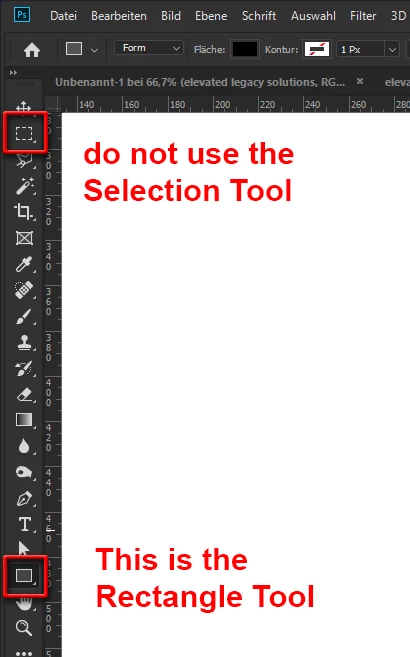
So i was following a tutorial on how to make twitch overlays and everything was going well, including the rectangle tool, until it wasn't. So previously, with the rectangle tool i'd just select anywhere on my image and it would let me input a size and it would create it's own overlay, now it doesn't. I've googled and followed a lot of youtube videos and nothing has helped. I even uninstalled and reinstalled. For some reason my rectangle tool no longer wants to make it's own overlay and doesn't allow me to input sizes.

Someone help please!
This topic has been closed for replies.
Correct answer pixxxelschubser

A picture shows more than 1000 words:

3 replies

pixxxelschubser
Community Expert
pixxxelschubserCommunity ExpertCorrect answer
Community Expert
May 23, 2020

A picture shows more than 1000 words:

KukkidoAuthor
Participant
May 23, 2020

Thank you so much!! xD 

pixxxelschubser
Community Expert
Community Expert
May 23, 2020

Again. You try to use the "wrong" tool. Take the "other rectangle" from your tool bar.

😉

pixxxelschubser
Community Expert
Community Expert
May 23, 2020

Your first screenshot shows not the Rectangle Tool. It shows the Marquee Selection Tool. This tool doesn't have a dialog for a size input.


Your second and third screenshot on the other hand show the Rectangle Tool (in Shape mode).

KukkidoAuthor
Participant
May 23, 2020

So the first screenshot is me after it's not in shape mode(from what you're saying) and the other 2 images were what it used to do. So i'm confused because i can no longer get it there and i havnt messed with it for it to change from shape mode to otherwise. How do i get it in shape mode? Didn't know that was a thing, please and thank you!

jane-e
Community Expert
Community Expert
May 23, 2020

I've circled the two tools. You are on the Marquee tool (at the top) and the tool you want it the Rectangle tool (near the bottom.