
2Charlie
Inspiring
November 26, 2024
Question

Adobe Photoshop 2025 quit unexpectedly

  • November 26, 2024
  • 5 replies
  • 3681 views

Photoshop version 26.0.1 constantly crashed whenever I use the Remove tool. I tried both with/out the AI on and it crashes every 1 or two minutes of using the Remove tool.

My system specs.


  Chip: Apple M1 Max

  Total Number of Cores: 10 (8 performance and 2 efficiency)

  Memory: 64 GB

 OS version: Sequoia 15.1.1


Error:
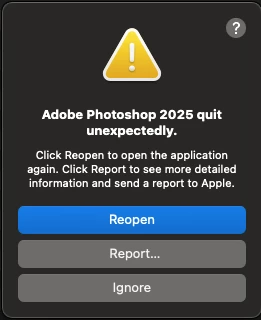
Exception Type: EXC_BAD_ACCESS (SIGSEGV)
Exception Codes: KERN_INVALID_ADDRESS at 0x00000000000001e0
Exception Codes: 0x0000000000000001, 0x00000000000001e0

Termination Reason: Namespace SIGNAL, Code 11 Segmentation fault: 11
Terminating Process: exc handler [4601]

VM Region Info: 0x1e0 is not in any region. Bytes before following region: 4299947552
REGION TYPE START - END [ VSIZE] PRT/MAX SHRMOD REGION DETAIL
UNUSED SPACE AT START
--->
__TEXT 1004c0000-107cbc000 [120.0M] r-x/r-x SM=COW /Applications/Adobe Photoshop 2025/Adobe Photoshop 2025.app/Contents/MacOS/Adobe Photoshop 2025


My performance specs:
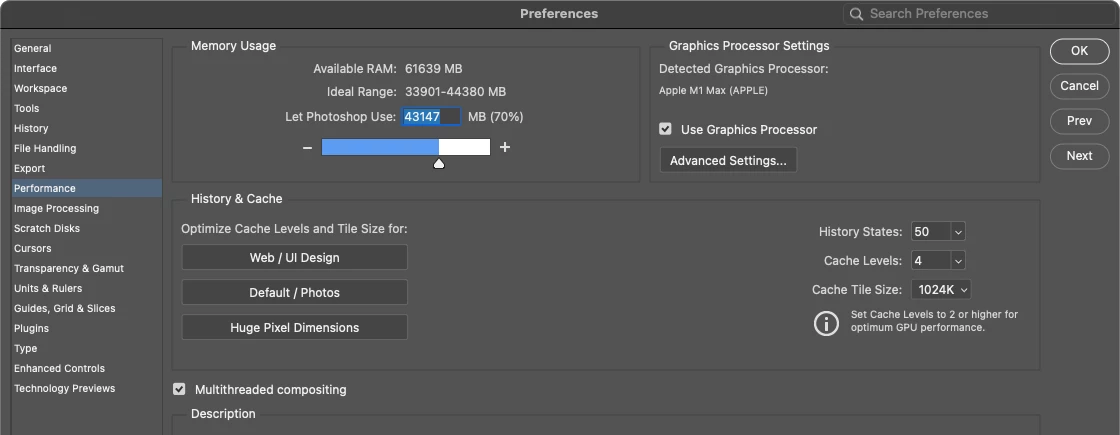
Any help is much aprpeciated.

5 replies

gener7
Community Expert
Community Expert
March 2, 2025

This is  why I shut off Automatic Updates in my Creative Cloud Desktop Preferences.


Participant
March 2, 2025

Iw got this issue just because my PS version was updating ... tried to uninstall, nothing ... went on to Adobe web page to see for update or somnething and thats when i noticed update progres. waited and once update finished launched PS withouit a problem .. 

Participating Frequently
November 28, 2024

Got the same thing, working with the new smart remove set to Auto, M1 Ultra Studio Mac, 64 GB / 4 TB, my setting give PS more RAM than yours, but basically that shouldn't be the issue. Seems a bit random, sometimes the brush works as it should, sometimes the image crashes (16 bit TIFFs) unexpected. I have set it to only remove stuff when I hit enter to reduce the crashing and that at least eased the frequency of PS quitting. 

2Charlie
2CharlieAuthor
Inspiring
November 28, 2024
quote

Got the same thing, working with the new smart remove set to Auto, M1 Ultra Studio Mac, 64 GB / 4 TB, my setting give PS more RAM than yours, but basically that shouldn't be the issue. Seems a bit random, sometimes the brush works as it should, sometimes the image crashes (16 bit TIFFs) unexpected. I have set it to only remove stuff when I hit enter to reduce the crashing and that at least eased the frequency of PS quitting. 


By @HD Schellnack

Yes, that is correct. It seems random. I will diffinitely try removing the stuff when hitting the enter key instead of every stroke of the Remove tool. I think this may reduce amount of crashes. Thank you!

Mohit Goyal
Community Manager
Community Manager
November 26, 2024

Hi there,


Could you submit the crash report to Adobe along with your email address? Crash report can help us identify the major cause of this crash.


Thanks,

Mohit

2Charlie
2CharlieAuthor
Inspiring
November 27, 2024

I don't know if what I've submitted goes to Adobe or Apple but when it asked if I want to submit, I did.

AlanGilbertson
Community Expert
Community Expert
November 26, 2024

Great report! It would be awesome if everyone were so meticulous about giving details. Unfortunately, this looks very much like a bug in the code. Here's what Apple's developer support says about this kind of error:

"A crash due to a memory access issue occurs when an app uses memory in an unexpected way. Memory access problems have numerous causes, such as dereferencing a pointer to an invalid memory address, writing to read-only memory, or jumping to an instruction at an invalid address. These crashes are most often identified by the EXC_BAD_ACCESS (SIGSEGV) or EXC_BAD_ACCESS (SIGBUS) exceptions in the crash report."

I'm passing this along to Adobe, but in the meantime the only suggestions I can offer are to click that "Report" button so Apple gets the info, and avoid using the Remove tool while a fix is worked out.

2Charlie
2CharlieAuthor
Inspiring
November 26, 2024

Thank you for trying to help. I did send the report to Apple. I'm not sure if it has something to do with MacOS 15.1.1. I don't remember having this particular issue with I have not updated to this latest version. If this issue continues to hinder my work, I may consider rolling back that version and see if makes any difference.

AlanGilbertson
Community Expert
Community Expert
November 26, 2024

A MacOS update isn't out of the question, given the number of reports of problems with Mac versions over the last year or two. The information you captured does point to Photoshop. I got word that your information has been passed to the engineering team to investigate.


The other thread on this issue is short on details, but one individual does mention Sequoia. I'm not on the Mac platform, so most of what I know is based on colleagues' and friends' experiences, but they tell me that OS problems have become a lot more common in the last couple of years.