

sbnnaruka
Participant
June 27, 2014
Answered

adobe photoshop cc 2014 has stopped working in windows 8

  • June 27, 2014
  • 9 replies
  • 15617 views

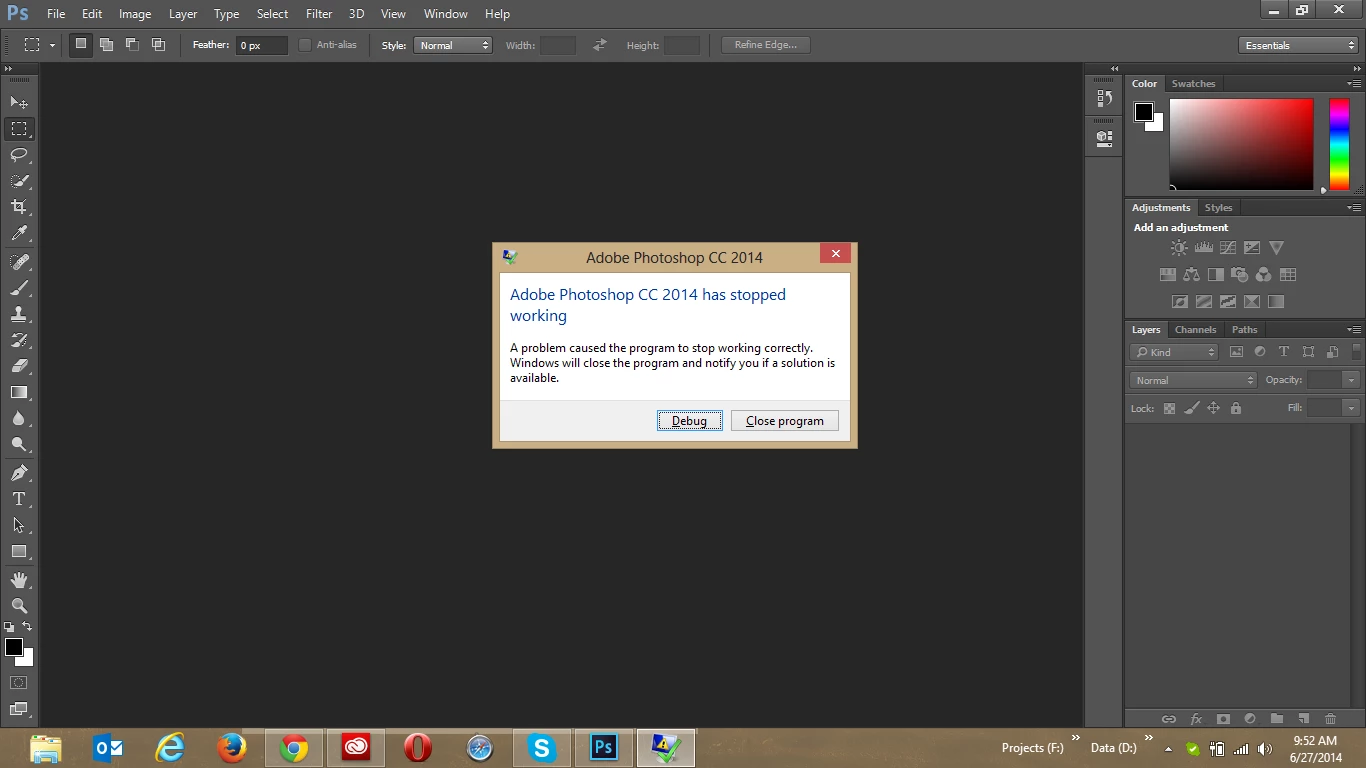
I am facing problem with the Photoshop 2014 release. It's getting stopped just after the start. Attaching a screenshot for the same.

Thanks

Bhupendra Singh
    This topic has been closed for replies.
    Correct answer Chris Cox

    And as you can see in the crash report, the problem is with your Intel video card driver.  Update the driver from Intel's website.

    9 replies

    Scooter_new_zealand
    Participant
    September 16, 2015

    The workaround solution for our university labs computers was the following:

    Before Adobe Photoshop CC 2014 crashes on startup

    Press Ctrl and G (To access preferences before it crashes) then under Adobe Photoshop select |Edit | Preferences | Plugins| uncheck the 'Load Extension Panels' and Save setting on exit.

    This seems to prevents the crash from reoccurring on startup.

    Once we confirm this resolved the problem. We then updated the Adobe Photoshop file on all profiles to disable 'load extension panels'

    \AppData\Roaming\Adobe\Adobe Photoshop CC 2014\Adobe Photoshop CC 2014 Settings\Adobe Photoshop CC 2014 Prefs.psp

    Participant
    July 11, 2015

    I have windows 7 home premium and removed the sniffer file and its all working fine now. Thanks.

    NewAgeCupid
    Participant
    June 18, 2015

    Hi, I have a Win8.1 64 bit and after my Creative Cloud updated Photoshop CC 2015 yesterday, my Photoshop keeps crashing after I attempt to close a image file that I opened and modified.  Any assistance with how to debug this issue is greatly appreciated.

    Faulting application name: Photoshop.exe, version: 16.0.0.88, time stamp: 0x55681d39

    Faulting module name: Photoshop.exe, version: 16.0.0.88, time stamp: 0x55681d39

    Exception code: 0xc0000005

    Fault offset: 0x0000000004869ea6

    Faulting process id: 0xe94

    Faulting application start time: 0x01d0a9edb0540bbb

    Faulting application path: C:\Program Files\Adobe\Adobe Photoshop CC 2015\Photoshop.exe

    Faulting module path: C:\Program Files\Adobe\Adobe Photoshop CC 2015\Photoshop.exe

    Report Id: 212205cd-15e1-11e5-833e-f816542ac74e

    Faulting package full name:

    Faulting package-relative application ID:

    Em-query
    Participant
    June 16, 2015

    HI, I have windows 7 64 bit and the other day updated to the current photoshop cc version

    And now I get the stopped working error and all sorts of weird stuff going on. Really can't use the program now where before the update things were fine. And upon exit or save get the stopped working error and have to shut down loosing any changes/work. Here is the log from the last time and decided to search the web and landed on the thread. So, any suggestions. Thanks!

    Problem signature:

      Problem Event Name:    APPCRASH

      Application Name:    Photoshop.exe

      Application Version:    15.2.2.310

      Application Timestamp:    5480338c

      Fault Module Name:    ntdll.dll

      Fault Module Version:    6.1.7601.18247

      Fault Module Timestamp:    521eaf24

      Exception Code:    c0000005

      Exception Offset:    0000000000053e98

      OS Version:    6.1.7601.2.1.0.768.3

      Locale ID:    1033

    studiogood
    Participant
    August 19, 2014

    Looks like all the original people on this post have found a solution to this problem.

    For those (like me) who came here looking for some guidance, here is what I did.

    I contacted Adobe via the online chat option and explained what was happening when I opened Photoshop CC 2014. He had me go into C:/Program Files/Adobe/Adobe Photoshop CC 2014/ and move the file called 'sniffer' to the desktop. Once I did this the program started up perfectly without an issue.

    Hope this helps someone.

    Chris Cox
    Legend
    August 19, 2014

    That just means that you are not testing the GPU driver for problems before using the GPU, which means that your video card driver can still crash.

    The solution is still to update your video card driver to fix the bugs in the video card driver.

    And yes, some other users have problems with third party plugins that they installed, and need to update those third party plugins. (different crash report means a different cause - they're not all the same)

    Participant
    August 15, 2014

    Uninstalling NIK fixed it for me.

    Participant
    June 29, 2014

    getting the same error - here's the data from the Application Event log:

    Faulting application name: Photoshop.exe, version: 15.0.0.58, time stamp: 0x536b438e

    Faulting module name: igdfcl64.dll, version: 8.1.0.2875, time stamp: 0x507eff6d

    Exception code: 0xc0000005

    Fault offset: 0x0000000000809283

    Faulting process id: 0x2448

    Faulting application start time: 0x01cf932c23e276af

    Faulting application path: C:\Program Files\Adobe\Adobe Photoshop CC 2014\Photoshop.exe

    Faulting module path: C:\WINDOWS\SYSTEM32\igdfcl64.dll

    Report Id: 63f3bc87-ff1f-11e3-bf15-b4b6762260e0

    Faulting package full name:

    Faulting package-relative application ID:

    Chris Cox
    Chris CoxCorrect answer
    Legend
    June 29, 2014

    And as you can see in the crash report, the problem is with your Intel video card driver.  Update the driver from Intel's website.

    Participant
    June 29, 2014

    updating the video driver fixed the problem :-)

    Chris Cox
    Legend
    June 27, 2014

    Check the Windows System Event Viewer for the details of the crash, most importantly the name of the faulting module.

    The most common cause is bugs in video card drivers.

    Participating Frequently
    June 27, 2014

    If you have an old version of Google's NIK collection installed as a plugin it will cause the error. Go to Google and download an updated version of NIK collection.

    I had to do this and not had a problem since.

    HDGirl1971
    Participant
    June 27, 2014

    I am having the same issue  :-(
