
Participating Frequently
September 16, 2020
Question

adobe printing problems with new epson printer

  • September 16, 2020
  • 5 replies
  • 4331 views

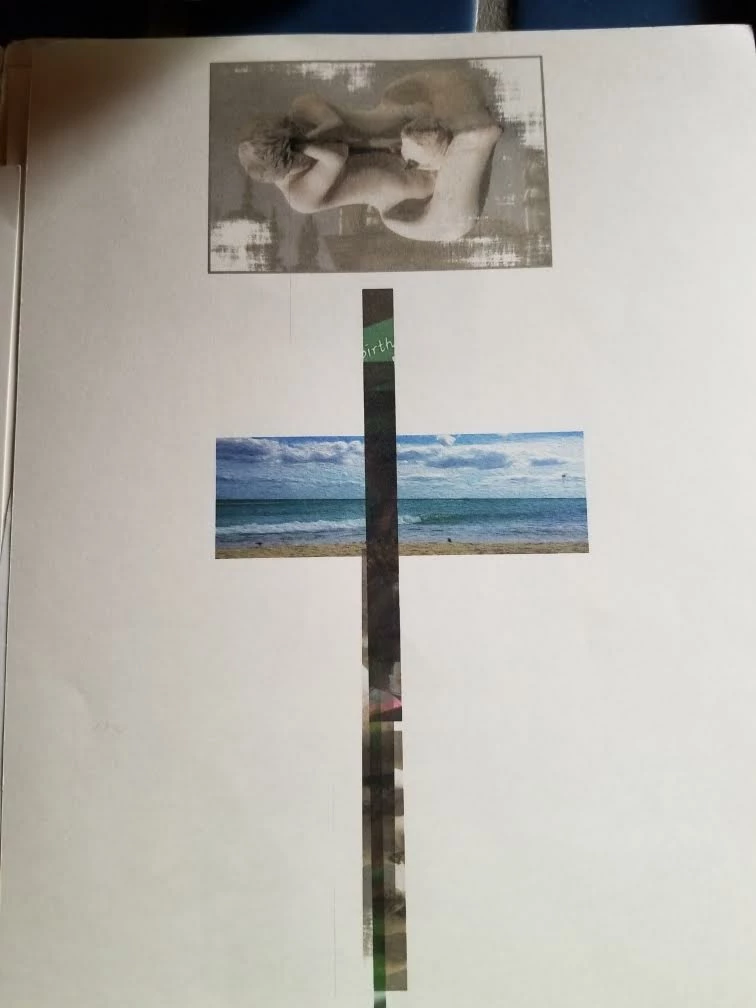
purchased an epson sc-p700 a few months ago.  printed well to start, then began have problems. still using starter cartridges. after printing an image, i went to print another and found the successive images were only a vertical line rather than the entire photo.  same for different size papers and finishes when printed with adobe photoshop cc.  rebooted computer and then printed from different programs like photos or epson print or simply windows.  no problems with any of the prints with different sizes or finishes of paper.  determined it was a photoshop problem.  reinstalled drivers for epson printer, several times. reinstalled photoshop cc on my windows 10 computer. printed ok for a short while then the problem returned.  contacted adobe support when i got error message "saved printer information is not compatiblewith the version of ps or default printer no longer available". was guided by tech to change preference for ps and keep old preference in a folder.  contacted adobe support multiple times.  no help. contacted epson who concluded with above testing it was a software problem. no exchange of printer.  i can't use this printer realiably and know i can't be the only one having this issue.  any suggestions.  frustration galore.  thx
This topic has been closed for replies.

5 replies

KR Seals
Community Expert
Community Expert
August 4, 2022

@davidwhitmer   Post the information request in this guidance. 

Have you uninstalled and reinstalled the printer in your OS?

Ken Seals - Nikon Z 9, Z 8, 14mm-800mm. Computer Win 11 Pro, I7-14700K, 64GB, RTX3070TI. Travel machine: 2021 MacBook Pro M1 MAX 64GB. All Adobe apps.
Participating Frequently
August 4, 2022

Hi Kenneth, thank you for responding!

I have uninstalled and reinstalled the printer numerous times, both with the initial P700 and the replacement.

Regarding the above information suggestions ...

I have macOS 12.2; there are no error messages; it looks like I have plenty of disk space (see image).

Any ideas would be appreciated, thank you!

David

NB, colourmanagement
Community Expert
Community Expert
August 7, 2022

Epson / Mac: Add printer, AirPrint issue, here are some notes about Apples built in Gimp Print / Gutenprint driver. Best avoided.  It can print quite differently from the manufacturer's own driver software. 


If you're using a mac this may help?

Does the print driver look different? some options have changed?

Are media names the same as previous drivers you've used, e.g.. is 'Premium Luster Photo Paper' mentioned or are the media types just simplified names like matte or gloss? 


You'll be aware, I'm sure, that the selected media name in the driver must match the selection made when printing ICC profiling patches, (so the ICC profile and media type selection are linked) . BUT is the media name selected previously actually there in the list?

IF the media names listed differ (and have been simplified) then you are perhaps inadvertently using the Gimp/ Gutenprint driver rather than Epson’s own. It's not just a matter of installing it you have to select it too. I do know it's very important to use Epson's own driver software. I tripped over this myself on a client site, the driver looked different and I put it down to an OSX update imposed style - took a while to work that one out.


Here's an example of what I'd expect to see in an Epson driver for media name options:

Can you access print settings in an application other than Photoshop, try Preview?

If not, a thorough purge may be in order, perhaps install drivers (downloaded from Epson) again: 


1. Delete all instances of Epson printers from 

System Preferences / Printers & Scanners -or- System Preferences>Print & Fax, whichever you have.

2. Then go to /Library/Printers and trash the whole Epson folder.

3. Delete the Epson LFP Remote Panel (IF you are using that utility).

4. Then go to Epson online and download the printer drivers yourself.

Do not let the Mac install the printer driver for you.


There’s one more tripwire - in System Preferences / Printers  - - - , when adding the connected printer

[i.e. click the padlock, enter your password and click the “+” button]


- watch out for the “Use" selection

- I recommend you do not select "Airprint" there under "use", but, rather, manually set "use” to the printer name, which will then call on the manufacturer’s own software rather than the default Apple driver (that’s based on Gimp Print, which misses out some printing options such as specific manufacturers media names). 


I hope this helps neil barstow, colourmanagement net :: adobe forum volunteer google me "neil barstow colourmanagement" for lots of free articles on colour management


Participating Frequently
August 4, 2022
quote

purchased an epson sc-p700 a few months ago.  printed well to start, then began have problems. still using starter cartridges. after printing an image, i went to print another and found the successive images were only a vertical line rather than the entire photo.  same for different size papers and finishes when printed with adobe photoshop cc.  rebooted computer and then printed from different programs like photos or epson print or simply windows.  no problems with any of the prints with different sizes or finishes of paper.  determined it was a photoshop problem.  reinstalled drivers for epson printer, several times. reinstalled photoshop cc on my windows 10 computer. printed ok for a short while then the problem returned.  contacted adobe support when i got error message "saved printer information is not compatiblewith the version of ps or default printer no longer available". was guided by tech to change preference for ps and keep old preference in a folder.  contacted adobe support multiple times.  no help. contacted epson who concluded with above testing it was a software problem. no exchange of printer.  i can't use this printer realiably and know i can't be the only one having this issue.  any suggestions.  frustration galore.  thx


By @defaultv83ztse81hil

I also got issue while i was doing my research and want to print it out from my website. But from your thread i hope i can also find answer.

Participating Frequently
August 4, 2022

Hi, did you ever resolve this?  I have a very similar problem - images are either printed as bars (as in the picture you posted), or - more often - not printing at all.  I have updated PS and LR, and generally print from PS.  I just got a brand new Epson P700 and it printed just fine for a day but then the above issue started happening.  I went through a long grueling conversation with Epson tech support and they eventually sent me a new printer.  Unfortunately, the printer wasn't the issue - incomplete or nonexistent printing still occurs with the new printer.  Two things to note:  one, the printhead moves back and forth as if printing (though no ink appears on the paper); and two, nozzle checks, performed from either the printer console or my computer, work just fine.


Participating Frequently
August 4, 2022

Oh, I should add that this occurs whether printing from PS or LC or even Epson Print Layout; also it occurs if I print a .tif, a .jpg, or a raw file straight from the PS or LC.

TheDigitalDog
Inspiring
August 4, 2022

@davidwhitmer wrote:

Oh, I should add that this occurs whether printing from PS or LC or even Epson Print Layout; also it occurs if I print a .tif, a .jpg, or a raw file straight from the PS or LC.


Mac? Then maybe do the Epson Enema and install both drivers (from Epson) again: 

 1. Delete all instances of Epson printers from System Preferences>Print & Fax.


 2. Then go to /Library/Printers and toss the whole Epson folder.


 3. Toss LFP Remote Panel (IF you are using this utility for your printer).


 4. Then reinstall drivers from Epson and never Apple.


NOTE: IF you have more than one Epson printer, you need to install the driver in the order of their release! Older then newer or you run into issues (eg, install 4800 before you’d install 3880).


Author “Color Management for Photographers" & "Photoshop CC Color Management/pluralsight"
Derek Cross
Community Expert
Community Expert
September 16, 2020

I think Digital Dog means post the screen capture images on here, so he can see what the issue might be, he's an expert in these matters.

Participating Frequently
September 16, 2020
thanks so much for your help. hope this is the info you need. otherwise,
let me know.

Jan Mayer
TheDigitalDog
Inspiring
September 16, 2020

Make a screen capture of the Photoshop Print dialog just before you click on that Print button. 

And a screen capture of the Epson driver. 

Author “Color Management for Photographers" & "Photoshop CC Color Management/pluralsight"