
Inspiring
September 27, 2022
Answered

Adobe programs being clueless about what directory I am working on

  • September 27, 2022
  • 1 reply
  • 304 views

Every time I open some directory inside any Adobe app, it always shows me last location this feature of this app worked on. Open, save as, save for web, import etc. 
Example - I work on my project with Photoshop, I open files from my project directory and place images from there and when I want to save for web it suggests me some old projects directory where last time something was saved. Is there any solution to make apps more intelligent. If I work on one project with 3 different apps even then other apps could look up what directory the action is going on, not remind me of some directory I worked on months ago.

Did not find any other general discussion section to put it.
This topic has been closed for replies.
Correct answer D Fosse

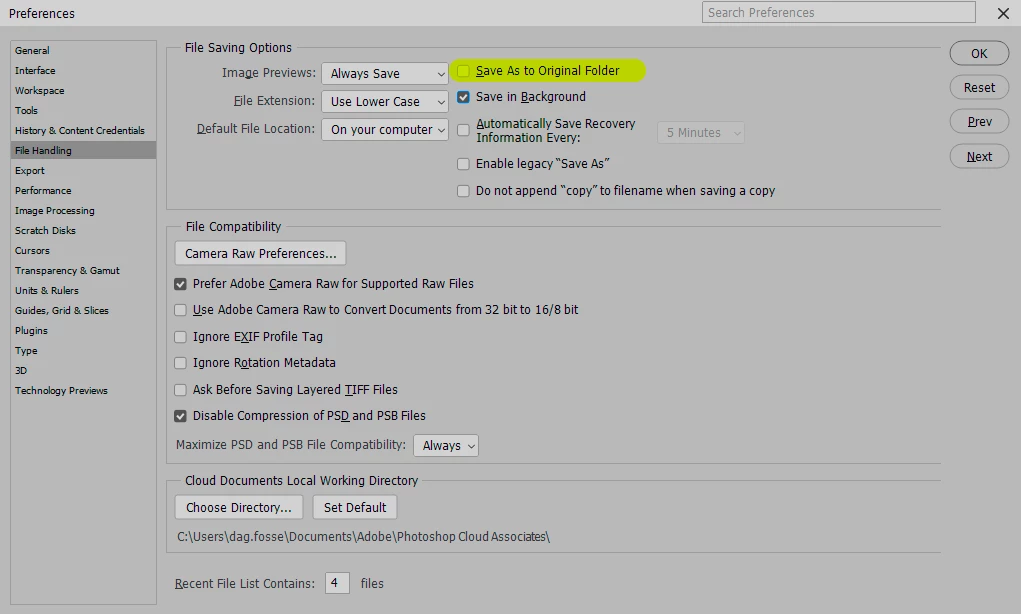
If you think about it, there are only two ways this can work: either save back to the original folder, or save to the folder you last saved in. Bot options can be selected in Photoshop Preferences:


A third option is a fixed folder, but that can easily be set up as an action by the user, so there's no need for that. And in any case there is a fallback default: the system folder for pictures.


For Save For Web and Export, last location is the only one that really makes sense. Saving back to original folder has a very high risk of overwriting an original jpeg or png. So they do not follow the PS pref, but always save to last location - or default pictures folder.

1 reply

D Fosse
Community Expert
D FosseCommunity ExpertCorrect answer
Community Expert
September 27, 2022

If you think about it, there are only two ways this can work: either save back to the original folder, or save to the folder you last saved in. Bot options can be selected in Photoshop Preferences:


A third option is a fixed folder, but that can easily be set up as an action by the user, so there's no need for that. And in any case there is a fallback default: the system folder for pictures.


For Save For Web and Export, last location is the only one that really makes sense. Saving back to original folder has a very high risk of overwriting an original jpeg or png. So they do not follow the PS pref, but always save to last location - or default pictures folder.

SorontarAuthor
Inspiring
September 27, 2022

Thanks, that's something. 

Earth Oliver
Legend
September 27, 2022

that's more than "something", it's the solution and has been in prefs for years and years.