
Participant
March 8, 2025
Answered

Adobe Super Resolution 2x upscale directly to TIFF format?

  • March 8, 2025
  • 2 replies
  • 435 views

Is there a solution to have Lightroom or Bridge (using Adobe Camera Raw) perform Adobe Super Resolution 2x upscale directly to TIFF format? The way it works now, when I use "Enhance 2x," the files don't appear upscaled when I load them into other editors, Topaz programs, XnView, and others. It unnecessarily complicates my workflow to have to enhance to DNG and then convert that DNG to TIFF in Adobe Bridge to get the upscaled image. Thanks
Correct answer D Fosse

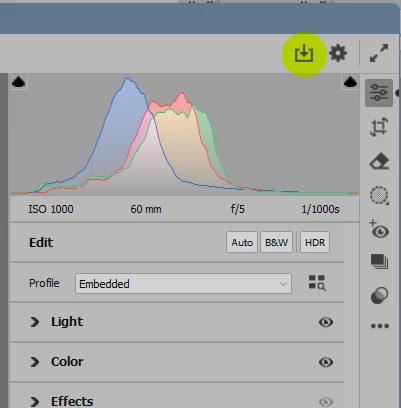
You have to output the file from ACR whatever you do, super resolution is no different. It's just a metadata setting. ACR never bakes anything into the file itself, that's the whole point of a parametric editor.


ACR treats TIFF/jpeg the same way as raw files. And raw files are strictly read-only, they can never be modified.


You can save out a rendered copy, with edits baked in, directly from ACR.

2 replies

Conrad_C
Community Expert
Community Expert
March 8, 2025

D Fosse is correct, what is happening is 100% consistent with how ACR/Lightroom has always worked with every format since the beginning. Edits are parametric, original pixels are never altered, if you want an image with the edits rendered to pixels you must export a copy.


For example, if you open a raw file in ACR and change Exposure, no other software will see that change…until you export a rendered copy.


If you set ACR to edit JPEG and TIFF files, and you open them and make any type of edit, once again, no other software will see that edit…until you export an rendered copy.


So, if you open a image and apply Super Resolution, you know the drill…no other software will see that edit until you export an rendered copy.

D Fosse
Community Expert
D FosseCommunity ExpertCorrect answer
Community Expert
March 8, 2025

You have to output the file from ACR whatever you do, super resolution is no different. It's just a metadata setting. ACR never bakes anything into the file itself, that's the whole point of a parametric editor.


ACR treats TIFF/jpeg the same way as raw files. And raw files are strictly read-only, they can never be modified.


You can save out a rendered copy, with edits baked in, directly from ACR.