
Participant
August 11, 2025
Answered

Advice on best way to recolour this image

  • August 11, 2025
  • 3 replies
  • 337 views

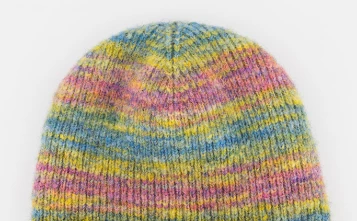
Looking to recolour this knited beanie, into three new shades, however it's proving to be beyond my Photoshop abilities. Any recomendations on how best to replace each colour, would much appreciated. 
Correct answer Derek Cross

One simple way would be to use the Hue/Saturation sliders found under the Image > Adjustments tabs.

For more detailed changes check out the Camera Raw Filter, found under the Filter tab.

3 replies

shannoncrooks
Participant
August 18, 2025

If you’re wanting to recolour the beanie into multiple shades, one effective way (that gives you more precision than global Hue/Saturation) is to create a Hue/Saturation adjustment layer with a mask. That way, you can paint on the mask to isolate only the beanie area and then tweak each colour separately. Another option is to use Select > Color Range to grab just the knitted areas you want to change, then apply a Solid Color Fill Layer set to Color or Overlay blend mode. This keeps the fabric texture intact while letting you try out different shades quickly. If you need three completely different colour versions (say, blue, red, green), duplicating the layer and applying different adjustment layers to each copy works well—you can then export each version individually.

shannoncrooks
Participant
September 23, 2025

For more inspiration on creative design touches, you can also check out this resource. If you need three completely different colour versions (say, blue, red, green), duplicating the layer and applying different adjustment layers to each copy works well—you can then export each version individually.


Leslie Moak Murray
Community Expert
Community Expert
August 11, 2025

I came here to say what @Derek Cross said, but I'll add that the Color Balance sliders might also be of use. Go Image>Adjustments>Color Balance

Leslie Moak Murray
Community Expert
Community Expert
August 11, 2025

Just a couple of possibilities:

Derek Cross
Community Expert
Derek CrossCommunity ExpertCorrect answer
Community Expert
August 11, 2025

One simple way would be to use the Hue/Saturation sliders found under the Image > Adjustments tabs.

For more detailed changes check out the Camera Raw Filter, found under the Filter tab.