rathins54482005
Participant
March 23, 2023
Answered

after Photoshop latest update screen starts blinking

  • March 23, 2023
  • 8 replies
  • 1451 views

After latest update when i open any file in Photoshop screen start blinking. I install 24.2.3 (older version) it works perfect.

This topic has been closed for replies.
Correct answer Ged_Traynor

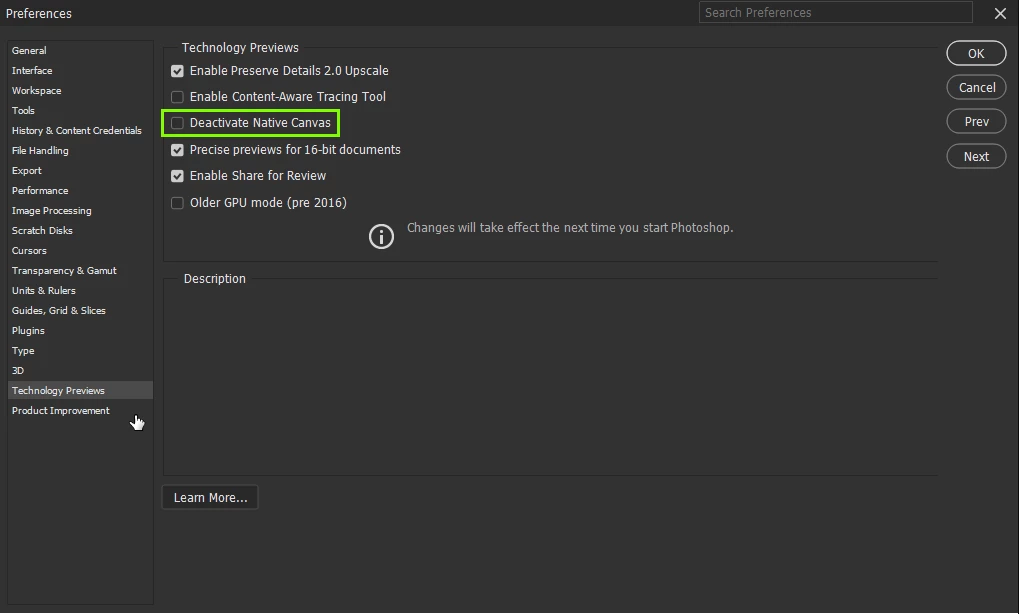
@rathins54482005 enable this option in preferences and restart Photoshop

8 replies

Participant
March 25, 2023

Thanks! I works and you saved my day ❤

Participant
March 25, 2023

This worked for me too--running Windows 10 64-bit on an older laptop, and never had an issue with PS in two decades.  NEFs opened fine in raw but not in PS (alarming flashing screen), and then I found I couldn't open jpegs or anything else.  I thought my 2015 vintage GPU might be the cause given the system requirements, but Ged_Traynor's suggestion worked for me just fine.  Thanks!

Participant
March 25, 2023

Thanks, it works.

javiera8212137
Participant
March 25, 2023

tks. It works for me!

DFru
Participant
March 23, 2023

Thanks!! T.hat fixed it


Ged_Traynor
Community Expert
Community Expert
March 23, 2023

@rathins54482005 go to Edit > Preferences > Technology Previews, remember to restart Photoshop after making the change!

Participant
March 27, 2023

Many thanks! Up and running again....;)


Participant
March 23, 2023

Thanks, it worked for my setup.

rathins54482005
Participant
March 23, 2023
I can't find this in preferences.
Can you share screenshot of Preference manu where i can find this
jane-e
Community Expert
Community Expert
March 25, 2023
I can't find this in preferences.Can you share screenshot of Preference manu where i can find this
By @rathins54482005


macOS: Photoshop menu > Preferences

Windows OS: Edit > Preferences


Then look at Ged's screenshot. He is in the Technology Previews tab.


Jane


Ged_Traynor
Community Expert
Ged_TraynorCommunity ExpertCorrect answer
Community Expert
March 23, 2023

@rathins54482005 enable this option in preferences and restart Photoshop