
Known Participant
October 23, 2018
Answered

After Updating to Photoshop v20.0 it now crawls

  • October 23, 2018
  • 2 replies
  • 1058 views

After Updating to Photoshop v20.0 it now crawls, opening files, saving files, transformations, cropping files, almost anything makes Photoshop come to a crawl. I use photoshop professionally so I had to revert to Photoshop 19.6 and everything works fine. Let's go photoshop, fix it!
    This topic has been closed for replies.
    Correct answer Mike_Gondek10189183

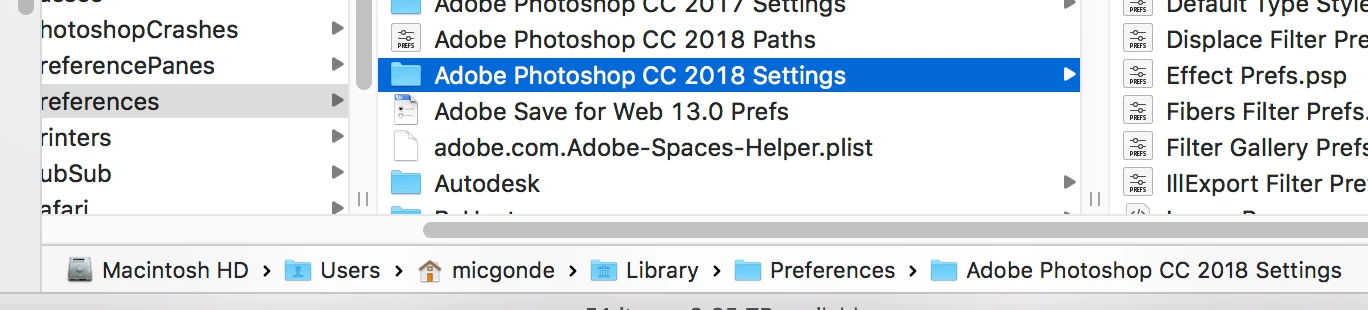
    Hi Mike, there is no Adobe CS2019 Settings folder in this location to rename... HD\Users\(user name)\Library\Preferences\Adobe Photoshop CS2019 Settings.


    Hi Mountart,

    I  was incorrect in calling this CS as in the past should be CC. Sorry I do not have CS2019 at work, but this is the traditional location for many versions.

    Search on you drive for "Adobe Photoshop CC 2019 Settings" folder or just "CC 2019" incase they renamed folder slightly.

    2 replies

    Known Participant
    March 16, 2022

    It just crawls. All the time. For no reason. you'd think after 30+ years and billions in revenue this wouldnt be an issue.


    Mike_Gondek10189183
    Community Expert
    Community Expert
    October 23, 2018

    What OS are you on?

    When upgrading to CC2019 click on advanced options and uncheck remove old versions.

    Does both cc2018 & c2019 run slow. Then lets l reset the OOBE in step 5.

    Adobe Creative Cloud desktop app doesn't open or shows a spinning progress wheel

    mountartAuthor
    Known Participant
    October 24, 2018

    Mac High Sierra 10.33.6. I am able to access the previous Photoshop cc208. Photoshop CC 2018 runs great. CC2019 crawls.

    mountartAuthor
    Known Participant
    November 3, 2018

    Ok good, stay on High Sierra, Mojave has some issues that are worth waiting for an update to Mac OS or Adobe.

    Lets reset your prefs

    Quit Photoshop

    Finder (Hold down Option) Go >> Library

    More thorough Reset your preferences.

    HD\Users\(user name)\Library\Preferences\Adobe Photoshop CS2019 Settings

    rename this folder to Adobe Photoshop CC 20198 Settings-old

    Reset your other preferences

    Library/Application Support/Adobe/Adobe Photoshop CS2019/

    rename Adobe Photoshop CS2019 to Adobe Photoshop CS2019-old

    Aldo run applications > disk utiltiy and fix any issues


    Hi Mike, there is no Adobe CS2019 Settings folder in this location to rename... HD\Users\(user name)\Library\Preferences\Adobe Photoshop CS2019 Settings.