Inspiring
October 21, 2023
Answered

AI Camera Raw masks not re-computed when used in an Action

  • October 21, 2023
  • 17 replies
  • 3397 views

Workaround found: see my post down below

Steps to reproduce:

  1. Open any picture as a pixel layer (not a smart object).
  2. Start recording an action, name in "test"
  3. Click Filter>Camera Raw Filter, Camera Raw window opens.
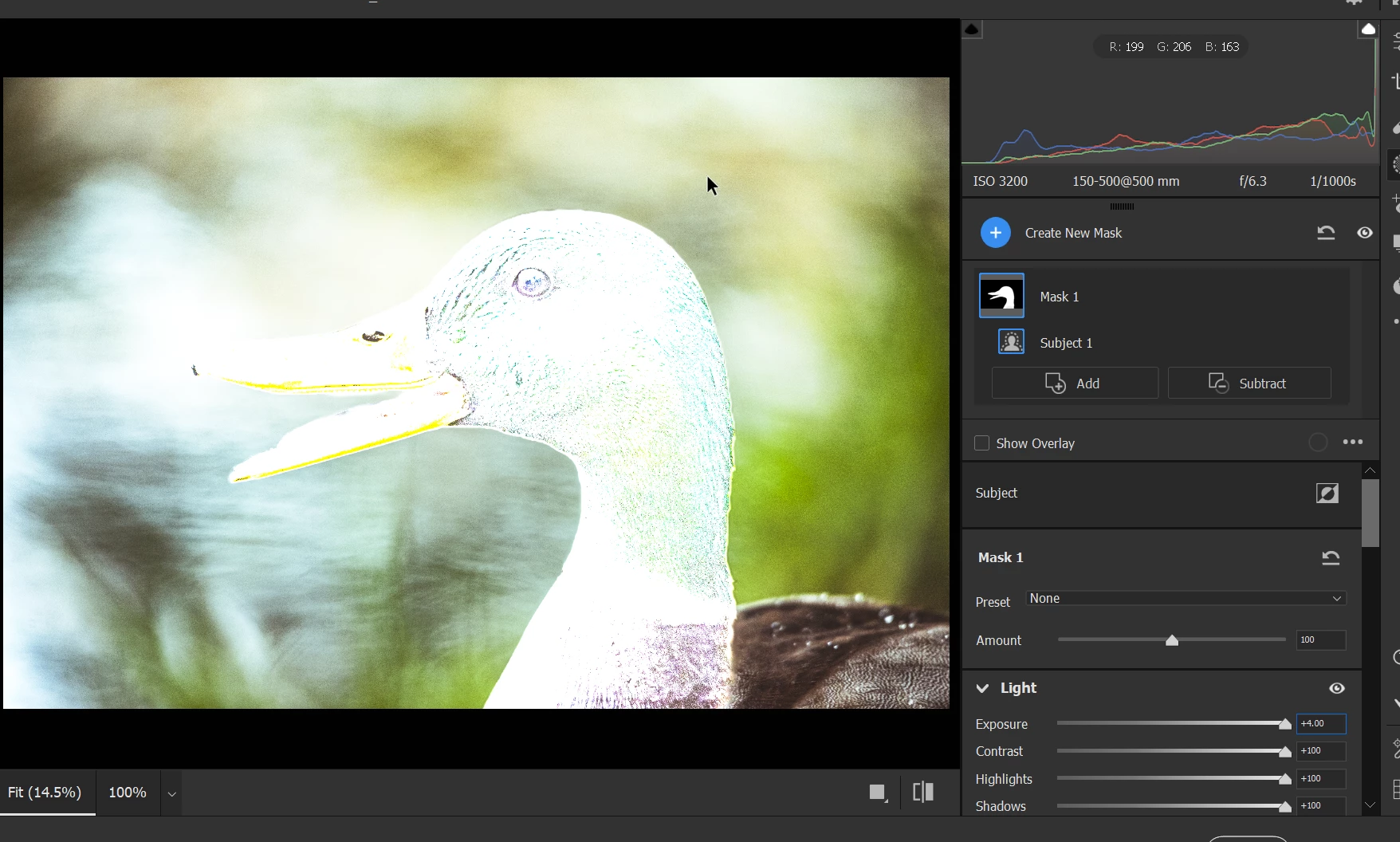
  4. Press M (switch to Masking), click "Subject", Adjust all Exposure, Highlight, Contrast to max (just to make the effect more visible).
  5. Click OK in Camera RAW. 
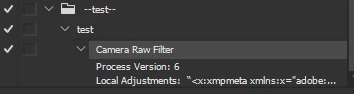
  6. Stop recording the 'test' action. The action recorded the Camera Raw filter:
  7. Close the picture. Open another (very different) picture.
  8. Run the recorded "test" action.
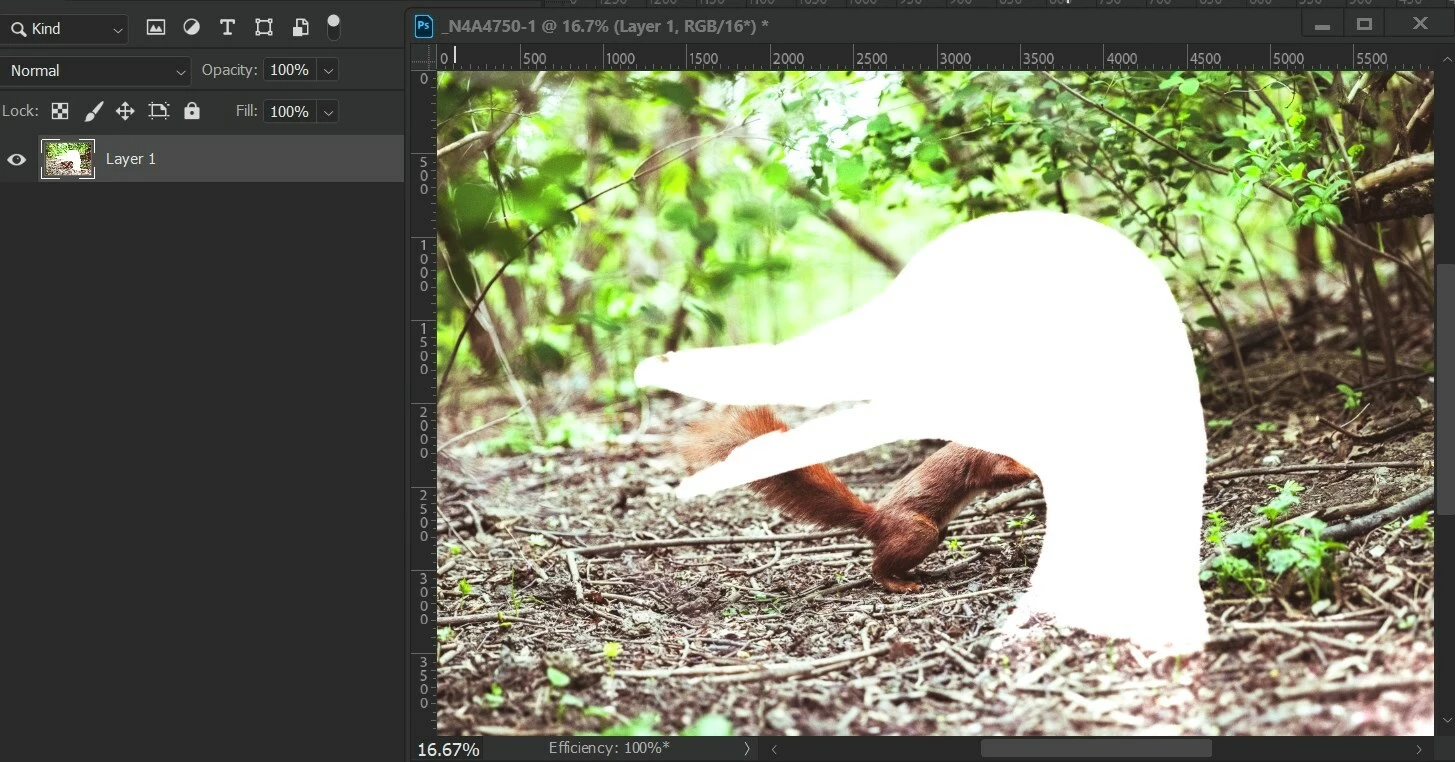
  9.  You've created duck-shaped correction on a squirrel. xD


Actual result: the initial AI mask is hard baked into an action.

Expected result: the AI mask feature (Subject, Background, body parts, etc.) are re-detected every time the action runs.


Version: Photoshop 25.0, Camera Raw 16.0 and 15.5.1

OS: Windows 10, x64


Correct answer DiodorS

Let's agree to disagree about the bug-status then 🙂 Thanks for the discussion and for giving me the motivation to dig deeper!


I just discovered another piece of evidence that makes me to lean even more to the bug side.


  1. Open an image, flatten all layers, convert the Background layer to Smart Object.
  2. Using ScriptEventListener record applying Camera Raw preset containing AI masks (as described above) to a smart layer. Remove lines with "crs:InputDigest", "crs:MaskDigest" (not strictly necessary to remove, but just to be sure) and the entire section that adds the BigT field (desc439.putData( idBigT, String.fromCharCode...) - this is a must. The resulting code should look like this:


var cTID = charIDToTypeID;
var sTID = stringIDToTypeID;

var idAdobeCameraRawFilter = sTID("Adobe Camera Raw Filter");
    var desc439 = new ActionDescriptor();
    desc439.putString(cTID("CrVe"), """15.5.1""");
    desc439.putInteger(cTID("PrVN"), 6);
    desc439.putInteger(cTID("PrVe"), 251920384);
    desc439.putString(cTID("LCs "), """<x:xmpmeta xmlns:x="adobe:ns:meta/" x:xmptk="Adobe XMP Core 7.0-c000 1.000000, 0000/00/00-00:00:00        ">
 <rdf:RDF xmlns:rdf="http://www.w3.org/1999/02/22-rdf-syntax-ns#">
  <rdf:Description rdf:about=""
    xmlns:crs="http://ns.adobe.com/camera-raw-settings/1.0/">
   <crs:MaskGroupBasedCorrections>
    <rdf:Seq>
     <rdf:li>
      <rdf:Description
       crs:What="Correction"
       crs:CorrectionAmount="1"
       crs:CorrectionActive="true"
       crs:CorrectionName="Mask 1"
       crs:CorrectionSyncID="4C2C200A187F3044A0F2BA8B1EBA146E"
       crs:LocalExposure2012="0.3625"
       crs:LocalContrast2012="-0.48"
       crs:LocalHighlights2012="0.29"
       crs:LocalCurveRefineSaturation="100">
      <crs:CorrectionMasks>
       <rdf:Seq>
        <rdf:li
         crs:What="Mask/Image"
         crs:MaskActive="true"
         crs:MaskName="Person 1 - Body Skin"
         crs:MaskBlendMode="0"
         crs:MaskInverted="false"
         crs:MaskSyncID="3E8A13F2992E434DAE3FC1C3DAB45CA2"
         crs:MaskValue="1"
         crs:MaskVersion="1"
         crs:MaskSubType="3"
         crs:MaskSubCategoryID="4"
         crs:ReferencePoint="0.633880 0.552734"
         crs:InputDigest="481D664F03D3BE00CA2D26C190FECDDE"
         crs:InputDigestVersion="2"
         crs:MaskDigest="12D09EA62EA09A4EF0D68D23531E052A"
         crs:WholeImageArea="0/1,0/1,1536/1,1097/1"
         crs:Origin="185,258"
         crs:ModelVersion="234881976"/>
        <rdf:li
         crs:What="Mask/Image"
         crs:MaskActive="true"
         crs:MaskName="Person 1 - Lips"
         crs:MaskBlendMode="0"
         crs:MaskInverted="false"
         crs:MaskSyncID="A78C9B8F27F92F46B25E231C2926A39D"
         crs:MaskValue="1"
         crs:MaskVersion="1"
         crs:MaskSubType="3"
         crs:MaskSubCategoryID="6"
         crs:ReferencePoint="0.562842 0.199219"
         crs:InputDigest="481D664F03D3BE00CA2D26C190FECDDE"
         crs:InputDigestVersion="2"
         crs:MaskDigest="D9B3D4A972BAFD5D57C0D4736A714193"
         crs:WholeImageArea="0/1,0/1,1536/1,1097/1"
         crs:Origin="579,284"
         crs:ModelVersion="234881976"/>
       </rdf:Seq>
      </crs:CorrectionMasks>
      </rdf:Description>
     </rdf:li>
    </rdf:Seq>
   </crs:MaskGroupBasedCorrections>
  </rdf:Description>
 </rdf:RDF>
</x:xmpmeta>
""");
    var idPset = cTID("Pset");
    desc439.putString(idPset, """<x:xmpmeta xmlns:x="adobe:ns:meta/" x:xmptk="Adobe XMP Core 7.0-c000 1.000000, 0000/00/00-00:00:00        ">
 <rdf:RDF xmlns:rdf="http://www.w3.org/1999/02/22-rdf-syntax-ns#">
  <rdf:Description rdf:about=""
    xmlns:crs="http://ns.adobe.com/camera-raw-settings/1.0/">
   <crs:Preset>
    <rdf:Description
     crs:Name="## AI mask"
     crs:Amount="1"
     crs:UUID="466679343ADD4546AE39653CBAE6947D">
    <crs:Parameters>
     <rdf:Description
      crs:Version="15.5.1"
      crs:CompatibleVersion="251658240"
      crs:ProcessVersion="15.4">
     <crs:MaskGroupBasedCorrections>
      <rdf:Seq>
       <rdf:li>
        <rdf:Description
         crs:What="Correction"
         crs:CorrectionAmount="1"
         crs:CorrectionActive="true"
         crs:CorrectionName="Mask 1"
         crs:CorrectionSyncID="4C2C200A187F3044A0F2BA8B1EBA146E"
         crs:LocalExposure2012="0.3625"
         crs:LocalContrast2012="-0.48"
         crs:LocalHighlights2012="0.29"
         crs:LocalCurveRefineSaturation="100">
        <crs:CorrectionMasks>
         <rdf:Seq>
          <rdf:li
           crs:What="Mask/Image"
           crs:MaskActive="true"
           crs:MaskName="Person 1 - Body Skin"
           crs:MaskBlendMode="0"
           crs:MaskInverted="false"
           crs:MaskSyncID="3E8A13F2992E434DAE3FC1C3DAB45CA2"
           crs:MaskValue="1"
           crs:MaskVersion="1"
           crs:MaskSubType="3"
           crs:MaskSubCategoryID="4"
           crs:ReferencePoint="0.500000 0.500000"
           crs:ErrorReason="0"/>
          <rdf:li
           crs:What="Mask/Image"
           crs:MaskActive="true"
           crs:MaskName="Person 1 - Lips"
           crs:MaskBlendMode="0"
           crs:MaskInverted="false"
           crs:MaskSyncID="A78C9B8F27F92F46B25E231C2926A39D"
           crs:MaskValue="1"
           crs:MaskVersion="1"
           crs:MaskSubType="3"
           crs:MaskSubCategoryID="6"
           crs:ReferencePoint="0.500000 0.500000"
           crs:ErrorReason="0"/>
         </rdf:Seq>
        </crs:CorrectionMasks>
        </rdf:Description>
       </rdf:li>
      </rdf:Seq>
     </crs:MaskGroupBasedCorrections>
     </rdf:Description>
    </crs:Parameters>
    </rdf:Description>
   </crs:Preset>
  </rdf:Description>
 </rdf:RDF>
</x:xmpmeta>
""");
executeAction(idAdobeCameraRawFilter, desc439, DialogModes.ALL);​


  •  Double click on the Camera Raw Filter smart filter
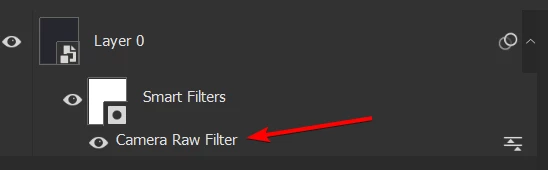
     

  • Switch to the Masking mode and click "Update All" - or just press Ctrl+Shift+U immediately after opening Camera Raw.
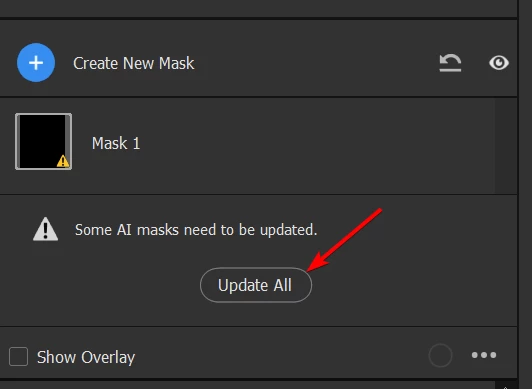
     

  • Done - the masks are re-generated.


This proves the point that all the necessary data are already stored in the Action Descriptor (which can easily be converted to an Action) and in the smart object (which itself stores ADs). We only need a way to "automatically click" the "Update All" button from an action (or a script).


It might be as simple as handling something along the lines of:

desc439.putBoolean(stringIDToTypeID("updateAiMasks"), true)

For sure - that would require some work on Adobe side, but it should be relatively straightforward. 3 story points 😉 (famous last words)


For now I have a workaround using AHK to press the Ctrl+Shift+U combination as soon as the Camera Raw window pops up. Not the cleanest solution, but hey, it works.


Here's my final POC. Script (JSX):


var cTID = charIDToTypeID;
var sTID = stringIDToTypeID;

function addPresetBasedACR_interactive() {
    // exactly as above, just change the last line to
    executeAction( idAdobeCameraRawFilter, desc439, DialogModes.ALL);
    //                                                        ^^^^^^ interactive
}

function prepareToPress_CtrlShiftU() {
    var ahkPath = new File("/c/Program Files/AutoHotkey/AutoHotkey.exe");
    var scriptPath = new File("/c/whatever_you_want/update_AI_masks_when_ACR_ready.ahk");
    var command = 'start "' + ahkPath.fsName + '" "' + scriptPath.fsName + '"';
    app.system(command);
}

function createSmartObjectFromSelectedLayers() {
    executeAction(sTID("newPlacedLayer"), undefined, DialogModes.NO);
}

function rasterizeSmartObject() {
    var ref47 = new ActionReference();
    ref47.putEnumerated(cTID("Lyr "), cTID("Ordn"), cTID("Trgt"));

    var desc638 = new ActionDescriptor();
    desc638.putReference(cTID("null"), ref47);

    executeAction(sTID("rasterizeLayer"), desc638, DialogModes.NO);
}

function main() {
    createSmartObjectFromSelectedLayers();
    prepareToPress_CtrlShiftU();
    addPresetBasedACR_interactive();
    rasterizeSmartObject();
}

main();


AHK:


; Allow for partial window title matches
SetTitleMatchMode, 2

; Wait for a window with ahk_class Bridge_WindowClass to become active
WinWaitActive, Camera Raw, , 2
if ErrorLevel
{
    MsgBox, Camera Raw window not activated within timeout. Exiting.
    Exit
}

; Get the window handle (HWND) of the active window
WinGet, hWnd, ID

; Send the Ctrl+Shift+U key combination
Send, ^+u

; After pressing Ctrl+Shift+U for the first time, ACR loses focus
; after some time (in ms). In that time event loop is not buffered
; so we cannot send Enter now. Let's wait for Photoshop to become
; active, then reactivate ACR and send Enter to close the ACR dialog
WinWaitActive, ahk_class Photoshop, , 2
if ErrorLevel
{
    MsgBox, Focus did not went back to Photoshop. Strange... Exiting!
    Exit
}

WinActivate ahk_id %hWnd%
Send, {Enter}




17 replies

DSeim
Inspiring
June 20, 2025

Agreed. Just ran into this same problem. Super frustrating, this has not been fixed. And yes, it should be treated as a bug. I can't even add it as a smart object, then go back and update masks, and that option is greyed out when I reopen the camera RAW Filter.

Adobe has been really bad about updating mask technology in PS, and we still just have the very limited Select Subject. The only way to automate these kind of masks is thru Camera Raw, but they are leaving us no way to automate it.

matutem50436448
Participant
July 11, 2024

Hello @DiodorS !

Did find a solution for this?

I'm facing a similar situation. 


Thanks in advance! 

Matias. 

DiodorSAuthor
Inspiring
July 13, 2024

Only a workaround. See one of my previous posts. From what I understand Adobe consider it as WAI.

Stephen Marsh
Community Expert
Community Expert
February 22, 2024

@martin.1 


Yes, the original Adobe Camera Raw plugin opens raw files or supported rendered files into ACR in a separate window to Photoshop.


The Camera Raw filter is only for rendered files inside Photoshop and isn't exactly the same.

Known Participant
February 22, 2024

Sorry,   I do not find a Camera Raw plugin under the Plugins menu.  By Camera Raw plugin, did you mean the Camera Raw screen shown up when a Raw File is opened but not the one called up in Filter menu?

Stephen Marsh
Community Expert
Community Expert
October 31, 2023

Yes, I don't have ducks and squirrels at hand, so a square and a circle were examples of different shapes that an AI mask should detect via subject selection.


The point was that parametric edits and settings sync/copy work as expected in ACR. That they don't work in CRF with actions doesn't surprise me, that wouldn't be my expectation.


So I'm just trying to offer a workaround for batch editing for those that don't know the difference.

DiodorSAuthor
Inspiring
October 31, 2023

Yes, that was never an issue. Although, I don't get how AI masks relate to the geometric shapes. Are they detected as a "subject" of the picture?

Stephen Marsh
Community Expert
Community Expert
October 31, 2023

Just an update, I tested this with TIFF files in the Adobe Camera Raw plugin (not the Camera Raw Filter in Photoshop).


The AI masks work as expected when the settings are synced from the first image to subsequent images.


The originals:


The AI mask synced across both images that contain different mask content (square vs circle) with colour change:


DiodorSAuthor
Inspiring
October 29, 2023

I've found some interesting strings in `Camera Raw.8bi`, including the ones you've linked to. But nothing seems connected to the AI masking...


The only notable finding is that after adding:

desc439.putBoolean(charIDToTypeID("LCs "), true);

the masks (and the option to re-generate AI masks) disappear. Probably it's even not bool but some other type (like action list). 

Stephen Marsh
Community Expert
Community Expert
October 29, 2023

I'll post a link later for code to use the auto tone button, it surprised me at the time that there was a scripted solution to "pressing a button in the GUI"... Perhaps something is similar there.


But again, it's expected that scripts provide extra functionality over actions, even if sharing the same base code.


Edit:


https://community.adobe.com/t5/photoshop-ecosystem-discussions/is-there-any-jsx-to-execute-the-auto-tone-of-camera-raw/m-p/10167490

DiodorSAuthorCorrect answer
Inspiring
October 29, 2023

Let's agree to disagree about the bug-status then 🙂 Thanks for the discussion and for giving me the motivation to dig deeper!


I just discovered another piece of evidence that makes me to lean even more to the bug side.


  1. Open an image, flatten all layers, convert the Background layer to Smart Object.
  2. Using ScriptEventListener record applying Camera Raw preset containing AI masks (as described above) to a smart layer. Remove lines with "crs:InputDigest", "crs:MaskDigest" (not strictly necessary to remove, but just to be sure) and the entire section that adds the BigT field (desc439.putData( idBigT, String.fromCharCode...) - this is a must. The resulting code should look like this:


var cTID = charIDToTypeID;
var sTID = stringIDToTypeID;

var idAdobeCameraRawFilter = sTID("Adobe Camera Raw Filter");
    var desc439 = new ActionDescriptor();
    desc439.putString(cTID("CrVe"), """15.5.1""");
    desc439.putInteger(cTID("PrVN"), 6);
    desc439.putInteger(cTID("PrVe"), 251920384);
    desc439.putString(cTID("LCs "), """<x:xmpmeta xmlns:x="adobe:ns:meta/" x:xmptk="Adobe XMP Core 7.0-c000 1.000000, 0000/00/00-00:00:00        ">
 <rdf:RDF xmlns:rdf="http://www.w3.org/1999/02/22-rdf-syntax-ns#">
  <rdf:Description rdf:about=""
    xmlns:crs="http://ns.adobe.com/camera-raw-settings/1.0/">
   <crs:MaskGroupBasedCorrections>
    <rdf:Seq>
     <rdf:li>
      <rdf:Description
       crs:What="Correction"
       crs:CorrectionAmount="1"
       crs:CorrectionActive="true"
       crs:CorrectionName="Mask 1"
       crs:CorrectionSyncID="4C2C200A187F3044A0F2BA8B1EBA146E"
       crs:LocalExposure2012="0.3625"
       crs:LocalContrast2012="-0.48"
       crs:LocalHighlights2012="0.29"
       crs:LocalCurveRefineSaturation="100">
      <crs:CorrectionMasks>
       <rdf:Seq>
        <rdf:li
         crs:What="Mask/Image"
         crs:MaskActive="true"
         crs:MaskName="Person 1 - Body Skin"
         crs:MaskBlendMode="0"
         crs:MaskInverted="false"
         crs:MaskSyncID="3E8A13F2992E434DAE3FC1C3DAB45CA2"
         crs:MaskValue="1"
         crs:MaskVersion="1"
         crs:MaskSubType="3"
         crs:MaskSubCategoryID="4"
         crs:ReferencePoint="0.633880 0.552734"
         crs:InputDigest="481D664F03D3BE00CA2D26C190FECDDE"
         crs:InputDigestVersion="2"
         crs:MaskDigest="12D09EA62EA09A4EF0D68D23531E052A"
         crs:WholeImageArea="0/1,0/1,1536/1,1097/1"
         crs:Origin="185,258"
         crs:ModelVersion="234881976"/>
        <rdf:li
         crs:What="Mask/Image"
         crs:MaskActive="true"
         crs:MaskName="Person 1 - Lips"
         crs:MaskBlendMode="0"
         crs:MaskInverted="false"
         crs:MaskSyncID="A78C9B8F27F92F46B25E231C2926A39D"
         crs:MaskValue="1"
         crs:MaskVersion="1"
         crs:MaskSubType="3"
         crs:MaskSubCategoryID="6"
         crs:ReferencePoint="0.562842 0.199219"
         crs:InputDigest="481D664F03D3BE00CA2D26C190FECDDE"
         crs:InputDigestVersion="2"
         crs:MaskDigest="D9B3D4A972BAFD5D57C0D4736A714193"
         crs:WholeImageArea="0/1,0/1,1536/1,1097/1"
         crs:Origin="579,284"
         crs:ModelVersion="234881976"/>
       </rdf:Seq>
      </crs:CorrectionMasks>
      </rdf:Description>
     </rdf:li>
    </rdf:Seq>
   </crs:MaskGroupBasedCorrections>
  </rdf:Description>
 </rdf:RDF>
</x:xmpmeta>
""");
    var idPset = cTID("Pset");
    desc439.putString(idPset, """<x:xmpmeta xmlns:x="adobe:ns:meta/" x:xmptk="Adobe XMP Core 7.0-c000 1.000000, 0000/00/00-00:00:00        ">
 <rdf:RDF xmlns:rdf="http://www.w3.org/1999/02/22-rdf-syntax-ns#">
  <rdf:Description rdf:about=""
    xmlns:crs="http://ns.adobe.com/camera-raw-settings/1.0/">
   <crs:Preset>
    <rdf:Description
     crs:Name="## AI mask"
     crs:Amount="1"
     crs:UUID="466679343ADD4546AE39653CBAE6947D">
    <crs:Parameters>
     <rdf:Description
      crs:Version="15.5.1"
      crs:CompatibleVersion="251658240"
      crs:ProcessVersion="15.4">
     <crs:MaskGroupBasedCorrections>
      <rdf:Seq>
       <rdf:li>
        <rdf:Description
         crs:What="Correction"
         crs:CorrectionAmount="1"
         crs:CorrectionActive="true"
         crs:CorrectionName="Mask 1"
         crs:CorrectionSyncID="4C2C200A187F3044A0F2BA8B1EBA146E"
         crs:LocalExposure2012="0.3625"
         crs:LocalContrast2012="-0.48"
         crs:LocalHighlights2012="0.29"
         crs:LocalCurveRefineSaturation="100">
        <crs:CorrectionMasks>
         <rdf:Seq>
          <rdf:li
           crs:What="Mask/Image"
           crs:MaskActive="true"
           crs:MaskName="Person 1 - Body Skin"
           crs:MaskBlendMode="0"
           crs:MaskInverted="false"
           crs:MaskSyncID="3E8A13F2992E434DAE3FC1C3DAB45CA2"
           crs:MaskValue="1"
           crs:MaskVersion="1"
           crs:MaskSubType="3"
           crs:MaskSubCategoryID="4"
           crs:ReferencePoint="0.500000 0.500000"
           crs:ErrorReason="0"/>
          <rdf:li
           crs:What="Mask/Image"
           crs:MaskActive="true"
           crs:MaskName="Person 1 - Lips"
           crs:MaskBlendMode="0"
           crs:MaskInverted="false"
           crs:MaskSyncID="A78C9B8F27F92F46B25E231C2926A39D"
           crs:MaskValue="1"
           crs:MaskVersion="1"
           crs:MaskSubType="3"
           crs:MaskSubCategoryID="6"
           crs:ReferencePoint="0.500000 0.500000"
           crs:ErrorReason="0"/>
         </rdf:Seq>
        </crs:CorrectionMasks>
        </rdf:Description>
       </rdf:li>
      </rdf:Seq>
     </crs:MaskGroupBasedCorrections>
     </rdf:Description>
    </crs:Parameters>
    </rdf:Description>
   </crs:Preset>
  </rdf:Description>
 </rdf:RDF>
</x:xmpmeta>
""");
executeAction(idAdobeCameraRawFilter, desc439, DialogModes.ALL);​


  •  Double click on the Camera Raw Filter smart filter


  • Switch to the Masking mode and click "Update All" - or just press Ctrl+Shift+U immediately after opening Camera Raw.


  • Done - the masks are re-generated.


This proves the point that all the necessary data are already stored in the Action Descriptor (which can easily be converted to an Action) and in the smart object (which itself stores ADs). We only need a way to "automatically click" the "Update All" button from an action (or a script).


It might be as simple as handling something along the lines of:

desc439.putBoolean(stringIDToTypeID("updateAiMasks"), true)

For sure - that would require some work on Adobe side, but it should be relatively straightforward. 3 story points 😉 (famous last words)


For now I have a workaround using AHK to press the Ctrl+Shift+U combination as soon as the Camera Raw window pops up. Not the cleanest solution, but hey, it works.


Here's my final POC. Script (JSX):


var cTID = charIDToTypeID;
var sTID = stringIDToTypeID;

function addPresetBasedACR_interactive() {
    // exactly as above, just change the last line to
    executeAction( idAdobeCameraRawFilter, desc439, DialogModes.ALL);
    //                                                        ^^^^^^ interactive
}

function prepareToPress_CtrlShiftU() {
    var ahkPath = new File("/c/Program Files/AutoHotkey/AutoHotkey.exe");
    var scriptPath = new File("/c/whatever_you_want/update_AI_masks_when_ACR_ready.ahk");
    var command = 'start "' + ahkPath.fsName + '" "' + scriptPath.fsName + '"';
    app.system(command);
}

function createSmartObjectFromSelectedLayers() {
    executeAction(sTID("newPlacedLayer"), undefined, DialogModes.NO);
}

function rasterizeSmartObject() {
    var ref47 = new ActionReference();
    ref47.putEnumerated(cTID("Lyr "), cTID("Ordn"), cTID("Trgt"));

    var desc638 = new ActionDescriptor();
    desc638.putReference(cTID("null"), ref47);

    executeAction(sTID("rasterizeLayer"), desc638, DialogModes.NO);
}

function main() {
    createSmartObjectFromSelectedLayers();
    prepareToPress_CtrlShiftU();
    addPresetBasedACR_interactive();
    rasterizeSmartObject();
}

main();


AHK:


; Allow for partial window title matches
SetTitleMatchMode, 2

; Wait for a window with ahk_class Bridge_WindowClass to become active
WinWaitActive, Camera Raw, , 2
if ErrorLevel
{
    MsgBox, Camera Raw window not activated within timeout. Exiting.
    Exit
}

; Get the window handle (HWND) of the active window
WinGet, hWnd, ID

; Send the Ctrl+Shift+U key combination
Send, ^+u

; After pressing Ctrl+Shift+U for the first time, ACR loses focus
; after some time (in ms). In that time event loop is not buffered
; so we cannot send Enter now. Let's wait for Photoshop to become
; active, then reactivate ACR and send Enter to close the ACR dialog
WinWaitActive, ahk_class Photoshop, , 2
if ErrorLevel
{
    MsgBox, Focus did not went back to Photoshop. Strange... Exiting!
    Exit
}

WinActivate ahk_id %hWnd%
Send, {Enter}