
Participating Frequently
March 28, 2021
Answered

alias statt Photoshop Datei

  • March 28, 2021
  • 2 replies
  • 837 views

Beim Übertragen aller meiner Dateinen auf einen neuen Mac Computer haben plötzlich alle meine Grafik psd Dateien als "Art" Alias statt Adobe Photoshop Dokument.

Nun er kennt Photoshop die Grafik-Dateien nicht mehr. Es kommt die Meldung:

Der Vorgang konnte nicht ausgeführt werden, weil Photoshop diesen Dateityp nicht erkennt.


Was kann ich nun tun, um alls Photshop Dokumente wieder in die alte Art zu verwandeln?


Bin für Hilfe sehr dankbar!


This topic has been closed for replies.
Correct answer c.pfaffenbichler

I'm not quite sure if I do the thing you thougt about.


I open one special (alias)document with open with - than there I cannot see al "change all".


or did you mean something else wit "When you select 'photshop'?


2 replies

Participating Frequently
March 28, 2021

Thanks fpr the first answer!

 - I will specify: All was copied via icloud. (all aother documents, word, excel etc. stayed the same.)

Screenshot attached.

c.pfaffenbichler
Community Expert
Community Expert
March 28, 2021

Again: What are their sizes? 


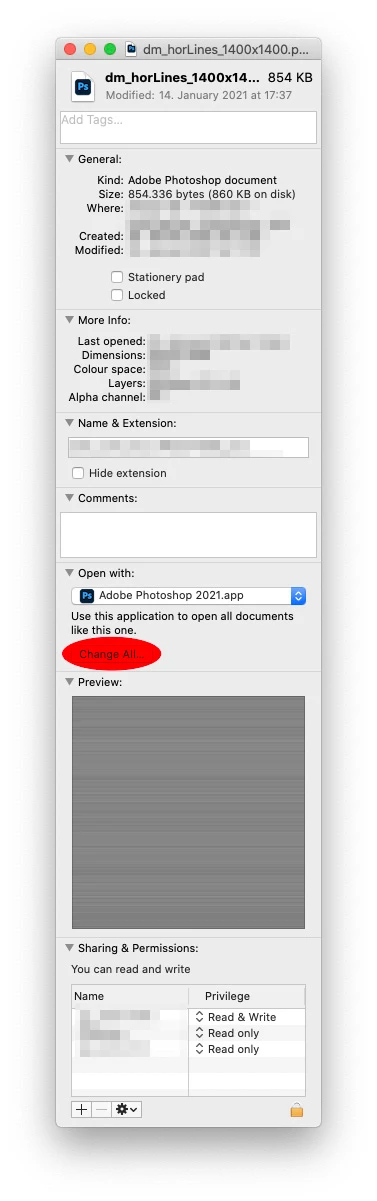
When selecting one of the images and using File > Get Info can you select Photoshop under »Open with«? 


The screenshot seems to indicate that the files are aliases, so you may need to transfer them to the new computer properly or maintain access to the originals the aliases »point to«. 

Participating Frequently
March 28, 2021

Oh great!!! You are completely right - I can open them under open with ... photoshop.

Than I can store them under "Photoshop document".

So - this is a milestone for me as I did not loose them!!!


However, is there a possibility to change them all (I habe about 400) so that I do not have to open them and store them again?

The size ist between ten and thirty MB.


But already I THANK you so much!!!!!!

c.pfaffenbichler
Community Expert
Community Expert
March 28, 2021

»Beim Übertragen aller meiner Dateinen auf einen neuen Mac Computer«

Please be specific; how did you transfer the images exactly? 

If you cmd-alt-dragged them for example you would not have actually copied them but only created aliases. 


Could you please post a screenshot of the Folder containing the images in Finder (as List)? 

What are their sizes?