
Salir
  • Comunidad global
    • Idioma:
      • Deutsch
      • English
      • Español
      • Français
      • Português
  • 日本語コミュニティ
  • 한국 커뮤니티

Align icon greyed out

Explorador ,
Sep 30, 2023 Sep 30, 2023

I have tried a lot to get my align icon to not be grayed but I can´t all the things I have found are non aplicable, any help?

TEMAS
Windows
650
Traducir
Informe
Directrices de la comunidad
Sé amable y respetuoso, muestra títulos de crédito de la fuente de contenido original y busca duplicados antes de publicar. Más información
community guidelines

correct answers 1 respuesta correcta

Community Expert , Sep 30, 2023 Sep 30, 2023

You have to have two or more layers selected for some options, or as Steven said, an active selection


Two layers selected
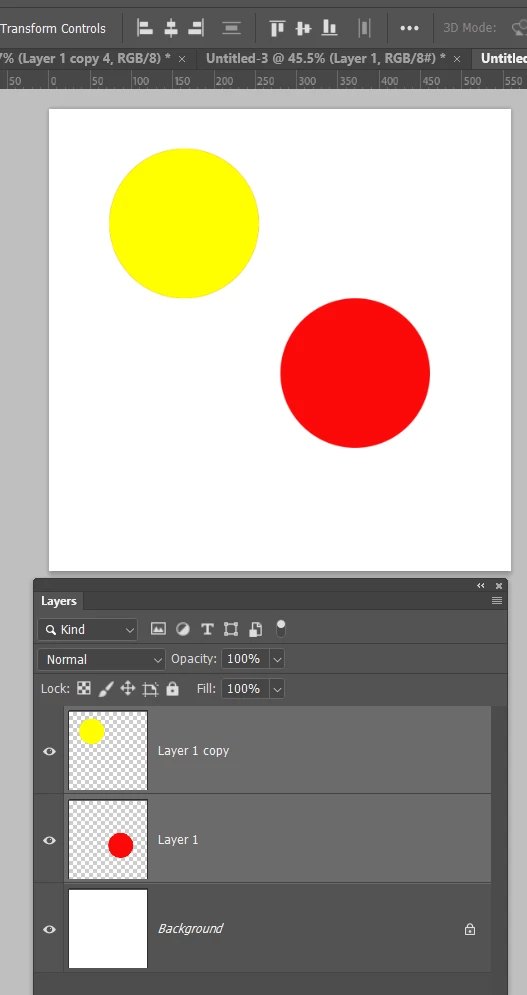
image.png


One layer selected and the entire canvas selected (Ctrl A /Cmd A)
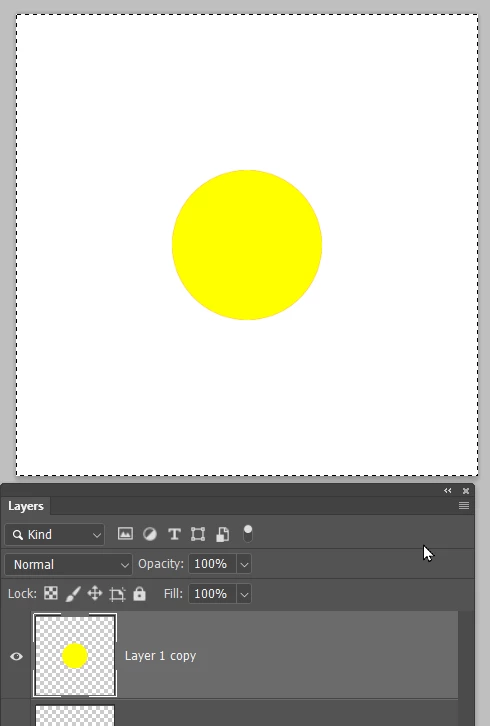
image.png

Traducir
Adobe
Community Expert ,
Sep 30, 2023 Sep 30, 2023

Have the moVe tool active, and the target layer active. If align is set to selection (rather than canvas) you also need to have an active selection.

Traducir
Informe
Directrices de la comunidad
Sé amable y respetuoso, muestra títulos de crédito de la fuente de contenido original y busca duplicados antes de publicar. Más información
community guidelines
Community Expert ,
Sep 30, 2023 Sep 30, 2023

You have to have two or more layers selected for some options, or as Steven said, an active selection


Two layers selected

image.png


One layer selected and the entire canvas selected (Ctrl A /Cmd A)

image.png

Traducir
Informe
Directrices de la comunidad
Sé amable y respetuoso, muestra títulos de crédito de la fuente de contenido original y busca duplicados antes de publicar. Más información
community guidelines
Explorador ,
Sep 30, 2023 Sep 30, 2023
MÁS RECIENTES

thank youuuuuuuuuuuuuuuuuu

Traducir
Informe
Directrices de la comunidad
Sé amable y respetuoso, muestra títulos de crédito de la fuente de contenido original y busca duplicados antes de publicar. Más información
community guidelines
