
Exit
  • Global community
    • Language:
      • Deutsch
      • English
      • Español
      • Français
      • Português
  • 日本語コミュニティ
  • 한국 커뮤니티
2

ALT + Backspace behaves differently

Community Beginner ,
Jul 18, 2023 Jul 18, 2023

I don't know which version I used before, but I recently updated to the latest Photoshop version (24.6). I had used ALT + Backspace (to fill with foreground color), and CTRL + Backspace (to fill with background color) daily to fill masks. But after the update, I occasionally get these errors when trying to fill a mask "Couldn't fill because the history state doesn't contain a corresponding layer".
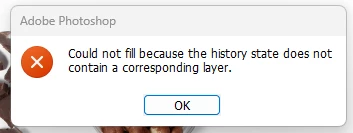
 

Screenshot_221.png


I don't know if this is a bug or something... But I have never encountered such error in previous version. It seems the ALT+Backspace doesn't fill with background color anymore, rather filling it with history state instead. Strangely, it only happens sometimes, In some cases, it fills with the foreground color like it is supposed to, then suddenly it doesn't and gives such an error instead.


Is there a solution to reverting this change?

TOPICS
Windows
699
Translate
Report
Community guidelines
Be kind and respectful, give credit to the original source of content, and search for duplicates before posting. Learn more
community guidelines
Adobe
Community Beginner ,
Aug 03, 2023 Aug 03, 2023
LATEST

I finally found a fix to the problem. It seems my keyboard settings automatically register the right alt as an ALT+CTRL, and that's why Photoshop registers it as a History Fill. If someone encounters the same problem in the future, try using an online keyboard test program if you have the same issue, and then change your Windows keyboard setting to US (image attached)

Translate
Report
Community guidelines
Be kind and respectful, give credit to the original source of content, and search for duplicates before posting. Learn more
community guidelines