
Participant
October 18, 2022
Question

Alt + click clipping not working

  • October 18, 2022
  • 4 replies
  • 795 views

Hi there, I have a problem with clipping layers.

I have tried to clip the "ADJ" folder to the "IMG" folder, this is something I normally do using Alt+Click between the two folders, when the little arrow facing down shows up. But now, when I click alt and my cursor is located between the two folders, the little arrow doesn't appear and I can't use the clipping function.
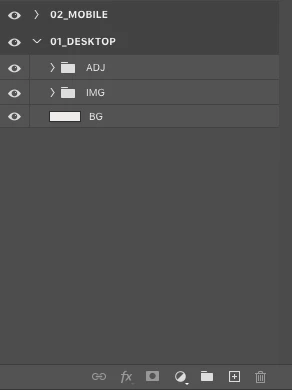
 

This happened suddenly, a few weeks ago I was doing it. What could have gone wrong?

Thank you in advance.

4 replies

Participant
February 14, 2025

It happened to me for many months and I don't know the reason. The ALT+click in the layers panes to use a layers as a mask is no longer an option. It's happening only in Windows 10, and it's a bug. But for many months is still happening.

c.pfaffenbichler
Community Expert
Community Expert
February 15, 2025
quote

It happened to me for many months and I don't know the reason. The ALT+click in the layers panes to use a layers as a mask is no longer an option. It's happening only in Windows 10, and it's a bug. But for many months is still happening.


By @Diego3715356203zb

As that is obviously not the case for many other Photoshop users could you please post a screenrecoring or screenshots with the pertinent Panels (Toolbar, Layers, Options Bar, …) visible to illustrate? 

c.pfaffenbichler
Community Expert
Community Expert
October 18, 2022

An alternative to a Clipping Mask, as far as Adjustment Layers are concerned, is putting them above the pixel content in a Group with the Blend Mode »Normal«. 

c.pfaffenbichler
Community Expert
Community Expert
October 18, 2022

No, it didn’t happen suddenly, Groups cannot be Clipping Masked to other Layers/Groups. 

Trevor.Dennis
Community Expert
Community Expert
October 18, 2022

The only way I can think of doing that with Grouped layers, is to make the clipping Group a Smart Object.